
Every Social Security disability firm knows the call. A client has not heard anything in a while, or a letter arrived they do not understand, and they want to know what is happening. The call is reasonable. It is also one more interruption for a team that is already in the middle of something else.
On November 12, 2026, Nikhil Pai of Chronicle and attorney Ryan Tank of Spector & Lenz closed out the individual sessions at CAPACITY ‘26 with a practical answer: speak first. Nikhil laid out where status calls come from and how to answer each one before it happens. Ryan, whose five-attorney firm has been putting the approach to work, described what it looks like day to day.
You can catch the replay here:
This session was part of CAPACITY ‘26, the Disability Law Tech Summit co-presented by NOSSCR and Chronicle. Nikhil also joined the closing panel on hidden capacity.
Speakers:
- Nikhil Pai: Co-founder and CEO, Chronicle. Nikhil is co-founder and CEO of Chronicle, ERE monitoring software built only for Social Security disability firms and used by more than 180 of them.
- Ryan Tank: Attorney, Spector & Lenz. Ryan practices Social Security disability and federal court litigation full time. Before that, he was an attorney advisor at Social Security’s Office of Hearings Operations.
- Will Yang: Co-founder and Head of Growth, Chronicle. Host of CAPACITY ‘26. Will leads Chronicle’s community, partnerships and events, including the Disability Heroes podcast.
Key Takeaways
- Count before you fix. Log every call for a week, with what triggered it, before changing anything.
- Most status calls come from a short list of triggers: a long silence, a form in the mail, a hearing date, a consultative exam, a decision.
- Each trigger has a standard answer. Write it once, in the firm’s own voice, and send it before the client calls.
- A good update says what it means for the case now, what happens next and roughly when, and what the firm needs from the client.
- Automation is what makes this sustainable. Ryan said it has “reduced the updates by more than half” at his firm, and his team still makes the calls for hearings and decisions.
- When nothing is moving, a regular check-in keeps clients from wondering. Ryan’s firm uses every 90 days.
Status calls follow silence and SSA mail, and each one pulls staff off other work
Nikhil pointed back to the audience survey. As he put it: “Sounds like 25 to 100 calls a week is typical.”
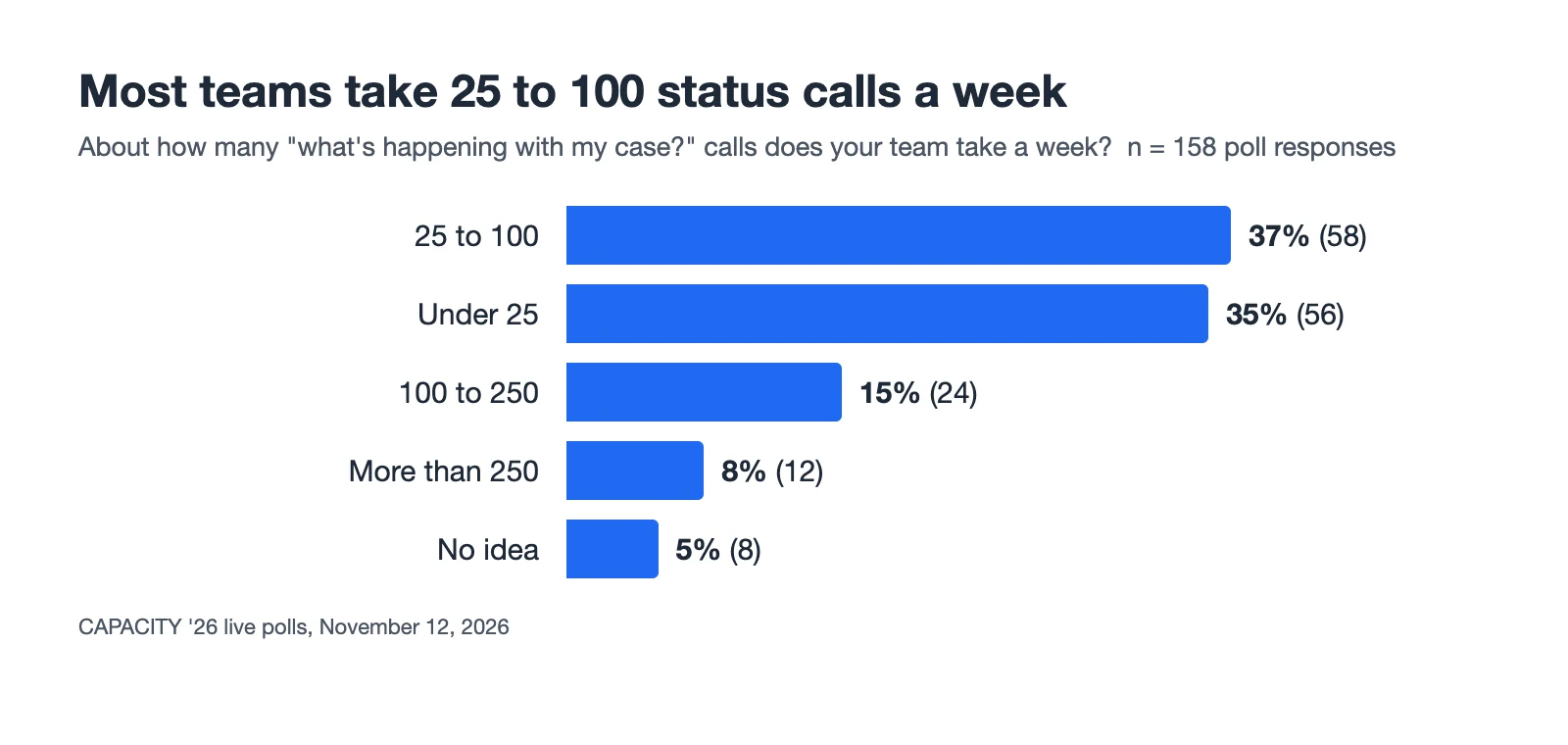
CAPACITY ‘26 live poll, November 12, 2026: about how many “what’s happening with my case?” calls does your team take a week? 158 responses.
The calls matter because of what each one costs. Every call pulls someone off what they were doing and forces them to catch up on a case, often one a colleague has been handling.
At one five-attorney firm, two case managers spend almost full time on calls
Ryan described what that looks like at his firm. As he put it: “We have two case managers who are working almost full-time just picking up these calls, and we’re a five-attorney firm.”
Counting emails, he said the volume is “definitely dozens a day to each case manager, and they’re spending between 5 and 10 minutes per case looking up the status and responding.”
The trigger is usually something SSA sent, not something the firm did
The hardest part is that the firm does not control what sets the call off. Nikhil pointed out the other party in every case: “Even if you have the best systems in place, you also have to keep track of this other third party, which is the SSA.”
For Ryan’s firm, the biggest trigger is the mail. Ryan said: “Mostly mail that comes from SSA. It’s been the big one.” He also noted a newer wrinkle: “claimants can see a lot more on MySSA than what we can see in ERE or in AARPS, so sometimes we’re actually asking them to go into their MySSA account and give us information.”
For more on what SSA’s changing portals mean for firms, see What Is AROS?. Firms that still sort paper notices by hand can start with the disability law office mailroom survival guide.
Step one: log every call and what triggered it before changing anything
The answer in Nikhil’s framing is “speak first.” As he described it: “rather than having your clients call you, and you’ve probably heard this throughout this week, you want to find ways to be proactive with your clients.”
The first step is unglamorous: measure the problem. His instruction was to “log every call you’re getting, so you know what’s triggering them and where they’re coming from.”
That gives the firm a short list of triggers. For each one, the firm writes down what it usually says, in the firm’s own voice, and then looks for a way to send that message first.
His closing advice repeated the point: “Before you get started with anything, count before you fix.”
Chronicle turned the exercise into a one-week worksheet with a call log and five message templates. You can find it in Fewer status calls in one week on the Disability Firm Playbook.
Five questions drive most status calls, and each has a trigger you can see coming
Nikhil walked through five questions that account for much of the volume. Each has a trigger the firm can see coming.
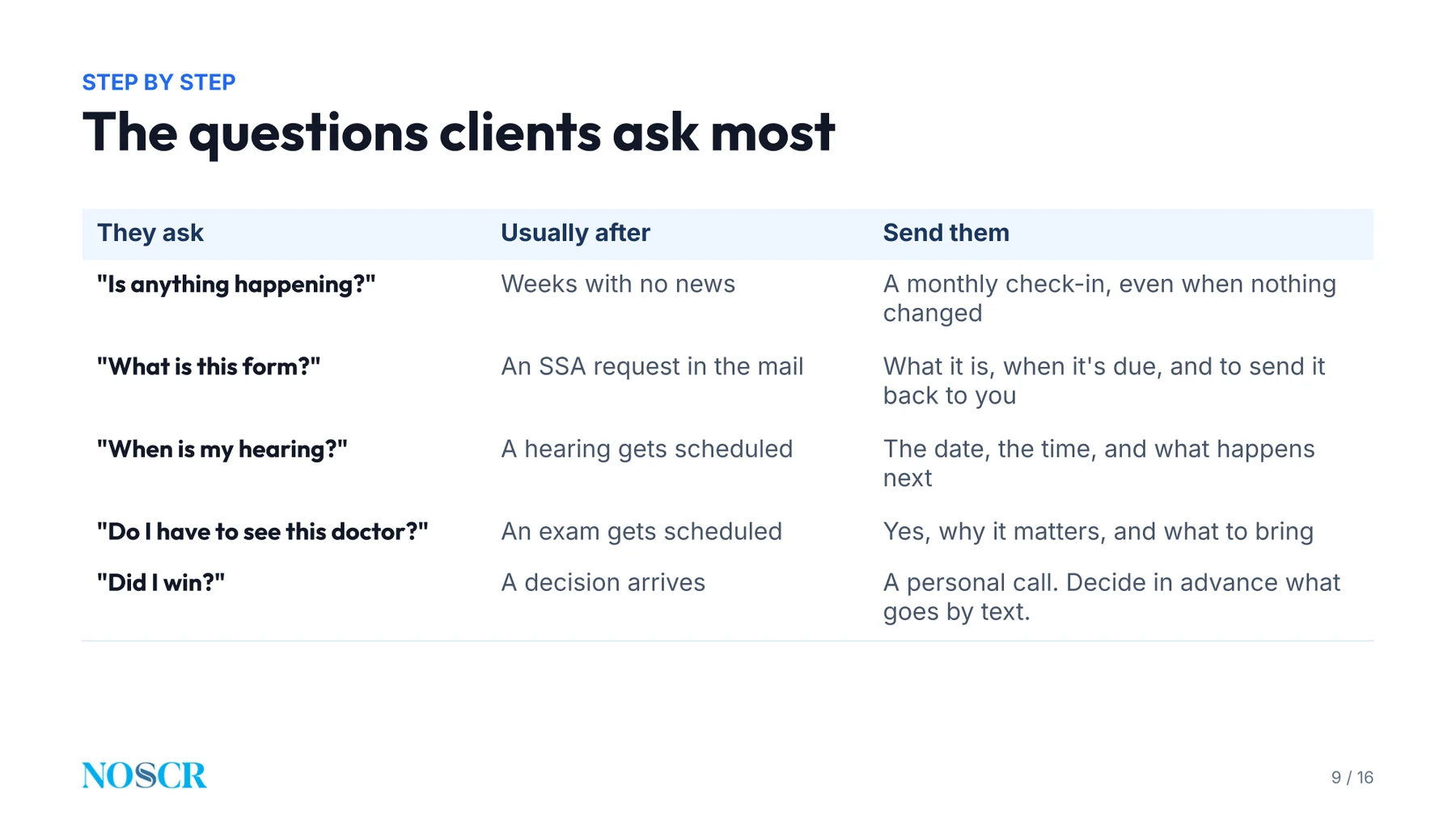
Nikhil’s slide matching each client question to its trigger and the message to send.
Silence: a monthly check-in answers “is anything happening?”
This is the call that comes from silence. Nikhil said it is especially common at the initial and reconsideration levels, where long stretches pass with nothing to report. His fix is small: “If you can just send them a monthly check-in, that can often help alleviate some of those calls.”
A form in the mail: tell the client before the envelope arrives
The SSA mails the client a form, and the client does not know what to do with it. If the firm can see the request in the ERE, it can reach the client first. Some firms, Nikhil said, send a video, a template or a guide along with the notice. For the form itself, see the SSA function report guide.
Ryan’s firm tells clients not to follow the upload instruction on the notice. He said: “We ask them not to do that, to do the first draft, and to scan it and email it to us, and then we lay eyes on it before it gets uploaded to ERE through Chronicle.”
That review is only possible if the firm hears about the form early. Nikhil agreed: with two days left before a deadline, there is no time for that kind of high-touch review.
A hearing date: send the date and what to expect as soon as SSA sets it
The call comes right after the hearing is set. If the firm tells the client the date and time as soon as SSA does, and sends an article or video on what to expect, the call never happens.
A consultative exam: explain what to expect ahead of time
A consultative exam gets scheduled and the client is nervous. Nikhil said: “Folks are scared, especially if it’s a psychiatric visit.” Guidance on what to expect, sent ahead of time, answers the question before it is asked. Firms that catch exam notices early can read how to never miss a CE appointment.
A decision: explain what it means before the client has to ask
A decision arrives, and with MySSA it can arrive straight to the client. The sooner the firm explains what the decision means and whether it will appeal, the fewer panicked calls follow.
A good update says what happened, what it means, what comes next and what you need
Nikhil’s checklist for any update has three parts. His slide adds a test: after reading it, would the client still need to call?
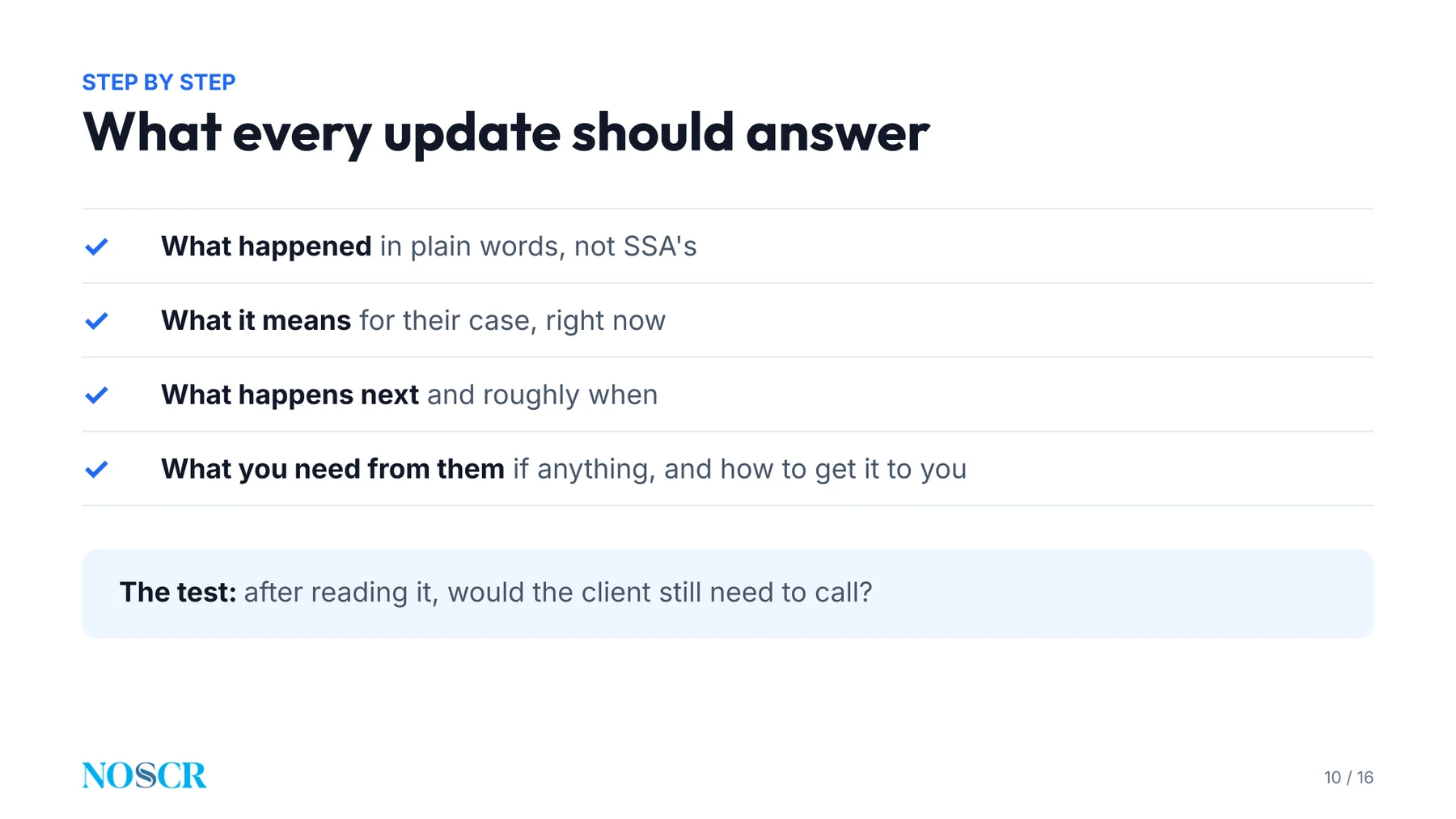
Nikhil’s slide on what every client update should answer.
The three parts:
- Plain English. No agency jargon. The client does not need the SSA’s program labels to understand their own case.
- What it means now, and what happens next. Where the case stands today, and roughly what to expect and when.
- What you need from them. Whether they can attend the exam, or whether they would prefer a phone or video hearing.
The middle step does the most work against follow-up calls. A client who knows the next change is weeks away has little reason to phone in the meantime.
Write each answer down, test it, then make it a standard procedure
Nikhil’s advice was to write out the answer for each trigger and test it: read it aloud and ask whether a client would still need to call. The next step is standard operating procedures. As he put it: “As much as you can write down and standardize for these things, the less juggling and less time it takes to answer when they come up.”
Spector & Lenz says texting cut its status updates by more than half
Ryan spent the middle of the session on his own firm’s experience at Spector & Lenz. The situation he described will sound familiar. SSA now provides more data electronically, including initial and reconsideration status changes. The firm wants to share it with clients, and doing that by hand costs staff time.
The manual version worked but took about eight hours a week
Until a few months ago, two case managers followed the ERE status spreadsheet or the Chronicle dashboard and sent email updates and phone calls whenever status changed. Ryan said they spent about eight hours a week on it. It reduced inbound calls, but it was slow.
Text messages in the firm’s own words took over the routine updates
Ryan said the firm turned to text messages: “We just started using Nikhil’s new product, Chronicle Dispatch, to send out text messages at a lot of these stages, and it’s helped reduce this burden quite a bit.”
He also pointed to the control the firm keeps: “Something we really like about it is that the language can be written by us.”
The firm also texts ahead of paper. When SSA sends out a work history or function report, the firm can warn the client before the envelope arrives.
Hearings and decisions stay personal
Ryan was clear that automation is not meant to replace the conversations that matter. As he put it: “The two most critical stages, at least in our view, are when a hearing is scheduled and when a decision is issued. Those are things where you need a lot of human judgment to be involved.”
For a hearing, staff contact the client as soon as it is scheduled. The firm sets up two attorney appointments: one about three months out to go through the medical file, and one about a month out to calm nerves and explain what is about to happen.
Ryan reported about a 1% opt-out rate and no hours-saved figure
Ryan was careful about what he could and could not claim: “I don’t have data on exactly how many hours this has saved us a week, but I know that it’s reduced the updates by more than half.”
Clients took to it. He said: “we’ve only had about a 1% opt-out rate,” and “The clients who have called us and asked questions have been really grateful for the frequent updates.”
There was a side benefit as well. The firm added a nudge to its status messages asking clients to send medical and work history updates. Clients reply with news the firm had not heard, such as an MRI or an upcoming surgery, which tells staff to request the records.
Automate the routine updates and pick a tool that fits disability work
Nikhil’s position was that automation is what makes the approach last, and that the firm should choose what fits. Case management systems offer templating, as Ryan mentioned with Clio, and Chronicle offers Dispatch.
He added one caution: pick a tool that understands how disability work runs. Disability has its own triggers, and the information the SSA provides can be used in a structured way if it reaches the right system.
For what Chronicle does here, see Introducing Chronicle Dispatch and the Dispatch feature page. Chronicle Dispatch is generally available.
Clients do not want another app, so keep any portal plain
Nikhil advised against assuming clients want an app. As he put it: “You have to remember, a lot of folks have phones that have low memory, already have a ton of apps on them, and they don’t want to download something and maintain another login.”
A web portal avoids that, and Nikhil’s guidance for any portal was to keep it plain: “Less is more in this sense.”
Ryan’s firm also uses a portal inside its case management system, where clients send documents back and forth, and then pulls what they send into Chronicle.
For the broader picture, see client communication for disability law firms. For how firms of different sizes handle it, see Client Communication in a Small Disability Practice and Client Communication at Large Disability Firms.
Start this week: one week of call logs, five messages, one check-in cadence
Taken together, the session reduces to a plan a firm can start this week:
- Count the calls for one week, with the trigger for each.
- Pick the three most common triggers and write the answer for each in your firm’s voice.
- Decide what goes out first. Forms, hearing dates, exams and decisions are the usual candidates.
- Keep the human moments human. Ryan’s firm automates the mundane status changes and keeps staff time for hearing prep and decisions.
- Set a check-in cadence for the quiet stretches.
If you want to see how Chronicle fits this into your firm’s workflow, book a demo. Chronicle Dispatch can text clients on status changes, decisions, information requests, consultative exams and hearings, and monthly check-ins, using templates the firm customizes. You can also read the Dispatch overview first.
Frequently Asked Questions
Q: How often should a firm contact a client when nothing is happening at DDS?
Ryan’s firm contacts clients every 90 days. He said: “We ask clients to check in with us every 90 days if they haven’t heard from us.” Nikhil’s broader point was that a regular check-in matters most at the initial and reconsideration levels, where long gaps are normal.
Q: Should a firm explain wait times in the engagement letter?
Nikhil said practice varies firm to firm, but that setting expectations is important. Ryan’s firm does it in writing and at intake. He said: “we have, in bold, underlined text at the bottom of the engagement letter, that it typically takes an average of two years in the Chicago area to resolve a Social Security Disability case.”
Q: What can a firm do about the repeat calls that come after a case is approved?
An attendee described a steady stream of questions about back pay, release timing and SSDI and SSI offset, with repeat calls to the payment center. Ryan said his own firm is still working on it, and asked where the line sits between the engagement and extra client service. Nikhil pointed to SSA’s coming portal as something that may help over time.
Q: Which number do Dispatch texts come from?
Each firm texts from its own dedicated, isolated number, and staff reply from inside Chronicle rather than from personal phones.
Q: Why do some firms see their status calls drop after adopting Dispatch and others do not?
Nikhil named two things: which messages the firm turns on, and the quality of the messages it writes. A message that includes real guidance, he said, is what gets ahead of the questions people call about.
Q: How do you keep clients from leaving when a case is delayed?
Nikhil’s answer was constant contact: a regular check-in so the client knows the firm is still working on the case. Ryan agreed and described the same 90-day check-in.
Resources From This Session
- Fewer status calls in one week: the call log and five messages from Nikhil’s session.
- Every CAPACITY ‘26 resource, with a direct line to each presenter.
- Chronicle Dispatch: how Chronicle texts clients when something happens on their case.
Watch the Full Replay
About CAPACITY ‘26
CAPACITY ‘26 was the Disability Law Tech Summit, held virtually on November 12, 2026 and co-presented by NOSSCR and Chronicle. Read the full summit recap for every session, or visit chroniclelegal.com/capacity for the resources.
Chronicle is ERE monitoring software built only for Social Security disability firms, and more than 180 firms use it. Questions? Reach us at support@chroniclelegal.com or 847-665-9612.
Full Session Transcript
The transcript below has been lightly edited for clarity and readability.
Introductions
Will Yang: Welcome, everybody, to our final individual session. Then we’re going to take it to a closing panel, but really excited to share this session on how to stop clients from calling to ask what is happening. It’s directly connected to that poll question that we just asked folks here.
Our speakers today, to do a quick round of introductions. First one is Nikhil Pai, the founder of Chronicle, the ERE monitoring software that’s built only for Social Security Disability firms and used by more than 180 of them. Before Chronicle, he built intake and retainer tools for lawyers at Atticus, and he spent seven years building software for specialists at Hearth.
And then we also have Ryan Tank from Spector & Lenz. Ryan represents… practices Social Security Disability and federal court litigation full-time, including appeals of denials at the Appeals Council and in Federal District Court. Before that, he was an attorney advisor at Social Security Office of Hearings Operations.
He earned his JD magna cum laude from Loyola University Chicago School of Law. Let’s go, Chicago. With no further ado, I’m going to pass it over to the two of you.
Presentation
Nikhil Pai: Awesome. Thanks so much for the introduction, Will, and thank you all for being here today. It’s been a long day of really great information, so hopefully this will continue to add to it.
Just a quick agenda of what you’ll leave with today: where status calls come from, and why most of them are something you probably already are dealing with. The questions clients ask the most, and then ways to answer each one first. We’ll go through each of those, give you a guide on how to think about them, and I’ll be talking to Ryan about how they solve it at Spector & Lenz today, to get a little context.
Starting off with the problem. As you all know, and as you saw from the survey, folks are getting a ton of questions from their clients all the time. Sounds like 25 to 100 calls a week is typical. Anywhere from large firms to small firms, your clients are your priority, and so when they call you, you need to pick up the phone. But ultimately, the problem with that is, every single time you get a call, you have to stop what you’re doing, you have to get quickly ramped up with what’s going on in the case, and you’re just context switching.
I’m curious, Ryan, for you guys, how often is this a problem? And what’s making it difficult at your firm?
Ryan Tank: It’s definitely become a problem. We have two case managers who are working almost full-time just picking up these calls, and we’re a five-attorney firm. So that’s a lot of staff resources.
Nikhil Pai: Awesome. Let’s talk a little bit more into that problem. Where it shows up: you get calls all the time, and often it’s something about “is there any news,” or you haven’t talked to them in a while. Having those calls get triggered by your clients is always hard to predict. It could be from a piece of mail, a decision, it’s just an unknown, and you have to pick up that phone.
The cost of this I was talking about is you have to spend the time to ramp up on that case. For a lot of firms right now, that means pulling up the ERE, pulling up your case notes. If you’re a large firm where you have multiple case managers, as Ryan was mentioning, you may not know what’s going on with that case, because someone else has been working on it, and so you have to jump into someone else’s work and try to figure out what’s going on. That, in that quick call interaction, adds minutes to each call, and also doesn’t give the best client experience, because you have to do that research each time. Some folks have systems in place to try to make that a little bit easier, but information ultimately is often scattered.
And why it’s hard to fix. Even if you have the best systems in place, you also have to keep track of this other third party, which is the SSA. You just don’t know what is going on at the SSA. They’re in their own work streams.
They have, at this point, two portals, about to be three portals, for you to find out what’s going on. A lot of it’s coming through the mail, in paper letters, or in that big PDF, and it’s just impossible to know what’s going on in a structured way. That means it’s a very difficult problem to solve, and something we try to solve a lot at Chronicle. Ultimately, all of this comes together to create a lot of time suck in the process.
Tough to solve, but the ultimate solution to this is trying to speak first. What I mean by speak first is, rather than having your clients call you, and you’ve probably heard this throughout this week, you want to find ways to be proactive with your clients. You want to be able to reach out to them and help them understand what’s going on in their cases so they don’t need to be the ones that call you. If you do this well, you can really reduce the number of calls that you’re receiving.
First, step one: it’s a step-by-step guide on how to think about this. Count the calls that you’re getting in a week. You want to log every call you’re getting, so you know what’s triggering them and where they’re coming from. Find that trigger.
Is it from a piece of mail? Is it a CE getting scheduled? Is it because you haven’t called them in a certain period of time? Then write down the answer.
And think about, okay, when this piece of mail comes, here’s what we usually say. When a CE gets scheduled, here’s what we usually say, in your firm’s voice. And then try to find ways that you can send it first. Now that you know what the trigger is and what message you send out, try to find what you could actually be proactively sending out to your clients, so they hear from you first.
I’m curious, Ryan, how many status calls are you getting each day? And how long does each one usually take on average?
Ryan Tank: If you count the emails as well, definitely dozens a day to each case manager, and they’re spending between 5 and 10 minutes per case looking up the status and responding.
Nikhil Pai: And do you have any sense of what is the most common trigger point for you guys right now?
Ryan Tank: Mostly mail that comes from SSA. It’s been the big one.
Nikhil Pai: That’s fair. And actually, I remember talking to Deb, one of the partners at your firm, and it seems like, especially now that the SSA is pushing out MySSA, that’s actually causing a lot more calls.
Ryan Tank: Yes, and oftentimes claimants can see a lot more on MySSA than what we can see in ERE or in AARPS, so sometimes we’re actually asking them to go into their MySSA account and give us information.
Nikhil Pai: Wow, that makes a lot of sense. It goes to what we’re also hearing on our side, which is, they ask “is anything happening?” Usually this has to do with the fact that you haven’t said anything in a while. They just want to know that someone’s working on their case, especially an initial and recon, where there’s a huge span of time where nothing happens. If you can just send them a monthly check-in, that can often help alleviate some of those calls, and it gets even better if you’re able to add a little bit of color of what’s going on, if you’re able to pull information from the various portals.
Another common question is “what is this form?” Once again, this goes to initial and recon. They’re receiving the work history questionnaire, or the function report, or they’re getting a call-in letter, or one of the many symptoms questionnaires.
The ideal form of this is, can you send them the form first, rather than the SSA dropping it on them and then being confused, especially if USPS is late? Can you actually hit them first? You can see it in the ERE, and say, “Hey, you have this form coming, here’s how to address it.” I’ve heard from some of the best firms that when they say “this form’s coming,” they’ll send a video or a template or a guide with that form on how the firm recommends you do it. And I’m actually, Ryan, for you guys, do you guys have the clients fill out the form themselves, or do you do it for them?
Ryan Tank: We ask them to fill it out themselves. In the notice that they receive from the government, it will now say, “Hey, you can just upload this using your MySSA account.” We ask them not to do that, to do the first draft, and to scan it and email it to us, and then we lay eyes on it before it gets uploaded to ERE through Chronicle. If there’s any glaring omission, we can pick up the phone and say, “Hey, do you also want to talk about your migraines that you told us about during intake? Is that still a problem?”
Nikhil Pai: I imagine to do that well, you need to have that form as soon as you can, and know about it as early as possible, because if you are two days from the deadline, you just don’t have as much time to do that high-touch customer service.
Ryan Tank: Exactly.
Nikhil Pai: Another common one is “when is my hearing?” It usually happens after the hearing is set, and they just want to know what to expect. If you can proactively let them know the hearing date and time when the SSA sets it, you can avoid those calls and give them that guidance. Once again, a lot of firms will send some sort of article or video along with those notices.
“Do I have to see a doctor?” CEs getting scheduled. Especially at initial and recon you get CEs, but also at the hearing level you might get a CE scheduled. You want to be able to guide them through that process.
Folks are scared, especially if it’s a psychiatric visit. You want to be able to tell them detailed information of what to expect about these CEs and how to attend them well. You can avoid those calls if you can send them that guidance ahead of time.
And then finally, “did I win?” A decision arrives, especially again with MySSA. These decisions are just getting dropped on your client, and they don’t really know what’s going on. The earlier you can contact them and help them understand what’s going to happen, that you’re going to appeal the case, or anything like that, it’s super important. If you can get ahead of those things, send out those answers earlier.
What every update should answer. You want to make sure when you’re sending these things out you have as much detail as possible in them.
Make it plain words, plain English. You don’t want to confuse them with SSA jargon. If you say Title 16 versus Title II, they’re not going to actually know what that means. You’re thinking about SSI, SSDI, but even that might be too much jargon for them. Simplify it as much as possible.
Then, what this means right now. The way you should frame these updates to your client is: what does it mean for their case right now? What does the decision mean today?
And then next, what happens next, and roughly when? So they can understand, “Here’s the lay of the land now, and here’s what I can expect going forward.” You’re answering their questions and setting expectations, and those setting of expectations are very key to avoiding those follow-up calls when things go silent. If you tell them, “We just filed your initial application, you won’t hear anything for 30 days,” you’ll avoid a call in those 30 days, most likely.
And then, what do you need from them, if anything? If there’s a CE, you may need to know, can they attend that CE? If not, you can triage those things for them. Or can they attend the hearing? Would they prefer a phone hearing or a video hearing? All those kinds of things.
And I’m curious, Ryan, like, for you guys, are there any tips or tricks you have found for certain answers that work the best to alleviate these problems?
Ryan Tank: It’s case-by-case, or not case-by-case, but trigger by trigger. For CEs, for example, consultative exams, we try to preempt that at the beginning of a case. We have a phone call with a client, with our intake team, and a long list of instructions that go out explaining what CEs are, when to expect them, and if it is both a physical and mental health case, that they’ll probably be seeing two doctors. We preempt all of those questions, and then they’re still going to call sometimes, but at least we’ve alleviated some of that burden.
Nikhil Pai: That makes sense. And to that point, trigger by trigger, the best thing to do with these is always write them out. Test them: read it out and imagine, will a client still need a call if you’re able to do this well?
And then, of course, it comes down to documenting SOPs, standard operating procedures, and this is a lot of what’s been covered today in a lot of sessions. As much as you can write down and standardize for these things, the less juggling and less time it takes to answer when they come up. If your team knows, when a CE gets scheduled, here’s the five places I need to go look to quickly ramp up, you can reduce that time, and then you can use technology to bring it all together in one place, with even less time taken there. So you always want to try to standardize these, and that way you can iterate and make sure that they’re working well for you. I actually want to now hand this over to Ryan to talk a little about what’s happening in the field, based on your own cases.
Ryan Tank: Thanks, Nikhil. I wanted to share a little bit about our experience. As I said, we’re a smaller firm, five attorneys, but we’ve been implementing some of this, and we’ve been really weighing two competing things that have been going on over the past few years. One is that, historically, we’ve tried to maintain a very high-touch practice with clients, where we have frequent contacts. We’re trying to be proactive to reduce some of the problems that Nikhil just mentioned with the frantic status calls and the emails. But at the same time, SSA is increasingly giving us more and more data electronically that we want to share with our clients, and having that frequent, high-touch practice and sharing all that information is becoming more and more burdensome if we’re doing it all manually.
Just a few years ago, we only had hearing office and Appeals Council level data available on ERE. Now we also have initial and recon, and all the little granular status changes that happen there, without having to pick up the phone and call DDS and go into the hour-long hold music black hole to figure out what’s going on. So it’s great having all this data available, but we’ve struggled with figuring out how to share all of this with our clients without totally burdening our team.
What we had been doing up until about a few months ago was following either the ERE status spreadsheet or the great little dashboard in Chronicle, seeing when status has changed, and then our two case managers would spend about eight hours a week going through those and sending email updates and phone calls to every client, letting them know that the status had changed and what to expect next. So it was proactive, it eliminated some of the inflow of calls and emails coming into the firm, and the context switching that comes with that. But it was really time-consuming.
We just started using Nikhil’s new product, Chronicle Dispatch, to send out text messages at a lot of these stages, and it’s helped reduce this burden quite a bit. We’ve also templated some of our emails in Clio, the case management system we use. There are other solutions out there also. But it’s really cut down on the amount of time that we’re having to spend on the more tedious parts of this.
Something we really like about it is that the language can be written by us. In the same way that we were writing manual emails and having these phone calls with clients, we can use the same language explaining what it means to be assigned to an adjudicator, and that essentially they just need to sit tight for a few more weeks until the next status change.
We’ve also been able to expand the number of things that we contact clients about. For example, as Nikhil mentioned, with forms being sent out. That’s data that’s now available to us through ERE: we know when SSA is sending out a work history report or a function report to be filled out. We know as soon as it goes out, and they’re going to get it in the mail a few days later.
So we can send them a preemptive text message saying, “Hey, you’re going to be receiving this in the mail. The instructions are going to say to upload it to MySSA.gov. Please don’t do that. Send it to our office. We’ll take a look at it, and we’ll upload it for you.” What’s been great about this is we’ve been able to create a lot of extra time for our case management staff to do the stuff that really matters and that does require a lot more human intervention.
The two most critical stages, at least in our view, are when a hearing is scheduled and when a decision is issued. Those are things where you need a lot of human judgment to be involved.
For hearing preparation, our staff contacts the client as soon as the hearing is scheduled, and we set up two appointments with attorneys. The first one is to go over the medical file and make sure that everything’s complete and ready for the judge. We do that about three months ahead of time. Then about a month before the hearing, we have another meeting with the hearing lawyer to calm their nerves and explain to the clients everything that’s about to happen.
So we have more time to focus on that, and on counseling them on what to do when a decision comes in. The more mundane status updates, like being assigned to an adjudicator or going into master docket stage at OHO, can be handled by these messages, but let them know that we’re continuing to follow the cases. I don’t have data on exactly how many hours this has saved us a week, but I know that it’s reduced the updates by more than half. Our incoming volume has been growing, too, so it’s helped us absorb some of that.
One other thing I’ll mention is that we’ve added a little nudge within all of our status update messages to clients to send us medical and work history updates. That has been great, because oftentimes, to Nikhil’s point, there’s always something that prompts little contacts that come in. Clients will see these messages, and they’ll pick up the phone and call us and say, “Hey, I just remembered to tell you, I got an MRI that I hadn’t told you about before, and I’m having surgery next week.” Then we know that we should request the operative report right after surgery and send that in. It’s happened a few times for us already.
It’s been great, and clients are very receptive to this as well. We were a little concerned about how they would react to getting electronic messages that are standardized, and we’ve only had about a 1% opt-out rate. The clients who have called us and asked questions have been really grateful for the frequent updates. Very happy with it.
Nikhil Pai: Awesome. The thing I love most about this, and what’s unique about Spector & Lenz, is you are a very high-touch firm. You care about that actual communication, and it’s cool to see how you can combine automation to allow you to stay high-touch, or be more high-touch, in terms of soliciting those client outreaches so you can give them a call when it’s most important.
Ryan Tank: Exactly, yeah.
Nikhil Pai: Cool, awesome. To that point, on automation: there are a couple of different ways to automate this, a couple of different tools out there, but ultimately automation is what’s going to save you the most time when it comes to standardizing these processes. Chronicle offers Dispatch. Because Chronicle can tell what’s going on at the ERE, based on those spreadsheets from the status reports being mailed out, we can essentially know when forms are being requested, hearings or CEs are getting requested, and automatically send out messages via text message for them.
But there are other options out there. A lot of the case management systems have either manual systems built in with templating engines, which is what Ryan was mentioning with Clio. I know Filevine has something similar. There are other tools out there, like [another tool] or [another tool] as well. The key thing there is always to find what fits best for you.
The thing to always watch out for is that disability is a niche industry, which has very specific requirements, and a lot of other systems out there don’t make it easy to set up. Notifying someone of the CE, for example, doesn’t often happen in PI. If you buy software that’s built for PI, it’s not going to have the concept of “the government needs you to go see a doctor, can I trigger a message off of that?” So that’s something to watch out for.
But the key here is you can actually automate this, because the SSA does provide you the information in a structured way, if you can get it into the right systems. Dispatch is an option for that if you want to learn more by scanning the QR code.
The other side of this is, even if you are messaging people, we found text message is the best medium for folks. As much as we think about email, you just have to remember your clients are getting probably a lot of spam email, and so mixing your own email in there can make things get lost. Text message is what they’re checking the most frequently. So you can text with your clients; that’s the number one thing.
But of course, there’s always the desire to have some place for folks to go to refer to their information. That’s where portals are super helpful. Once again, Chronicle offers a portal, and there are a couple of different portal providers out there. The key thing for your portal is making it as plain English as possible. They don’t need to see every single piece of detailed information. Less is more in this sense.
The other thing we hear from most folks is, “Oh, let’s build an app.” Everyone thinks, “I have apps, my clients will love an app.” This is another key one where I think folks don’t think as their clients do; they think about what they would want. You have to remember, a lot of folks have phones that have low memory, already have a ton of apps on them, and they don’t want to download something and maintain another login.
So web portals tend to be super helpful, but even then, text is the number one way to communicate. I’m curious, Ryan, do folks use the web portal at all for you guys? Do you see any success with portals?
Ryan Tank: We haven’t used the Chronicle Portal as much yet. We do use a portal through our case management system, through Clio, where clients can send documents back and forth, and I think they get a link to the Chronicle Portal when the welcome text goes out through Dispatch, but I haven’t heard any client feedback about this part of it yet.
Nikhil Pai: Okay. Are folks uploading through the Clio portal, though? Are you getting good success with that?
Ryan Tank: Yes. They can share documents, and then it goes straight into our case management system, and we can pull and upload it to Chronicle.
Nikhil Pai: Amazing. That’s really cool. Just a last couple of key takeaways. Before you get started with anything, count before you fix. If you don’t know the size of the problem or where the problem is, you’re going to lose time, so just start counting.
Then track what you’re counting and what the biggest problems are. What is the trigger? That way you can start categorizing what’s causing all of these calls, and then find ways that you can automate or reach out to your clients first, so you’re the one telling them beforehand, rather than them calling you.
Audience Q&A
Nikhil Pai: We have some time for some questions.
Will Yang: Awesome. Just to get us kicked off on the question side of things, the first question is, in lieu of any updates from the SSA, especially while cases are at DDS, what is your typical outreach timeline as a high-touch firm?
Nikhil Pai: That’s Ryan.
Ryan Tank: For us, it’s every 90 days.
Will Yang: The next question… oh, go ahead.
Ryan Tank: Oh, no, go ahead.
Will Yang: Okay, and then the next question that I had was from an attendee, asking, do you suggest sending a detailed client engagement letter explaining the process and potential wait times in advance?
Nikhil Pai: It varies firm to firm. Setting expectations is obviously super important, to have some set view of the process, but I’ll let Ryan speak a little bit more to that.
Ryan Tank: We do include that in our engagement letter. We include it in our intake process as well, explaining it verbally to folks. And then we have, in bold, underlined text at the bottom of the engagement letter, that it typically takes an average of two years in the Chicago area to resolve a Social Security Disability case. To Nikhil’s point, it sets the expectation.
Will Yang: Attendees had this question, which is, a huge problem they have is being stuck on the phone for post-benefit approval. They get so many questions about back pay and time frame for release, as well as confusion on SSDI and SSI offset. After speaking with the client, it’s usually multiple calls to the payment center with follow-ups every 30 days. Any suggestions as to what might alleviate this issue?
Nikhil Pai: I’ll hand that to Ryan.
Ryan Tank: I don’t really have suggestions, because we were just talking about this a couple of weeks ago in our firm, and trying to figure out a solution as well. And figuring out where is that point where you have to say, “This has gone beyond the scope of our engagement.” And I don’t know where that point is.
Nikhil Pai: I guess the one thing I’ll add is I know that the SSA is launching their new portal later this year. It won’t contain fee payment information yet, in terms of breakdowns of the NOA. It will in the future, and hopefully that will help answer some of the questions, but it will be sometime next year.
Will Yang: The next question is from an attendee, who asks, which sending phone number shows up when using Chronicle Dispatch? Can we make it our own? In other programs, my clients have historically gotten confused and tried to call the SMS and get frustrated when there’s no one there, or it doesn’t ring to us.
Nikhil Pai: Great question. Chronicle does assign you a phone number that we own. You can always have it transferred to you if you want to leave with us. If they call that number, it will forward to a line, so whatever office number you want us to forward to, we can forward it to, so that breaks that problem. The reason we need to assign you a number is that in order to send SMS in bulk, we actually do a lot of compliance. If you try to automate too many messages out of your own phone system, chances are you’re going to get blocked by the carriers for being spam.
Will Yang: Another question is, of firms that have been adopting Dispatch, across the firms you’ve seen, what separates the ones whose status calls actually drop from the ones who start sending updates and then don’t see any change in the number of status calls coming in?
Nikhil Pai: I think there are two parts to this. One is what you turn on. Dispatch is fully customizable, so if you don’t want to text them about a form, you don’t need to. That’s a double-edged sword. You want to turn this on as much as possible to keep your clients as informed as possible.
And then second is the quality of your template. That’s what I was mentioning. We have some stock templates, we think they’re great, but if you can include guidance, links to articles, videos, that’s where you really start getting ahead of what people call you about.
Will Yang: An attendee asked, how do you save or prevent clients from ghosting your firm when cases are delayed at DDS?
Nikhil Pai: At least on our side, what we see is it goes back to constant contact. Clients ghost you or find other representation if they don’t think you’re doing something. So having some sort of check-in frequency, so they just know you’re around, is super important to stop them from ghosting you. I’m not sure, Ryan, if you have any tips on that.
Ryan Tank: Exactly that. We ask clients to check in with us every 90 days if they haven’t heard from us, and it sets the expectation, especially at the initial and recon levels, that it’s going to take a little while, and they need to bear with us.