
Four calls come into a disability firm’s front desk in a normal week, and they are almost always the same four.
I got a letter about some exam this week, what is this. My hearing moved, and nobody told me. Is my case still going, I haven’t heard anything since March. There was a form in the mail, was I supposed to do something.
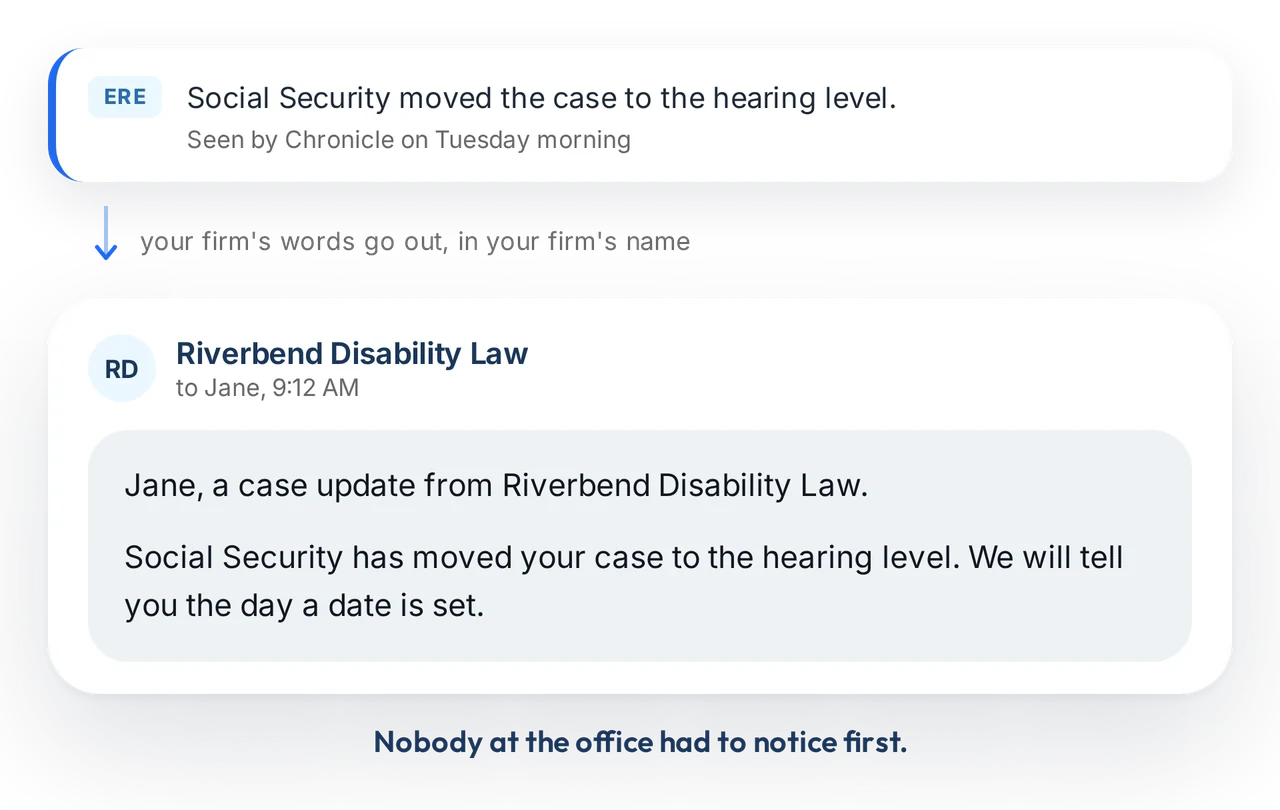
Every one of those calls starts the same way. The Social Security Administration did something on the claim, the mail reached the client, and the client told the firm. The firm is second to know about its own case.
On September 16, 2026, Chronicle released Chronicle Dispatch, which is built to reverse that order. Founder Nikhil Pai set it up live from an empty account and ran the whole thing end to end, from the first phone number to the client portal. Then he took fifteen minutes of unscripted questions from practitioners in the room about Clio, Filevine, Neos, DibCase and Prevail, about running it one way at a firm with two thousand clients, and about what the portal deliberately does not show.
This session was part of Chronicle’s Advancing Technology in Disability Law series.
Catch the full replay here:
Speakers:
- Nikhil Pai: Founder, Chronicle. Built Chronicle for Social Security disability firms after watching teams lose hours a week to manual ERE checks, and led the design and build of Chronicle Dispatch.
- Will Yang: Head of Growth, Chronicle. Leads growth and community at Chronicle and hosts the Advancing Technology in Disability Law series.
Key Takeaways
- The firm should not be second to know. Every routine status call to a disability firm’s front desk begins with SSA acting on a case and the client finding out first. Dispatch texts the client off the ERE event, before the mail arrives.
- The gap is larger than most firms assume. Across the cases Chronicle monitors, SSA generates about 110 events for every 100 cases each month. Most clients hear about exactly one of them, the decision.
- Setup is an afternoon, not a project. Two phone numbers, a welcome text, one message type switched on, a spreadsheet of client numbers or a pull from the case management system, and enrollment by claim stage.
- Control is the design principle, not a setting. Nothing sends unless the firm turns it on. Messages can be written per claim stage and per form type, decisions can be withheld, and a client excluded by hand is never enrolled automatically.
- Two-way is optional. A firm carrying thousands of cases can run Dispatch one way with an auto-reply pointing clients back to the office line.
- It is not another portal to chase clients into. A case management system portal does not know a consultative exam was scheduled or a function report was mailed. Dispatch does, because it reads the ERE.
What problem was Chronicle Dispatch built to solve?
A disability claim can sit for a long stretch with nothing visible happening. During that stretch the client’s impression of the firm is being formed anyway, and it is formed almost entirely by how often they hear from anyone.
The four sentences that produced the product
Will opened with what firms have been telling Chronicle for two years, in their own words rather than in a feature request.
Our clients find out from the mail before we do. We can’t text everybody, there’s not enough time. Our case management system says it has client messaging. I’d rather grow the caseload than grow the team.
Each of those is a different failure of the same thing. The first is a detection problem. The second is a labor problem. The third is a data problem, because a case management system can relay a status that somebody typed, but it has no idea a hearing has been scheduled, so nothing can fire on its own. The fourth is the constraint that makes the other three expensive to solve by hiring.
Dispatch is the answer to all four at once, which is why the session spent its first ten minutes on the problem rather than the product.
How often does SSA actually move on a caseload?
This is the number the session was built around, and it is worth sitting with.
Across the cases Chronicle monitors, SSA generates about 110 events for every 100 cases each month. Status changes. Consultative exams scheduled. Hearings set, and hearings moved. Information requests mailed. Decisions issued.
Run it on a real caseload. A firm carrying 240 active cases divides by 100 to get 2.4, multiplies by 110, and lands at roughly 260 events in a month. That is 260 separate moments when the client could have heard from the firm.
Today they hear about one of them.
The client experience during the wait is the one thing a firm actually controls
Will Yang, Head of Growth at Chronicle
What a firm actually controls
The argument underneath the product is a competitive one, and Will made it plainly.
A firm cannot compete on the outcome. The ALJ decides that, and the firm influences it rather than controls it. A firm cannot compete on the fee, because it is capped and every firm in the market charges the same. What is left is the wait, and the wait is long.
As Will put it: “The client experience during the wait is the really one key thing that you control, as well as anybody that might be a competing firm or a nearby firm to you.”
That is not a marketing frame. It is the reason the product exists in the shape it does, and it is why the rest of the session is about message control rather than message volume.
How do you set Chronicle Dispatch up?
Nikhil started from an account with Dispatch newly provisioned and nothing configured, which is the part of a demo most vendors skip.
His framing for why that matters: “we know there’s many options out there, but they’re hard to use, they require setup, people are paying consultants thousands of dollars to get it done. This is something that we can get done in the afternoon.”
What the setup screen tells you first
Before asking for anything, Dispatch shows the firm its own number: how many events occurred on its caseload in the last thirty days that a client could have been contacted about. CEs, hearings set, forms requested.
It is a useful order of operations. The firm sees the size of the gap before it sees the price of closing it.
Two phone numbers, and why there are two
The firm enters a general support email address and a phone number clients can reach it at. That second number is the existing front desk line, and it does two jobs.
- It tells the client who to call back. The text names the firm, and the number in it resolves to the firm.
- It catches the callbacks. If a client calls the Dispatch number directly, the call forwards to that front desk line rather than ringing into nothing.
Separately, the firm is assigned its own Dispatch number, which can be customized to a state and local area code. That is the number clients see the texts come from. It belongs to the firm and it is not shared.
The welcome text is the firm’s, not Chronicle’s
The first message a client ever receives is the welcome text, and it is editable before anything goes out. A firm picks a tone, edits the wording directly, and drops in variables like the client’s name.
Nikhil was explicit about why this is the first thing configured rather than the last: “We want it to be in your voice and seem like it’s coming from your firm to really make that difference to your client, to make them feel like they’re being taken care of.”
Turning on the first message type
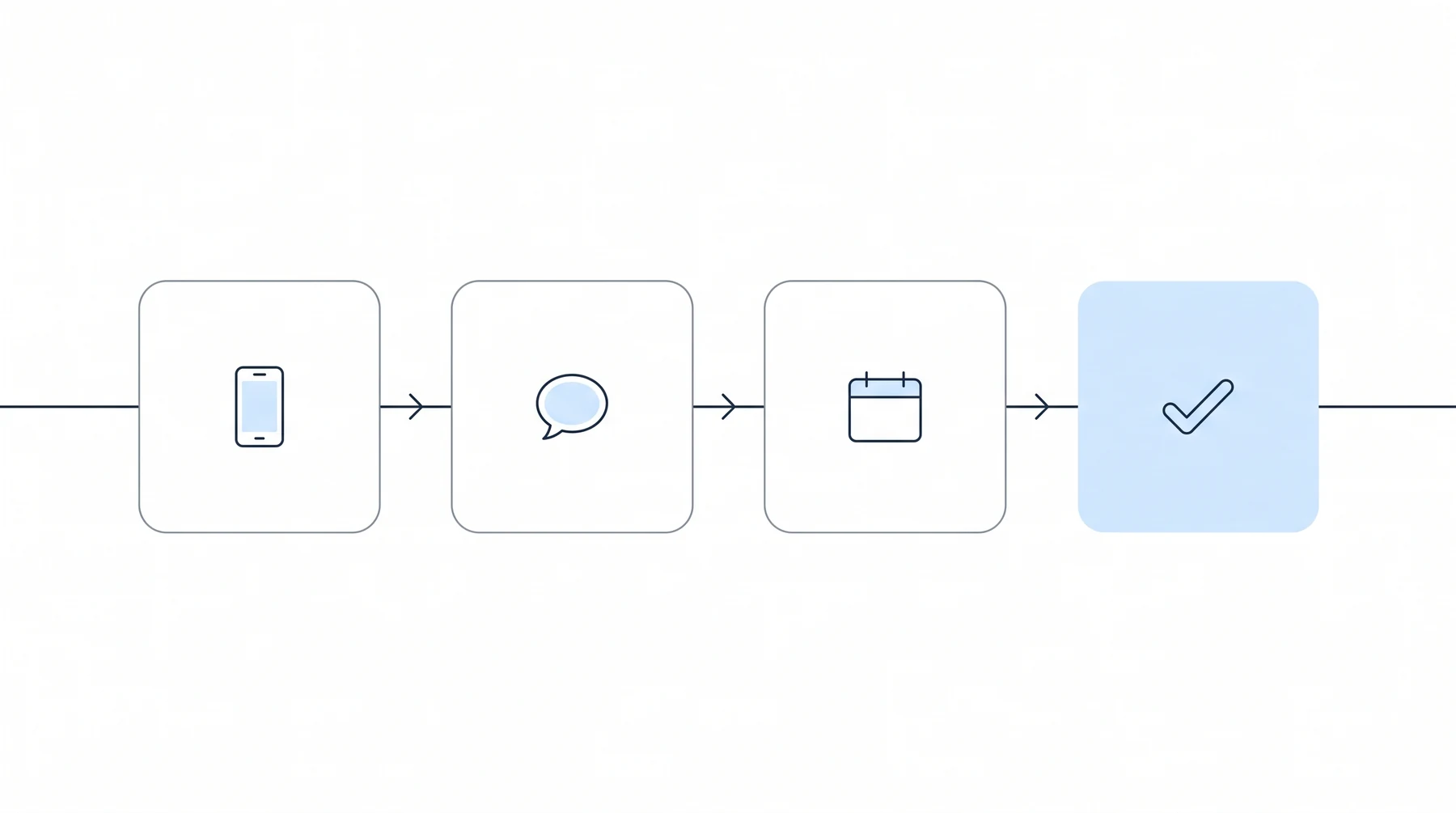
Dispatch ships with several message types, and the setup flow recommends one to start: appointment notifications for consultative exams and hearings.
It is the right first choice because it is the one with the most daylight in it. The message tells the client the CE or hearing has been scheduled, reminds them to attend some days ahead of it, and notifies them if it is rescheduled or canceled.
As Nikhil put it: “This now is getting to your clients 7 to 10 days before they even get the notice.”
The remaining types are switched on optionally: status updates, decisions, information requests including work histories and function reports, and a periodic check-in message for the stretches when nothing is happening at all.
Getting client phone numbers in without retyping them
Two paths, and neither involves data entry.
- Upload a spreadsheet. Drag and drop, and Dispatch matches clients and attaches the numbers.
- Pull from the case management system. For firms on Clio, Filevine or Neos, Chronicle pulls client phone numbers directly, so there is nothing to export.
The firm phone number is the one thing that has to be typed by hand, and only once.
Enrolling by claim stage rather than all at once
Enrollment is the last step and it is deliberately granular. A firm can enroll by stage, so a firm that wants Dispatch running at initial and reconsideration while it handles hearing-level clients itself can do exactly that. Or it can enroll client by client.
Then it goes live. The whole sequence, from empty account to a running system, took a few minutes on screen.
What does Chronicle Dispatch look like day to day?
Setup is a one-time event. The inbox is the thing a firm looks at every morning.
The shared inbox
Every inbound client message lands in one inbox covering the whole caseload, sorted the way a phone sorts texts: outstanding, read, responded.
Opening a client shows the full thread in order, with automated messages and human replies interleaved, and a record of which team member sent each reply. That last detail matters more than it sounds. It is the difference between a shared inbox and a shared mailbox nobody is accountable for.
Templates, merge fields, and a spelling pass
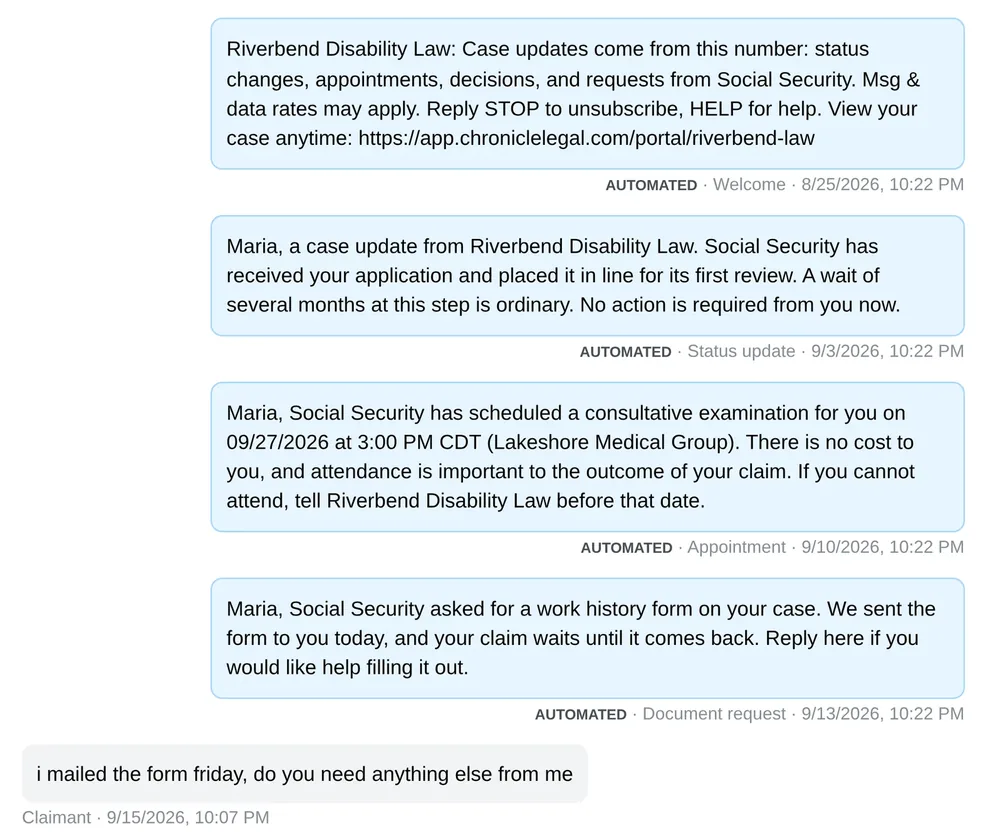
Three quality-of-life features sit on top of the message box.
- Templates with customized variables, so a common reply is one click rather than one retype.
- Status pulled from Chronicle, so a template can fill in where the case actually stands without anyone looking it up.
- An AI editing pass for grammar and spelling before sending.
Nikhil’s reason for the last one was refreshingly ordinary: “I make a lot of typos all the time.” The point is that a client-facing message from a busy case manager reads like it came from a law firm.
Writing a different message for every form type
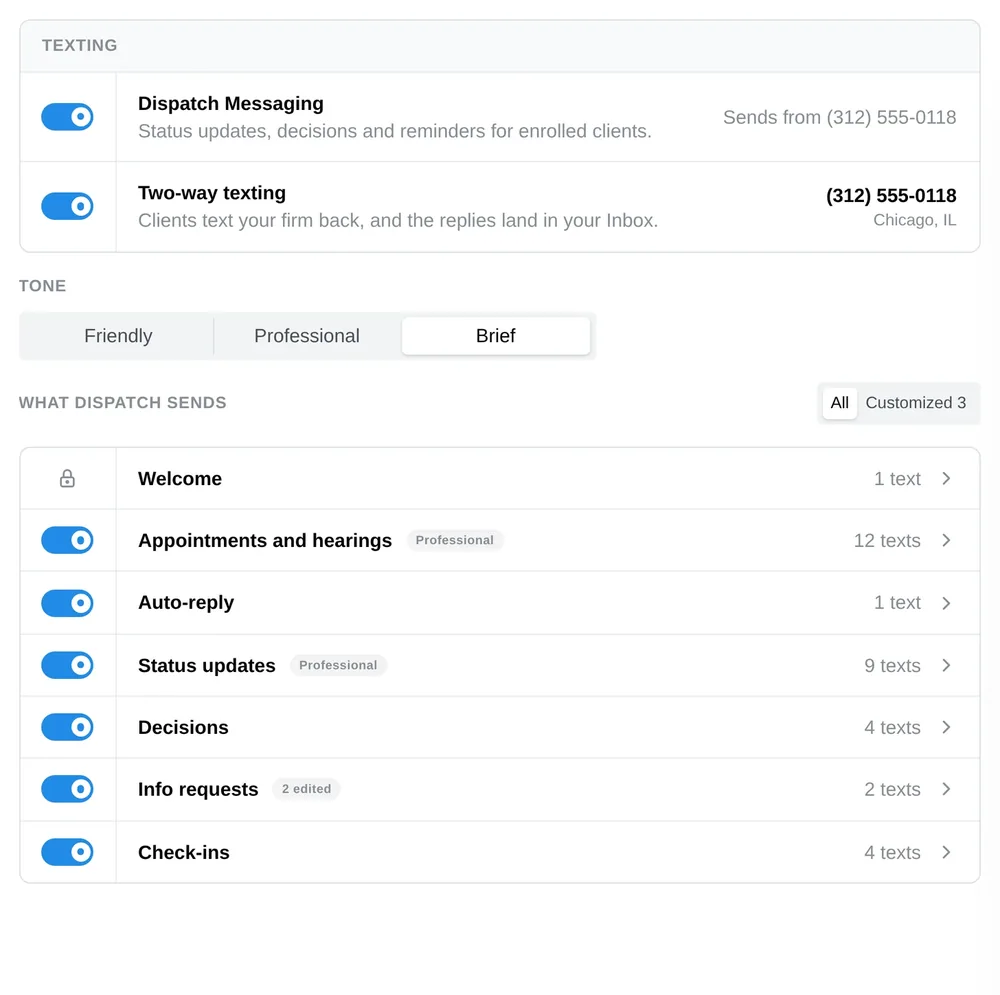
This was the deepest customization shown, and it came out of a question from the room rather than the script.
Leanne asked whether a firm that does not let clients complete their own function reports can change what the automated message says. Many firms work those forms with the client by phone, so an automated message telling the client the form is coming and to fill it out would be exactly wrong.
Nikhil shared his screen again and built it live. Under information requests, a firm creates a group, selects which letters belong in it, names it, sets the reminder cadence and maximum reminders, and writes the message that group sends. A function report group can say one thing. A work history questionnaire group can say another. Everything else can say a third.
The practical version is that a firm can tell a client a form is on its way and to call the office rather than fill it out, and that message only fires for the forms the firm chose.
The client portal, and what it deliberately does not show
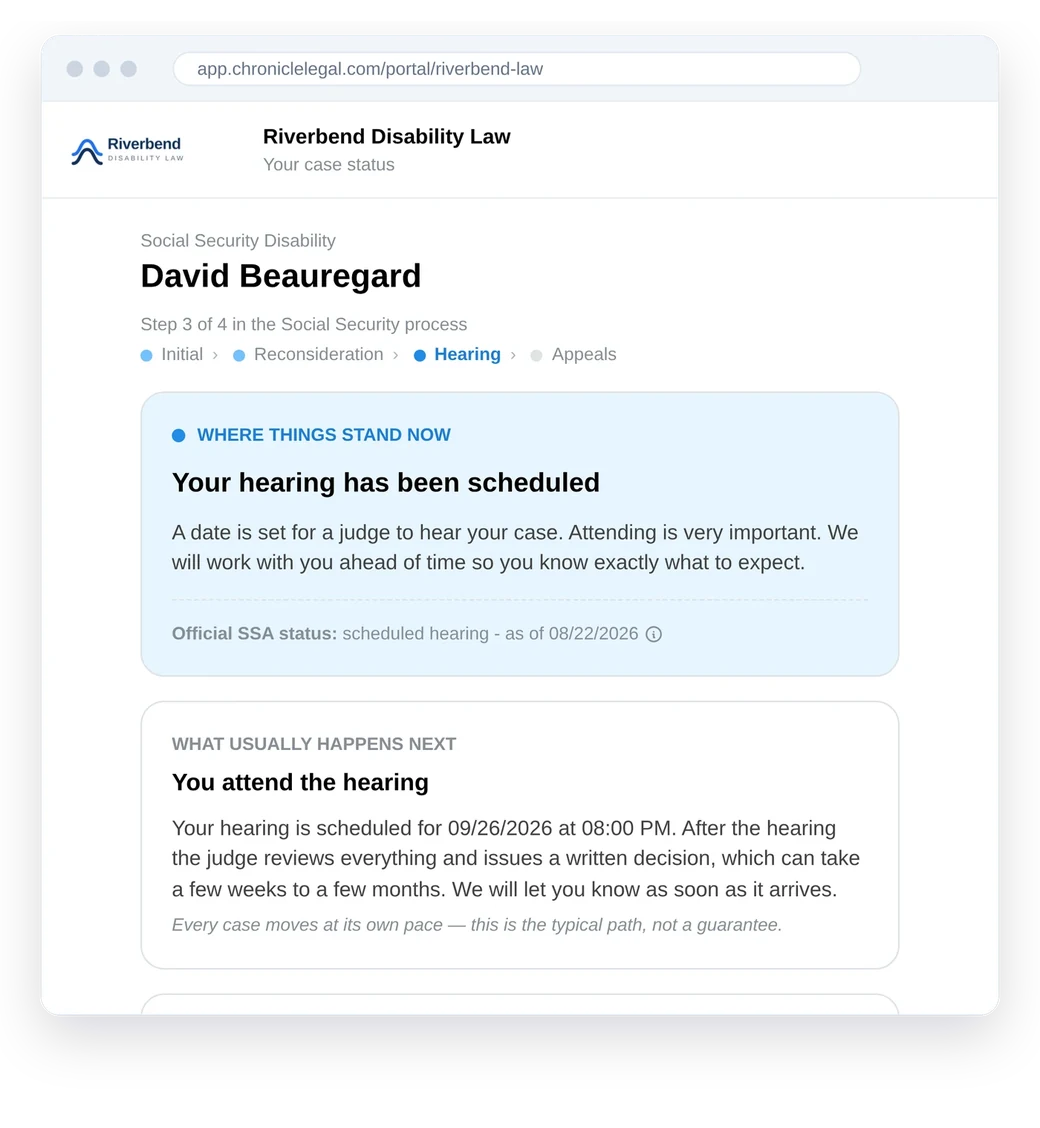
Clients get a portal they can log into at any hour, which is the obvious answer to the eleven o’clock status call.
It shows where things stand now, what happens next, upcoming appointments, and outstanding information requests. The plain-language explanation of each phase is written by the firm.
What it does not show is most of the ERE. Mike asked directly whether clients see all the ERE data, and the answer was no. Documents and medical evidence are visible in the firm’s Chronicle dashboard and not in the client’s portal. Nikhil named broader document sharing and client uploads as roadmap items rather than shipped ones, which is the right way to answer that question on a recording.
Firms can also see portal usage per client, including how many times someone has logged in, and preview any individual client’s portal as that client sees it.
What three decisions shaped the build?
Nikhil named three, and they are useful as a way of evaluating any client communication tool, not just this one.
Detection first, messaging second
Chronicle reads the ERE continuously. That is the existing product, and Dispatch is built on top of it rather than beside it.
The ordering is the whole moat. A messaging tool that cannot detect anything needs a person to notice something happened and press send. Chronicle detects the event, shows it to the firm, and then triggers the message.
Your voice, not ours
Every message is editable. Tones are a starting point, not a constraint, and a firm that wants to rewrite every template can.
Nothing sends unless you turn it on
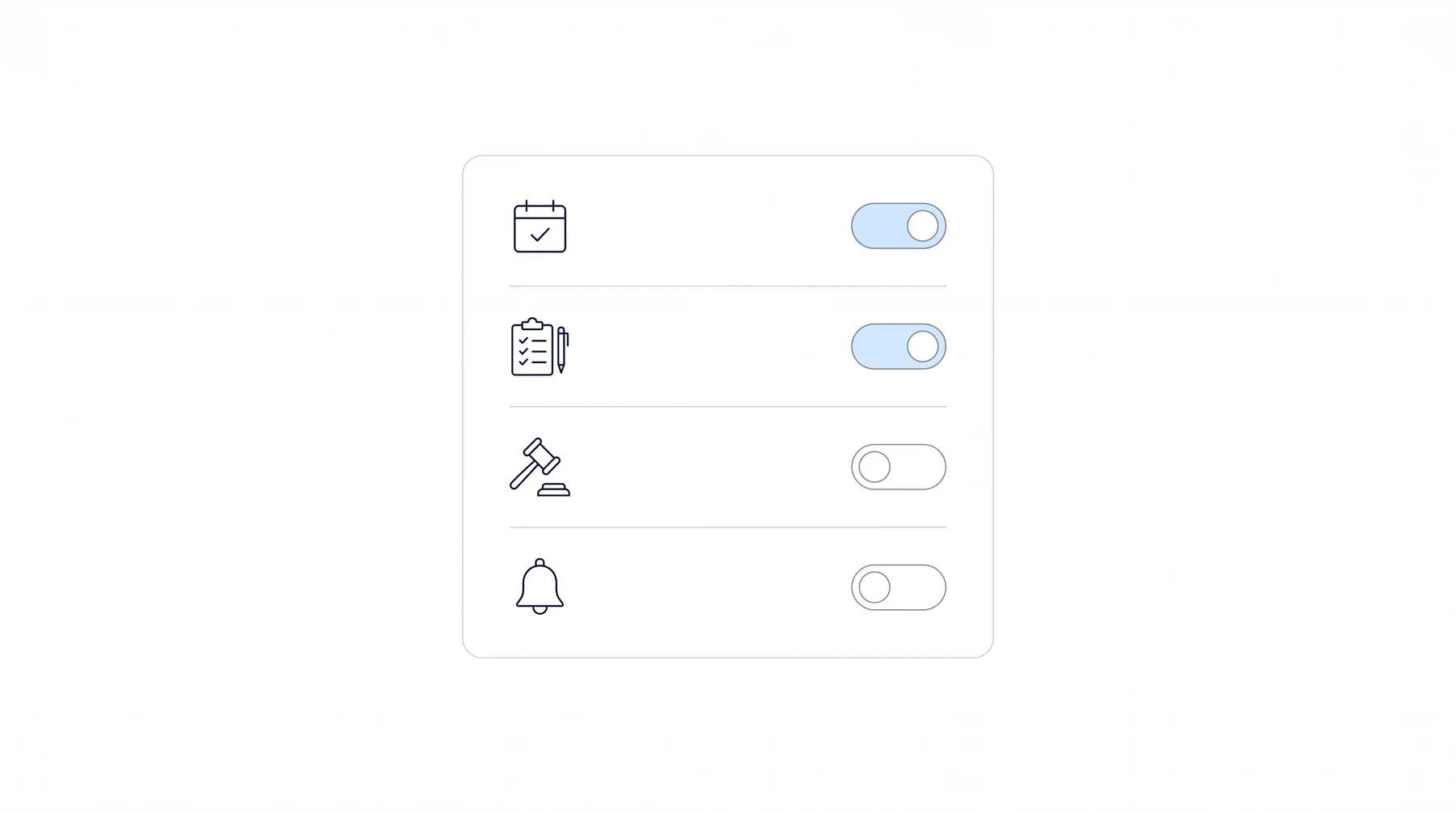
Every message type toggles independently, per claim stage. A firm can run status updates and suppress decisions. A firm can announce an approval and handle every denial by phone.
Nothing sends unless you want it to
Nikhil Pai, Founder of Chronicle
That one landed, because the room’s real fear about automated client texting is not that it will fail. It is that it will work, on the wrong message, to the wrong client, at the wrong moment.
How should a firm decide what Dispatch is worth?
Nikhil offered a framework rather than a number, which is the more useful thing for a firm doing its own arithmetic.
The three ways a firm grows
Pick whichever of these is the binding constraint right now.
- Clients sticking around. Acquisition is already paid for on every client currently in the book. A client who withdraws or moves to another firm because they did not know what was happening is a fully paid-for loss.
- Reviews and referrals. Clients who felt handheld through the process say so publicly and send people. Clients who felt abandoned during a two-year wait do the opposite, with the same energy.
- Caseload per person. As Nikhil described the default: “the main way to grow right now is you add more people as you add more cases.” Breaking that link is what lets a firm scale without a proportional hire.
The point of choosing is that it tells the firm what to measure afterward, and it tells Chronicle which angle matters on the setup call.
Before and after at a median firm
The median firm in Chronicle’s book carries about 115 active cases, which produces roughly 115 SSA events in a month that the firm could have contacted the client about.
Before. The client hears about the decision. Staff catch some of the rest by hand. The front desk fields status calls all day. A few clients quietly withdraw or sign with another firm, because from where they sit nothing has happened in months.
After. All 115 events reach the client, with the firm’s name on every one, ahead of the SSA mail. Status calls fall because clients already know. The firm looks like it is running the case, because it is.
What are firms already using it saying?
Chronicle built and tested Dispatch with firms on real caseloads before this session. Four of them supplied written testimonials, and their words are below rather than a summary of them.
Chronicle Dispatch has helped my firm automate a large portion of client communication that previously took dozens of staff hours each day. Clients receive case status updates and CE appointment notices automatically, along with another way to communicate with our team. A major time saver for our firm and a better experience for our clients. Five out of five stars!
 Jonathan O. Pena, Attorney at Law
The biggest benefit has been creating that consistent, branded ‘constant contact’ with our clients that was difficult to maintain with staff alone. Chronicle Dispatch helps supplement our real staff’s client communication so clients consistently feel like we’re on top of their case, even when there may not be a major update to report.
 Travis R. McCracken, Golson, McCracken Inc
It lets us keep clients consistently informed with real-time ERE updates while removing a huge amount of manual follow-up from our team. The automated messaging and two-way communication have made it easy to maintain clear, documented conversations directly in each client’s file.
 Shivam Patel, Esq., The Law Office of Shivam Patel, P.C.
The high level of customization offered in Dispatch allows us to provide timely case updates while also maintaining our own voice.
 Ryan Tank, Spector and Lenz
Three different firms, three different reasons. Staff hours for one, the feeling between updates for another, a documented record for the third. That spread is worth noticing before a firm decides which of the three growth levers it is buying.
On longer-running Chronicle results, Nikhil pointed at two customer stories. The Disability Champions scaled from 900 to 3,000 active cases without adding staff specifically to handle that growth. Ficek Law reported being on track for 67% year-over-year revenue growth after implementing Chronicle. Both predate Dispatch and describe ERE monitoring on its own. Dispatch is the next thing built on that same signal, pointed at the client instead of the firm.
How do you get Chronicle Dispatch?
Four things worth knowing, and none of them require a decision today.
- A free month. Everyone who attended live, and everyone watching the recording, gets a free month to try it. Switch on as much or as little of the book as you want.
- Founding cohort pricing. Firms joining the founding cohort lock founding pricing for the first twelve months from signing. The founding window closes at the end of December.
- Priced per enrolled client, never per seat. Chronicle has never charged by user, and Dispatch does not either. Add as many team members to the inbox as the work requires. Your number is worked out on the setup call.
- A few firms a week. Onboarding is deliberately paced so every firm gets set up properly rather than handed a login.
The next step is a setup call, which is where the free month starts and where your quote comes from. Book your Dispatch setup call, or book a Chronicle demo if you want the wider product first. More detail lives on the Chronicle Dispatch feature page.
Frequently Asked Questions
These came from the room, live, and the answers are Nikhil’s.
Does the firm get notified every time an automated text goes out?
No, and deliberately. That would be a very large number of notifications. Followers on a case are notified when a client replies, and when a client opts out of Dispatch, so the things that need a human get one.
Can Dispatch piggyback off the messaging already in our case management system?
No. Nikhil was direct that Chronicle looked at it and it is not technically possible. What does happen is the reverse: Dispatch pushes the communication record out, so each Filevine project or Clio matter carries a note recording the message, whether it was inbound or outbound, automated or manual.
Do client communications land in Clio Manage or Filevine?
Yes. Under integrations, a firm turns on a sync and all client communication, automated, manual and inbound, appears in the case management system as a note or a client communication. This is also what makes a fee petition straightforward to assemble.
Can texts send from our existing Filevine texting number?
No. As Nikhil put it: “we cannot piggyback off of their text numbers, but we can push our information into there so you can see it as well.” Each firm texts from its own dedicated Dispatch number.
Is there a DibCase or Prevail integration?
Not today, for either. Prevail recently opened an API and Chronicle is evaluating it, with no plans committed.
Can Dispatch run one way, without two-way texting?
Yes. This came from a firm carrying 1,000 to 2,000 clients with four to six case managers, worried about the reply volume. Two-way can be switched off entirely, and an editable auto-reply tells clients the line is not monitored and points them to the office phone or email.
Does the client portal show all the ERE data?
No. It shows case status, appointments and information requests, each of which can be turned on or off. Documents and medical evidence stay in the firm’s dashboard. Broader document sharing and client uploads are on the roadmap and not available today.
Can clients send documents back?
Not through the portal yet. Clients can text an image, so a photograph of a completed form can come in through Dispatch and be uploaded to the ERE from there.
Will there be email as well as text?
Text only today. Email is planned, with no date attached.
Is Chronicle becoming a CRM?
Not today. In Nikhil’s words: “Chronicle is not a CRM today. We are slowly making moves towards that place, but we really think of ourselves as an operational backbone.” The distinction he drew is that a case management system is the system of record for legal compliance, and Chronicle is built for the operator of an SSD firm who needs tasks and mail handled fast.
We already have a portal in our case management system. Why another one?
Because of what it knows. As Nikhil put it: “your portal in Clio or Filevine or DibCase or whatever doesn’t know about any CEs, it doesn’t know about any info requests.” It may know about the hearing. Dispatch knows about all of it, because it reads the ERE, which is the difference between a portal a client checks and a portal a client gets told to check.
Can a favorable decision trigger a review request?
Yes, in two places. The decision message itself can be customized by level, including turning denial messages off entirely so those go out by phone, and a Google review link can sit in the approval message. The portal can carry the same message on a favorable close.
Watch the Full Replay
Upcoming Events
- Permissions 201: a hands-on walk through the six roles in Chronicle and how to give the right people the right access. Thursday, September 17 · Register
- Disability Peers in Practice: a practitioner roundtable on knowing your numbers: what you measure, what your case management system will not give you however you ask it, and what changed once you could see it. Tuesday, September 22 · 12 PM CT (Register) or 2 PM CT (Register)
- 35 Years of Firm Marketing: Nathan Chapman of Firmidable on what actually works. Wednesday, September 23
About This Series
Advancing Technology in Disability Law is Chronicle’s practitioner series. Chronicle builds software for Social Security disability firms, and it builds the community around that practice area, because the strongest operators in this field tend to have solved hard problems with nobody outside their office knowing. The sessions, the roundtables and the recaps exist to make that work visible, credited by name.
Everything is free and everything is recorded. The full calendar is at the Chronicle events page.
More on client communication in disability practice: how to keep disability clients informed without drowning in calls, what actually works in a small disability practice, and automation and portals at large disability firms.
Follow Chronicle on LinkedIn for session announcements and recaps. Questions about anything here go to support@chroniclelegal.com or 847-665-9612.
Full Session Transcript
Welcome
Will Yang: Welcome, everybody, to Introducing Chronicle Dispatch. Your clients hear it from you first. We’re really excited to share with you our latest product release from today, that we’ve been working on for the last few months.
So, to get us started here. First and foremost, thank you so much for being here. We are joined today by Nikhil, the founder of Chronicle, and I’m Will. I lead events and community here at Chronicle.
Over the course of the next hour, we’re going to be covering quite a bit, but if you have any questions along the way, you are welcome to drop them in the Zoom chat. We recommend that you just put two hashtags in front of your question. It makes it easier to follow along. And you will get a recording with this event, so stay tuned in terms of your email. It’ll be posted both on our site as well as on our YouTube channel after this event.
Just to give you a high-level roadmap of where we are going to be going over the course of this hour. First, we’re going to talk about how to get your own number, and what we mean by that is there is a metric or a number that we’re going to talk about of how many times the SSA is moving on your client’s cases in the last month alone, and from there, it’ll give you the background understanding of the power behind Chronicle Dispatch and what we’ve built for you today.
The next thing is we’re going to talk about looking at the whole thing. Nikhil is going to take us through Chronicle Dispatch and tell you exactly what Dispatch does for you with all that data that’s feeding through from the SSA.
And then the third thing is we’re going to talk about a simple framework in terms of deciding what is this worth to your firm, and then lastly, we’re going to talk about how to get in, and when, in terms of the onboarding process.
Why Your Client Hears It From SSA First
So, with that, I’m going to get into our first section, which is talking about the quiet months.
As you all know, over the course of the span of a disability case, a claim can be sitting in your pipeline for a long stretch at the hearing level. What this often leads to is a situation in which your client’s impression about your firm can change depending on how often they’re hearing about you, or how often they’re knowing about certain things changing in their cases. That’s where we started building this concept behind Dispatch, which is a new way for you to stay in communication with your clients throughout the process, whenever there are meaningful updates to the cases in your ERE updates.
How does this work? We first want to set the stage in terms of what are some of the common calls that your front desk is probably taking in the last few weeks. Often we have heard of firms receiving inbound calls to their staff members, essentially asking questions like, I got a letter about some exam this week, what is this? Or they might be asking, my hearing moved, and nobody told me. Or they might be saying, is my case still going? I haven’t heard anything since March. Or they might also be saying something to the effect of, there was a form in the mail, was I supposed to do something?
These are all common questions that disability firms are having to answer on a regular basis in their office. Every one of these has started with the Social Security Administration doing something about your claimant’s case, and your client potentially hearing about it before you got the opportunity to explain it to your client. That’s really the crux of where this problem arises from when it comes to what we’ve built with Dispatch.
What Firms Told Us
That leads us to what you’ve told us over the last two years.
You told us statements like, our clients find out from the mail before we do. This was a common reason why people came to Chronicle in the first place. It was the single most common thing that we heard about the state of disability teams when it came to their support calls.
You also saw cases in which teams said, we can’t text everybody, there’s not enough time. There were cases in which teams were doing this manually, or carving out time in their regular work weeks to reach out to the clients, text them, let them know about some of the things that might be coming. But because there are just so many cases being handled, and so many different things to do on the other side throughout the process, you might still be missing people.
And then you also had cases in which the case management system might be saying that it has client messaging. There are some common case management systems that have basic client messaging, however, it has no understanding as to whether or not a hearing has been scheduled. So nothing can actually automatically fire in terms of once that change happens at the SSA level, your client getting notified about that respective thing that’s coming down the pipeline.
The last thing that often happened is a statement like, I’d rather grow the caseload than grow the team. This is what a lot of firms have said before, and also one of the big value points to using technology and solutions like Chronicle, in which it allows people to handle more of a caseload in terms of their typical average caseload per case manager, or within the support team.
It leads to the situation in which it sets the stage for Dispatch, which is our answer to these four sentences. It’s everything that you’re about to see in the live demo in a little bit, as I’ll pass it over to Nikhil, but it traces back to one of these four points in terms of why this is such a problem in disability firms.
Your Number
One of the things that you’ll want to think about as we explain this to you is essentially this core number. We ran against all of the data that we have, how many events actually occur from the SSA for every 100 cases. And every single month, it works out to be about 110 SSA events.
So if you ever wanted to think about the total number of moments when a client could have heard from you over the course of a month, it can be quite a bit.
Just taking an example here. I’m going to take the example of a firm with 240 active cases. If you divide that by 100, that’s 2.4, and then 2.4 times the average number of SSA events that happen every single month is about 260.
What that means is there are 260 opportunities in which your client could have heard from you, and today, they’re probably roughly hearing from you about one major one, which is the decision.
This is something where Dispatch really unlocks the ability for firms to be more proactive versus reactive in terms of their communications with clients, which then leads to a happier client, leads to more referrals, more reviews, as well as everything else in terms of just a great elevated client experience.
What You Actually Control
What this really matters on for firms, in our opinion, is this. At the end of the day, you can’t always compete on the outcome or the fee, because some of those things are outside of your control. Ultimately, it’s because right now, the decision, the SSA makes it. You influence it, but you do not actually control the decision from the ALJ. There’s a fee, it’s capped, but every firm in the market is going to be charging the same thing.
What it leads to is this opportunity in which the months that we’re talking about here that you can stay in communication with your client is your opportunity as a firm to influence the way that your firm’s impression is with the client, as well as your client feels supported throughout the process.
The client experience during the wait is the really one key thing that you control, as well as anybody that might be a competing firm or a nearby firm to you. That’s probably true if you just think about all the years of experience you all have in terms of the reason why people trust you all is because of that communication.
With that, I want to pass it over to Nikhil, who’s going to talk about Chronicle Dispatch, what we’ve built, how we’ve built it, and also why we think it’s the right shape for this practice area. Nikhil, feel free to take it away.
What We Built, and Why
Nikhil Pai: Excited to be showing you guys Chronicle Dispatch. This is definitely one of the largest launches we’re doing to date since we launched Chronicle a couple of years ago, and it really comes from a lot of the feedback that we’ve heard from you all as customers, folks we meet at conferences. I think it really nails the problem of keeping in contact with your clients throughout the disability process with minimal setup.
That’s something we took very front and center, is making sure this is easy to get going, because we know there’s many options out there, but they’re hard to use, they require setup, people are paying consultants thousands of dollars to get it done. This is something that we can get done in the afternoon.
With that, let me share my screen and share the Chronicle dashboard.
This is Chronicle. Most of you have logged in before and seen Chronicle, but for the folks who may have not, this is our Chronicle dashboard. The key thing that powers Chronicle is that direct connection to the ERE. We are constantly pulling new information at all levels, which is how we know about all your hearings, your decisions, but also, very importantly, at the initial and recon level, all the info requests and CEs getting scheduled. All these things that your clients need to be doing are currently populating to Chronicle, and what we’ve heard from many teams is they get the notification from Chronicle, they see it in the dashboard, and they manually reach out.
This is where Dispatch comes in, and automates all of that for you over text.
Live Walkthrough: Turning Dispatch On
So you can see here, once Dispatch is activated on your account, you’ll have an inbox tab, where you can now see the Dispatch setup process. It’s super straightforward.
We’re going to let you first and foremost know how many events, what is your number of things you could have been reaching out to your clients on in the last 30 days, whether it’s CEs, hearing set, forms requested, all of that.
Then we’ll give you a quick estimate of your costs. Just so you know, Chronicle is about [pricing figure omitted] per client, depending on the size of your firm. But you’ll be able to get your custom quote, and we’ll talk a little bit about that at the end. When you get started, we give you a free month, so you can really try it, put it through the wringer to make sure it’s a good fit for you over that month, and you can cancel at any time.
Once Chronicle provisions Dispatch to your account, you’ll just set up a couple of key pieces of information. You’ll enter in the email address that you want your clients to reach out to you at, so this is just a general support email address, and then whatever phone number you want your clients to be able to reach you at.
This phone number is for two reasons. One, so that when we text your client, they can know who to call back, and if they attempt to call the Chronicle Dispatch phone number, it will forward to this line. So you can imagine it being your general front desk.
You’ll also get assigned a Dispatch phone number that you can customize to your state and local area, and that will be the number your clients are getting texted from.
Then I’ll hit save and continue. I’ll then have the option of customizing my welcome text, and this is a key part of Dispatch. We want this to be in your voice, and let you really customize all the messages your clients get from you. You can see here, you can choose from different tones, you can actually edit the message, add in different variables, like the client’s name, whatever you want. And that’ll be the welcome text.
Then we have you set up your first message type. We have several options, but this is the one we think will be the most useful first, which is getting appointment notifications to your clients, whether it’s CEs or hearings. You can already see here, we’re adding a ton of value in terms of communicating with your clients. You can let them know when it’s scheduled. You can remind them to actually attend that CE or hearing days beforehand, and then also notify them if it gets rescheduled or canceled. Things that your team is probably missing because it’s already late by the time it comes to the mail. This now is getting to your clients 7 to 10 days before they even get the notice.
You can see here an example of what that conversation looks like, saying, hey, you’re going to be scheduled on this date at this location, it’s free, you should attend, here’s a reminder, and so on.
Then you can turn that on, and that turns on your first message type. From there, you can already see one message has been turned on for Chronicle Dispatch, where your clients are now getting notified whenever a CE or hearing is scheduled.
You’ll see here we have a couple more options that you can turn on optionally, such as status updates, decisions, info requests being work histories and function reports, and then even a check-in message. We hear from many firms, clients just want to know that you’re there every few days, and so you can have a check-in message.
Then I’ll turn on the messaging system, and this will turn on Chronicle Dispatch. I have to confirm the terms and conditions, just because you need to make sure you’ve actually gotten information from your clients to text them.
Then you can upload a spreadsheet of all your client phone numbers, so you just need to pull that out from whatever system you have. If you are using Clio or Filevine or Neos, we can actually pull those phone numbers out of your case management system, so you don’t need to manually enter them. But it’s just a quick drag and drop, we’ll match the clients, we’ll add the phone numbers, and that way they can get easily set up.
Then you can start enrolling clients, and you can do this by stage. So for example, maybe you only want Dispatch at initial and recon, and you’ll take care of the hearing. You can choose that, or you can do it one by one. And then I’ll just enable that, and that means now all people in those stages are going to get enrolled, and Chronicle Dispatch is now live.
That’s it. You can see, within a few minutes, Chronicle Dispatch has already been set up, and I can go and add additional things later, but that gets you going and getting you a ton of value out of the gate.
The Inbox
I’m going to hit Finish Setup, and I’ll just quickly show you a little bit of what Chronicle Dispatch looks like on a day-to-day basis. Now the inbox is set up. I’ve already preloaded a couple of different conversations to give you guys an idea of what this will look like.
This inbox shows you all of your outstanding messages, clients that have messaged you that you may need to respond to, the ones that you have read so far, so very much similar to your own text messages. Maybe you’ve read it and it doesn’t need to be addressed, and then what you’ve responded to.
If I jump into one of these messages, I can see the full conversation history here between what was automated and what my team has sent out. I can see the welcome message, they asked a question, I responded, I can see who responded. Then another automated message came out, and they asked more questions, and you see the back and forth.
We’ve also added a bunch of quality-of-life features to this text messaging service, such as templates, so you can have preloaded messages that your team can add and edit with customized variables. Say I want to just give them a quick status update, I can do that. It will pull the status of the case from Chronicle, I can send that, or I can even edit it with AI. I make a lot of typos all the time. I can have grammar and spelling fixed. So I always make sure my team looks professional and gets the right message written.
That is the Dispatch inbox and seeing these messages.
Customizing Message Types
Then, going into settings, I’m going to walk a little bit more through the kind of customizations you can make, and the portal you also get with Dispatch.
As I mentioned, we have different message types. Each of these can be edited, and you can change the tone for each.
I can go in here and I can say, you know what, I want to turn on SSA updates. I can pick and choose what I want at each level, so at initial, I can say that the application’s been received, versus there is someone reviewing it. At hearing, if it was waiting for a hearing date, hearing date set, or hearing held, and then make the changes at each level.
At decisions, you can also have a lot more customization here, where maybe you want to say, I just want to let them know it’s closed, or I don’t want to let them know the decision, and change that depending on level.
And lastly, for info requests, you can really customize this to however you want to handle it. I can actually say, I only want to notify them on certain form types, so maybe I only want the work history questionnaire and function report. I can add and remove different questionnaires and change the message they get for each questionnaire. So there’s a lot of customization, but we try to set it out of the box so it’s ready to use, and you don’t need to change each item.
The Client Portal
Then we also have the portal. Just so you have a sense, the Chronicle portal is a portal that your clients can log into to see all the information they’re getting texted at any point in time. We break it down into where things stand now and what happens next. Once again, you can customize this message to be whatever you want for your firm.
And then they can also see all their future appointments and info requests. So the fact that a function report was requested, that they have a CE or a hearing scheduled, and that way your clients can log in at any time and see what’s going on.
And once again, for each of these clients, we have full tracking for them. So if I jump back into Arthur here on the Dispatch tab, I’ll be able to see their conversation history, their portal usage, so how many times they’ve logged into the portal, and preview their portal as well, so I get a sense of what their individual portal looks like.
And that’s the Chronicle Dispatch system. As you can see, really easy to use out of the box, but you can go in there and customize it to your needs.
Let me stop sharing my screen.
Three Decisions Behind the Build
Will Yang: And with that, we’re going to go back to the slide share. Nikhil, I think it’d be helpful to talk more about how you built this, and share with folks what exactly changes once you start implementing this.
Nikhil Pai: Yeah, for sure. As I mentioned through this demo, there were a couple of decisions that really shaped this product.
First is detection first, messaging second. We wanted to make sure that as we get data from the SSA, we’re able to notify you, let you see it, and then have that trigger automations for you, so you’re always ahead of your client.
Second is your voice, not ours. We have a lot of customization ability in there, whether it’s choosing one of our stock tones or completely editing the message. We want it to be in your voice and seem like it’s coming from your firm to really make that difference to your client, to make them feel like they’re being taken care of and know that someone’s on their side.
And then last is nothing sends unless you want it to. You really can turn anything on or off. Maybe you want certain messages at certain levels, maybe you don’t want to tell them the decision. As you saw in the demo there, you can really toggle anything on and off, to make sure that you customize the system to what you want it to be.
We’ve built and tested this with real firms on real caseloads over the last couple of months with real clients using it, and we already have some great reviews that we’ll show you in a little bit. It’s really been tested and is a solid product that you can use today.
What Changes at Your Firm
As you think about how does this actually apply to my firm, imagine if, first, SSA schedules the hearing. Your clients now know about it before they even get the hearing notice in the mail. Just that fact that you’re the one telling them rather than the SSA adds so much trust.
Another one is a CE gets sent, and your client now gets that date and location and time and reminder and whatever additional information you want to get them, days before they even get that in the mail.
Same for forms. If a function report comes out, often what’s happening is your client gets it first, they fill it out, they submit it before you even have a chance to review that file. Now, with Chronicle Dispatch, you can notify them and tell them, hey, it’s coming in the mail. Give us a call, we’ll work through it together. You don’t need to do this yourself.
Or the last one, which is, nothing happens in 6 weeks. There’s tons of pauses. Maybe they’re waiting for medical records, and so the SSA has gone completely silent. You can now have an automated check-in message, just to let them know that you’re there, you’re watching this, and they can feel taken care of.
None of this needs a person, it’s all automated now, and that’s the whole point of Chronicle Dispatch.
The Six Things, Recapped
The six things that you saw. You turn it on, you choose what event types you want, SSA updates, CEs, chasing forms, and then you can see the inbox and the client portal.
You turn it on, and you can see who’s getting enrolled and why. You can then choose if you want status updates on, and be able to send out, is the case moving forward? Has it gone from the queue into DDS, and so on?
You can then choose to turn on hearing and CE exams, so getting notifications whenever a CE or hearing gets set.
Then there’s forms, so that being any info requests at the initial and recon level. You can say when that form was mailed out, what are they meant to do. That stops that call, and now they can watch for it and reach out to you, depending on what you’ve set the message to be.
And then you have the inbox. Chronicle is now a two-way system, so the clients can respond to you, you can have that conversation. It’ll be a centralized inbox for the whole team, and that way, no one gets left behind.
And then lastly is we have the client portal. Say it’s late at night, your client wants to know what’s going on. They can log into that portal, see the latest status of the case, when the last time the SSA made any changes, see if they have any appointments, so they have that reference point, and it hopefully reduces some of the calls you guys get just asking for the status of your case.
Three Ways a Firm Grows
How should you think about this? We’ve just shown you a lot of great features and products, but where does this actually show up in your practice, and how do you decide if this is the right fit for you?
The best way to think about how you value Chronicle is the three ways that a firm grows, and how you think about what is this really solving for.
First, clients sticking around. If you’re a large firm, or you’re a growing firm, you can lose clients. The more clients you can keep, you’ve already paid for the cost of acquisition, you’ve paid for that lead, you want to hold on to them. So if you’re just holding on to more clients, retaining more clients, that’s growth vector one.
Second is reviews and referrals. We were just talking about client experience and making your clients feel taken care of. That often translates to real reviews and real referrals, because they felt that they were being taken care of and handheld at each step of the process. So if Chronicle Dispatch helps with that, you’ll see those reviews and referrals come in.
And last is caseloads per person. I often hear when I’m on demo calls with firms, or just talking to folks that are peers in practice, the main way to grow right now is you add more people as you add more cases. This helps break that math where you can scale a little bit faster with the same amount of people.
So pick whichever of these three matter most to your firm right now. I’m sure the other ones still matter as much, but that’s the way to think about how does Chronicle Dispatch solve this problem for me.
What Firms Are Saying
So what has growth looked like? Chronicle has already helped many, many firms grow their practices without needing to add more headcount. We have some great stories already on our testimonial side, on our case studies page, where Al took over the firm, they had 900 active cases, and they’re now up to 3,000 active cases, without actually hiring that many more people.
Or Tony, who grew revenue 67% from last year, and Chronicle has launched them into a different orbit. So it’s a huge part of their growth story, is Chronicle already, and staying ahead of things.
But I’ll now show you a little bit of what other firms have been saying about how Dispatch has helped them.
One of our test firms has been Jonathan Pena out of Fresno, California. For him, Dispatch has already helped him automate a large portion of his client communication that previously took dozens of staff hours a day. He has a large team, he really cares about that client communication, and he had his team texting everyone all the time, trying to help them through the process. This has been a major time saver for them, and a better experience for their clients. He says 5 out of 5 stars.
Next we have Travis, from Golson, McCracken. For him, it has been creating a consistent, branded constant contact for their clients. It’s hard to maintain that with staff alone. Dispatch helps supplement his real staff client communication, so clients constantly feel like their firm is on top of the cases. So once again, really focused on that client experience where folks feel like they’re being taken care of, and they don’t have to be the ones reaching out.
And then the next firm that we’ve been testing with, Shivam Patel, from the Law Office of Shivam Patel. For him, the two-way messaging has been really critical and what they’ve loved. Automated messaging and two-way communication have made it easy to maintain clear and documented conversations.
This is another piece we actually haven’t mentioned. If you are using Clio or Filevine, all of our communications do sync into their case management system, so you have those records of all client communications and can easily put together a fee petition. So we have thought about that piece of Chronicle Dispatch as well, and that’s something Shivam had mentioned. We are doing two-way communications, they’re having everything documented, and it’s easy because it’s in one place, and it’s a mix of automated and real person.
Before and After at a Median Firm
So, one firm before and after. How do you think about it before? In a month, in a 115 client practice, which is roughly the median firm we have today, there were 115 things that happened at the SSA they could have reached out to their clients on. The client hears, right now, just about the decision. Maybe your staff is getting to some of the other ones. Your front desk is taking dozens of calls a day from clients asking, what’s the status of my case, what’s going on? And then some clients are bouncing, signing over to a different firm, withdrawing, because they just don’t know what’s going on.
Now, that same firm, all 115 events are getting notified out to those clients. Your firm’s name is on every single one of them, and it’s coming before the SSA mail reaches them. So once again, you seem like you’re in control, your firm’s the one guiding your clients. The number of calls that are coming in are reduced because they now feel like they know what’s going on. And you’re saving thousands of dollars in staff time. Depending on the size of your firm, this could be roughly [pricing figure omitted] at our list pricing, and that is something you now can think about. Is that worth it, given the amount of staff hours you’re probably paying to have that covered?
How to Get It
Will Yang: One of the things that folks are probably going to be asking in the chat is, how do we get this? How do we get access to it? And it’s pretty simple.
The first thing is, we just dropped a link in the Zoom chat if you want to book a time to get this set up for your firm. Every single person that’s in this live event, as well as reviewing this recording, is going to get a free month to try out Chronicle Dispatch. You can switch on as much or as little of the book as you want. Again, as Nikhil mentioned, we built this with control in mind, and so you have full control as to who’s going to get this, when, and where.
The other thing is, anybody that is part of our founding cohort, which will span over the course of the next few months, is going to be locked in for founding pricing for the first 12 months or so, so that’ll be a discount that will be locked for the first year to help make this an easy decision for you to see the value of Chronicle Dispatch.
Everything is going to be priced by client, so not by seat, so you can have as many team members as you want working through Dispatch. As you know, Chronicle has never charged on the individual user. In Chronicle, it’s always been on the client side.
And every single week, we’ve been onboarding a small amount of firms, in order to make sure that everybody gets supported properly in terms of their Dispatch setup. So if you want to make sure that everything is squared away, your I’s are dotted and your T’s are crossed, we’ll make sure that we get everything set up perfectly for you. Founding pricing is going to close by the end of December, and as Nikhil mentioned, it depends on the firm size, but you’ll have some sort of quote leaving that call.
If you want to know what to do next, you can type one word in the chat, since we’ll have this Zoom chat transcribed, and that’ll give us an understanding of who we should follow up with. If you’re ready to be put in the next batch, feel free to just type the word ready in the Zoom chat. If you want more details, and just more details on pricing, you can just say details. And if you are at a place where you just want to wait a little bit for later, you can also just say later, and we’ll keep you posted and go from there.
We’ll follow up with everybody that typed something in. Hopefully you all don’t have, like, iPhone as your Zoom name, because that’ll be difficult to track you down. But assuming that you do have a generic Zoom name, I would say, if you can include your name as well as your firm, we’ll make sure to look you up from there.
With that, I know we have a lot of questions, so I want to make sure that we have given you all the space to get those questions in place.
Questions From the Room
Will Yang: The first question we’ve got today. Shari’s asking, do we get a notification that a text message has been sent?
Nikhil Pai: Currently, no, we do not. If we automate a message, we don’t message you letting you know we’ve sent it, because that would be a lot of text messages all the time. However, you can easily go into each client and see what’s going on. If your client responds to a message, because this is a two-way system, anyone who is a follower on the case will get notified. And then if anyone opts out of Chronicle Dispatch, we also notify the followers, that way you can make sure that that’s addressed, or at least noted.
Will Yang: Cassi is asking, do you have any plans to integrate this with existing messaging systems in case management systems? For example, getting clients to use portals instead of calling can feel like pulling teeth sometimes.
Nikhil Pai: In terms of integrating with existing messaging and CMSs, it’s a little bit of a mixed bag. As I mentioned, anything that happens in Chronicle Dispatch, if we have a native integration with them, we push notes or communication history into the case management system, so you have that full record in your case management system.
In terms of piggybacking off of, say, Clio’s messaging system, unfortunately it’s just not technically possible. We have looked into it, so that’s why it exists purely in Chronicle, but we sync the data out so Clio knows what we are doing.
Will Yang: There’s going to be a series of these integration questions, but the first one from Kerie is, is there a DibCase integration?
Nikhil Pai: Currently, there’s no DibCase integration on this. And in terms of plans, unclear. They are making some changes, so we just haven’t been in contact in a little bit.
Will Yang: Mike asked, does the portal let them see all of the ERE data?
Nikhil Pai: No. Great question. As you know, in the Chronicle dashboard, you can see a lot of ERE information, like all the documents, all the medical evidence, anything. We’ve tried to really slim it down so it’s just the key information, and you guys can customize what is shown.
Right now, that is essentially the status of the case, their appointments, and their info requests. Each thing can be turned on and off and customized. In the future, we are thinking about letting you show more of the ERE, such as documents or specific files with your client, and upload back, but that’s something that’s not available today in the portal. It is on the roadmap.
Will Yang: Leanne asked, if a client is sent a 3373 form, can we customize the message that they are sent automatically? We don’t allow our clients to complete 3373 forms, 3369 forms, and so on, so we just want to tell them what they’ll be receiving, and to call us to schedule time for us to do them together by phone.
Nikhil Pai: This is going to expose my lack of knowledge about which exact forms those numbers refer to, because I only know the names of them when they’re words. If they’re at the initial and recon level, so it’s like a function report, a work history questionnaire, or one of those variants, you can customize that message. You can essentially say, for a function report, send this message saying, don’t fill it out.
Will Yang: It’s a work history and function report, for reference.
Nikhil Pai: Yes. So you can tell in the message, specifically for work history questionnaire, send this message. For a function report, send this message. For every other form, send this message. So you have a lot of control there.
Will Yang: I actually think what would be useful, Nikhil, if you want to share your screen and zoom in a little bit from what you shared earlier, just to show the depth of customization. That might be useful for folks to see.
Nikhil Pai: Let me share my screen.
Very specifically to Leanne’s question, because we thought about this one a lot, and we got feedback actually from Shivam when we were setting this up. It’s under Dispatch. If you look at messages, there’s an info request, which is where these forms exist.
You are able to add a group, select which letters are in this group. So let me actually remove function reports and work histories from here. Group 2, I might call this Function Report. I can say I only want ADL, which is the function report, to be in here. I want this reminder cadence, max reminders, and then for the function report group, I can go to message and edit this, saying, you know, has sent you this, don’t fill it out. And that will now be the message clients get for function reports only. And I can then do the same for work history questionnaires. Or I can make groups of them and bundle things together, so your client’s getting the right information when they get that specific form.
Will Yang: The next question is from Mike. When we get a favorable SSA decision at any level, is there a custom portal message to congratulate them, ask for a Google review, or referrals?
Nikhil Pai: Great question. You can customize that in two places. You can do it in the message, so you can say, at each level, I want to say, if approved. I can turn off denial messages, maybe you guys want to call them about denials, and I can put a message in and add my Google review link or whatever I want on that approval. Same in the portal. I can say on decisions, when it’s closed favorable at hearing, show this message, and have a link to my Google review.
Will Yang: Jeff is asking, first question, firm uses Clio. Does the communication thread with clients transfer into the client’s matter in Manage?
Nikhil Pai: Yes, that’s what I was thinking about before. In our settings now, under integrations, you will be able to turn on a sync. I can’t actually show it in my demo account, but you’ll be able to turn on a sync so that all client communications, both automated and manual, and client inbound, show up in your case management system, either as a note or as a client communication in Clio or Filevine.
Will Yang: And then the next question is, is there some type of push notification sent by Dispatch alerting the subscribed user that a message has been received from a client?
Nikhil Pai: As long as you’re using a follower on that client, whenever a client messages back, those people will get a notification via email. Additionally, we’ll have this little blue dot next to the inbox. This is for everyone, wherever we can see what the outstanding messages are.
Will Yang: Jason said, awesome product. Is there a more passive option that allows a message to be no reply? With a caseload of 1,000 to 2,000 clients and 4 to 6 case managers handling cases, these messages are going to generate a lot of responses from our clients, and another platform to monitor, manage, and train on.
Nikhil Pai: Great question. Yes, Chronicle Dispatch can be one way. So if you want to turn off two-way texting, you can. When you turn off two-way texting, we have an auto-reply that you can change. That lets them know, hey, this is not a system that’s being monitored. Please call us or email us at this phone number or email address if you have any issues or want any follow-up. So that is an option as well.
Will Yang: A series of Filevine questions led by Benjamin. The first question is, how deep is this integration with Filevine? For example, if there is a Filevine integration, I assume it can pull the phone numbers for clients, but can it also pull the firm numbers that they’ve set up, as well as leave a copy or some sort of note in the activities feed saying that a message was sent?
Nikhil Pai: To answer that one by one. From Filevine, and this is true of Clio as well, and Neos, we can pull the client’s phone numbers out of your case management system, so you don’t have to manually enter them. We cannot pull the firm phone number, that’s something you have to manually enter, but you just have to enter it once. And then we do leave a copy, a note on each project in Filevine, or each matter in Clio, with what the client communication is, if it was inbound, outbound, automated, manual, and so on.
Will Yang: I think you just answered this, but just to hammer it home, Greyson asked, can Dispatch be set up so that text messages are sent from an existing Filevine texting number?
Nikhil Pai: No. Once again, whether it comes to Clio or Filevine, we cannot piggyback off of their text numbers, but we can push our information into there so you can see it as well.
Will Yang: Kerie asked the question, can you explain more about the inbox? How extensive is it for client communication?
Nikhil Pai: The inbox is just your home where you can see, if you have two-way on, all of the messages that your clients have sent you, whether you’ve read it, responded, or outstanding. Just so you know, right now, Chronicle Dispatch is texting only. We will be adding email in the future, but as of now, it is just purely texting.
Will Yang: Leanne asked, will there be any integration with Prevail?
Nikhil Pai: Currently, no, there is no integration with Prevail. They recently opened up an API, we’re waiting to see if that’s something we can handle, but at this point, no plans to integrate with Prevail.
Will Yang: Christine asked, are there any plans to automate the completion of function reports and the disability report appeals forms through Chronicle? We tried Benny, and it was burdensome for clients.
Nikhil Pai: I think Benny’s a great product, so I don’t know if we can do it better than them, but we will probably, at some point, allow clients to submit documents through the Chronicle portal. Just so you know, your clients can actually send images through text. So if they do want to snap a picture of that completed form and text it via Dispatch, that is an option. You can then upload it to the ERE. But as of now, we don’t have plans on doing the form completion, but that’s not to say we won’t in the future.
Will Yang: Stephanie said, I think this is a more general Chronicle direction question, but is there any plan to eventually develop a full CRM? Our clients already have a portal and a way to communicate with us, and I feel like this could complicate it or be too much.
Nikhil Pai: Great question. Chronicle is not a CRM today. We are slowly making moves towards that place, but we really think of ourselves as an operational backbone. A case management system is a system of record, it’s for your legal compliance, in addition to doing work. Chronicle really wants to be focused on, if you’re an operator of a firm specifically in SSD, making sure your tasks and your mail are being handled quickly and efficiently.
To your second question, which is about having another portal, and this is about case management system portals and messaging systems in general, you probably know, your portal in Clio or Filevine or DibCase or whatever doesn’t know about any CEs, it doesn’t know about any info requests. It may know about the hearing, but you can’t automate and show this information to your client so they can quickly consume it and know what they need to do next.
That’s the key difference about Chronicle Dispatch. We already know about all the things the SSA has requested from your client, and you don’t have to find a way to manually or hack together some system to show it in these portals from the other providers, because they’re not built for disability specifically.
Will Yang: Benjamin asked, if email is implemented, can we add a Filevine integration to CC, for example, project-specific emails?
Nikhil Pai: Probably. I would never say never. That sounds like a good idea, Ben. So sign up and we’ll get it going.
Will Yang: And then Karen asked, is there any integration with Wings or Crocodile?
Nikhil Pai: Not today. We integrate some stuff with Wings and Crocodile, but there is no integration for Dispatch.
Will Yang: Kerie asked, is there any chance that this texting will integrate with the website bots that some of us already use for new cases that eventually will be in Chronicle anyway? Many continue to respond there. So I think it’s those chat bots when you’re on your website.
Nikhil Pai: Great question. Yes, this is a long-term product vision. The reason why we got started on Chronicle Dispatch is, in the world of AI, once we start getting this kind of system of templates and knowing what you guys want, we can use that to build better AI bots that either can answer the phone, respond over chat, and that kind of thing, to once again help your clients get the information they need faster, rather than having to wait on [inaudible].
Before You Go
Will Yang: I think I’ve covered most of the questions, Nikhil, so I’m going to take over on the screen share. Other questions, feel free to drop them in the chat.
But otherwise, thanks so much, everybody. We have the Zoom chat, so if you haven’t already, here are those three words again. If you’re ready, feel free to type it in the chat. If you want more details, just type in details. If you want to just learn more later, feel free to say later. And you also can feel free to just book a time directly with the link in the Zoom chat.
Coming up on our calendar, as a heads up. Tomorrow, we are teaching Permissions 201, so this will do a deep dive into the 6 different types of roles in Chronicle, and whether or not your team and team members have the right level of permissions to what you want them to have. So that’ll be the follow-on to our previous workshop, which was around Notifications 201.
And the next Tuesday, we have Disability Peers in Practice. If you want to connect with other practitioners like yourself, we have 2 sessions, at 12 p.m. Central as well as 2 p.m. Central. And then lastly, we have Nathan Chapman for 35 years in firm marketing, to share what actually works from his experience there.
And we also launched a podcast recently, so if you go on Spotify, iTunes, or whatever you listen to your favorite podcast on, and search Disability Heroes, Diane Haar is our first episode. We’ll be releasing on a bi-weekly basis the stories of practitioners like yourself, in terms of how they built their practice and why they do the work that you all do. And it’s all free, so you can learn more at our events page.
Otherwise, we’re going to give you guys about 12 minutes back, give or take, and look out for the recording of this event. Thanks so much, everybody. Have a great rest of your day.
Nikhil Pai: Thanks, y’all.