
Most disability firms are not short of AI ideas. They are short of a way to tell which idea is worth a weekend. At CAPACITY ‘26, Bryan Konoski of The Federal Appeals Firm gave the room a filter: find the place where work gets stuck in your office, fix that one thing, and judge the result against three plain questions.
His session, “More Cases, Same Team: Using AI to Address Your Firm’s Bottlenecks,” was part of the Disability Law Tech Summit: CAPACITY ‘26, co-presented by NOSSCR and Chronicle. You can catch the replay here:
Speakers:
- Bryan Konoski, Founder and Partner, The Federal Appeals Firm. His firm is a national practice representing Social Security Disability claimants in federal court appeals. He is also co-founder and Chief Vision Officer of Brief Master, Inc., an AI platform focused on federal appellate intelligence.
- Will Yang, Co-founder and Head of Growth, Chronicle. Host and Q&A moderator. Will leads community, partnerships and events at Chronicle, including the Disability Heroes podcast and Disability Peers in Practice.
Key Takeaways
- Start with the stuck spot, not the tool. Ask where work piles up in your office, then pick one bottleneck with a meaningful benefit.
- Judge every AI workflow on three tests. Does it improve speed and efficiency, does it improve revenue, or does it improve how you manage the practice? A workflow that does none of them can be skipped.
- Put a person at the front of AI intake. Bryan’s firm pairs a human who greets the caller with an AI assistant that asks the screening questions.
- Guided letter workflows beat a red pen. A step-by-step assistant in ChatGPT or Claude can produce 5-day letters and subpoena requests that meet the requirements, whoever on staff fills in the facts.
- Staff can ask the AI first. A trained assistant answers routine how-do-I questions so paralegals stop lining up at the attorney’s door.
- Finish one before you start the next. Bryan’s practical plan is to get a single workflow running properly, then move on.
AI pays off when a workflow passes one of three tests
Bryan opened with a study he thinks tells only part of the story: an MIT report finding that most businesses see little to no measurable bottom-line return from generative AI. He agrees many organizations are struggling to adopt it, but not that the technology cannot pay off.
His objection is that bottom-line revenue is only one way AI helps. In his view, the question to ask is which of three outcomes a workflow delivers.
Test every workflow on speed, revenue and management capacity
- Speed and efficiency. The workflow moves work through faster, which may lower costs.
- Revenue. The workflow has a measurable positive effect on what the firm earns.
- Management capacity. The workflow makes the practice easier to run and takes weight off the people running it.
Some workflows pass more than one test. Some pass only the third, and Bryan counts that as a real win.
AI does not always make work faster, and that can still be a win
He was also direct about the hype. “AI does not always speed everything up,” he said, and he does not buy the idea that the billable hour is dead. Some uses improve efficiency, some improve revenue, and some simply improve management capacity “which may not result in speed.”
Skip any workflow that moves none of the three
Spending serious money on an AI workflow for routine emails is, in his view, a poor use of time. The target is a workflow that will “improve your workflow substantially” in one of the three categories.
Start with the place where work gets stuck in your office
Bryan’s diagnostic is a single question: “where does your work get stuck in your office?” He offered a few places to look:
- Phones. Do clients jam up your paralegals, and does your intake department get pulled into conversations that have nothing to do with intake?
- General correspondence. Letters that follow a pattern but carry legal requirements.
- Medical chronologies and pre-hearing briefs. He left these to the other sessions of the day, noting they had been covered by other presenters. The recap of the LexMed session on OTR requests covers that ground.
He then walked through three workflows that his firm uses or has built: phones, correspondence, and staff training.
Bottleneck 1, phones: put a person first, then hand the intake to an AI assistant
The usual fear is that a caller who realizes they are talking to a machine will hang up and call another firm. Bryan shares the concern. His answer is not to remove people, but to change who goes first.
A staff member greets the caller, then introduces the AI assistant
He does not think a bare AI receptionist is a good idea standing alone. Instead, a staff member answers, introduces themselves, and explains that an AI assistant will streamline the process and get the caller an answer faster. He calls it “a warm introduction to the AI assistant that you’re going to be using.”
The handoff strips out the off-topic talk
Intake calls drift. Callers talk about old injuries, relatives who got benefits, and conditions that have nothing to do with the claim. When the call moves to the AI assistant, the questions stay on what the firm needs to decide whether to take the case. The staff member is free to take another call or get back to other work. Calls from existing clients asking for updates are a separate half of the phone problem, and the session on stopping client status calls takes that on.
The call transcript becomes a screening note and a decision
The phone system produces a transcript. Bryan’s firm runs it through ChatGPT or Claude to flag unanswered questions and problems with the intake, so the firm gets a screening summary it can act on quickly. The flow is call transcript, then intake forms or screening notes, then one document on the attorney’s desk.
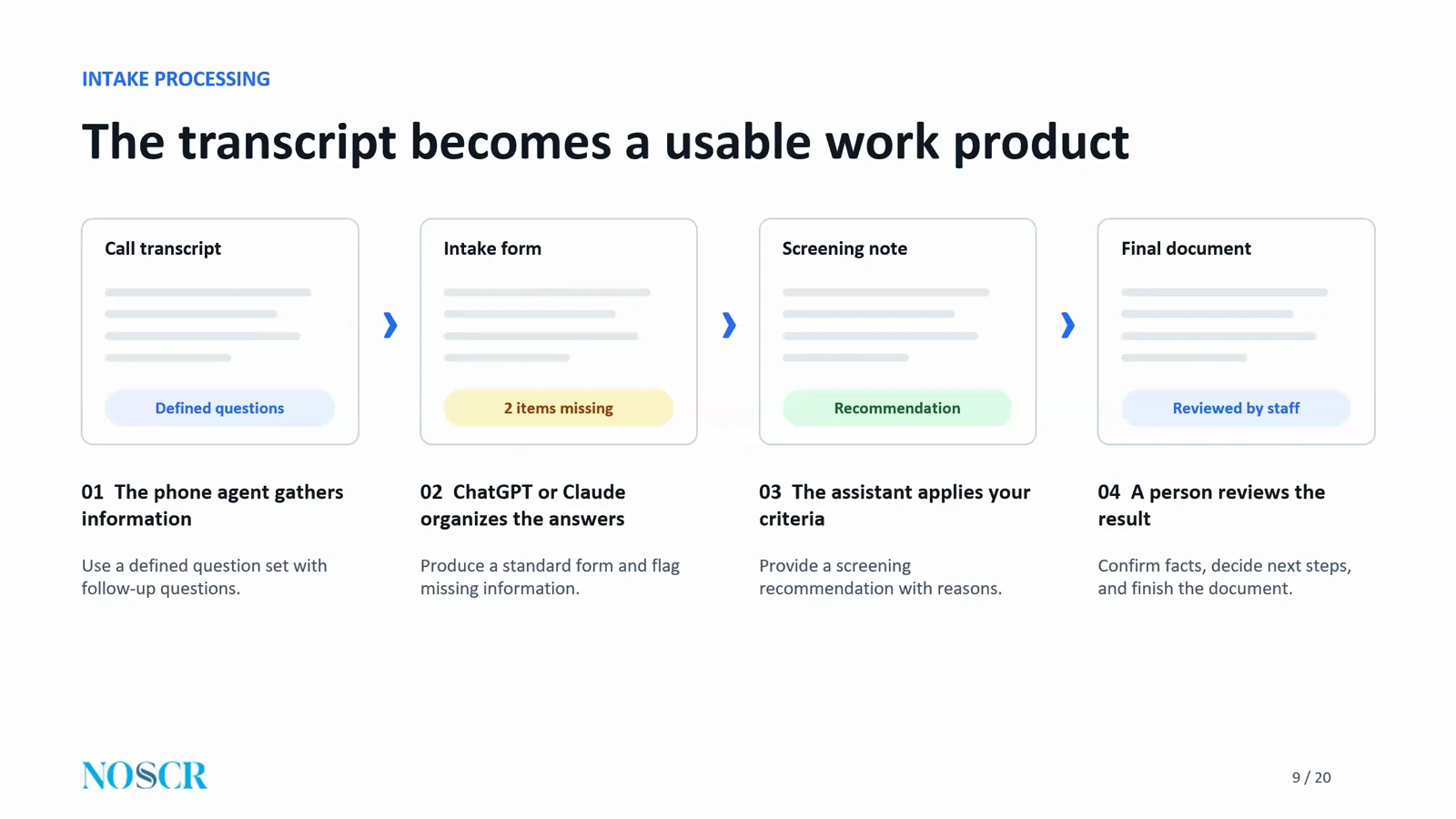
Bryan’s slide on moving from call transcript to a reviewed work product.
A federal appeals firm cleared a backlog without more hires
Bryan’s own intake is different from an administrative practice, because referrals arrive with documents. His bottleneck was gathering client information for a routine federal court application. The work had backed up, and the firm was weighing more hiring or a way to make AI work. Federal court volume is a pressure of its own; see managing the SSA federal court workload surge.
They built the AI workflow, and the backlog cleared. In his words: “no additional need for more staff, so clearly it resulted in speed, efficiency, reduced costs in that department.” The assistants who had been tied up on that work then had time to help with other tasks.
You can build it yourself, without a developer
Bryan stressed that he set the system up himself, without a development team. “If you sit down and you put in the time, it can be done yourself.” He used ChatGPT to help him work through the setup.
Bottleneck 2, correspondence: a guided letter generator makes routine letters compliant
The second workflow is correspondence. Bryan separated letters that are too quick and routine to bother with from letters that “happen routinely all the time, but some of them have legal requirements.” In Social Security practice, his examples were 5-day letters and subpoena requests.
Letters with legal requirements are worth automating
A subpoena request can be denied because the letter did not address the required elements. In a volume practice, it is hard to check every one. So his team built a guided letter generator for administrative practices, and offers it free as The Federal Appeals Firm’s AI letter generator. He described the interface as button-driven: choose a 5-day letter, a subpoena request, or both, then upload a letterhead and hearing notice, or enter the details by hand.
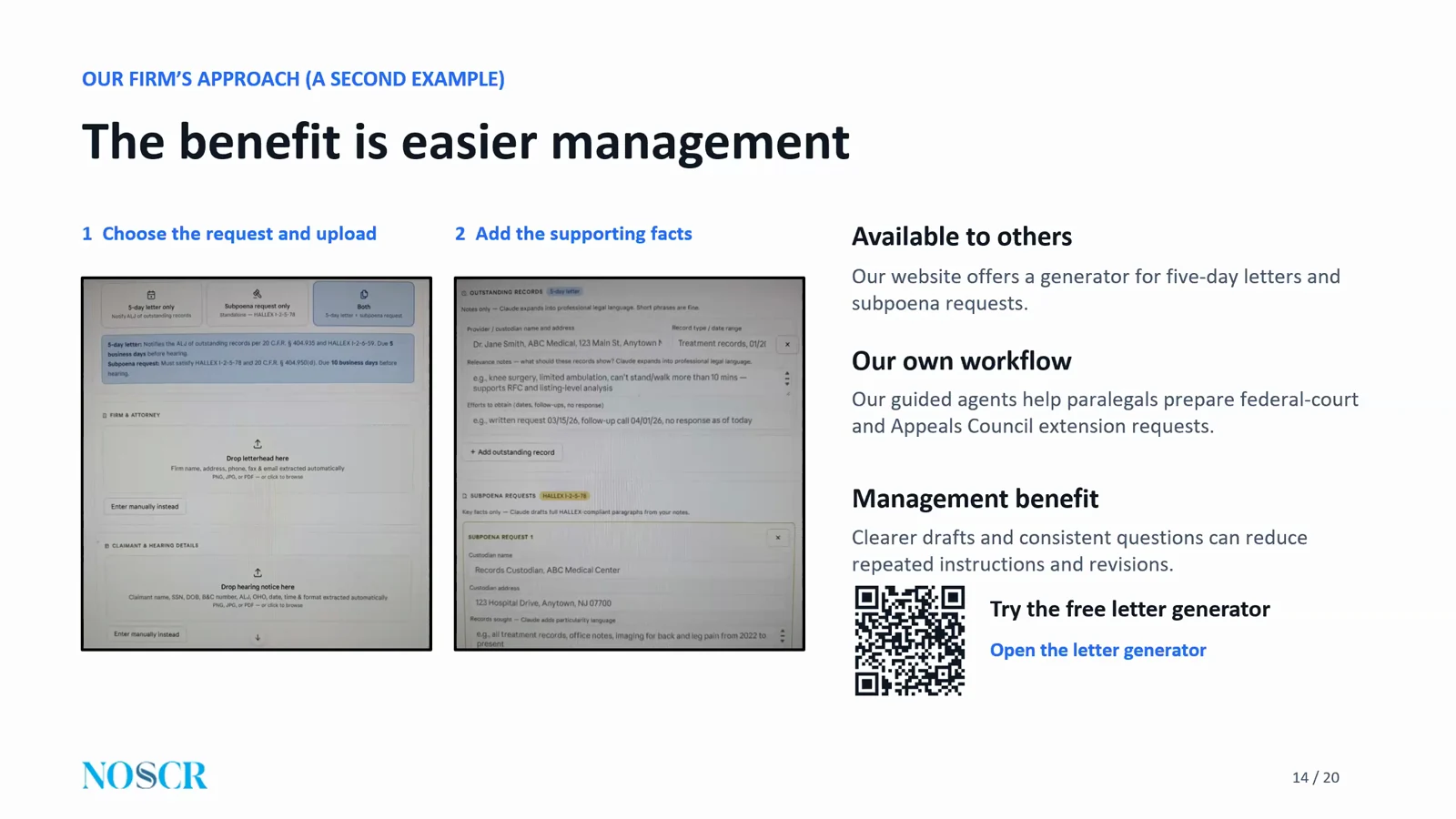
Bryan’s slide showing the two steps of the guided letter generator.
The tool asks the questions and the paralegal supplies the facts
The tool then asks for the outstanding records, why they matter, and what efforts the firm made to get them. You can build the same thing without his tool, as a custom assistant in ChatGPT or a project in Claude. You give it instructions, and it takes a paralegal through the questions step by step.
Consistent drafts mean no red pen
The payoff is consistency. As Bryan put it, “if you leave paralegals to their own devices, they’re going to write this section up the way they write it up.” With a guided workflow, it matters less who writes well, so long as the answers are clear and coherent. He counts this as improving management as well as efficiency, even if the letter takes the same amount of time.
Bottleneck 3, training: let staff ask the AI before they ask you
The third workflow is training. Bryan suggests building an assistant in ChatGPT or Claude and giving it what you would give a new hire: what tasks happen in your office, how they are done, with samples and examples.
Staff get a place to ask first
Staff can then ask the assistant how to complete a form, file an Appeals Council appeal online, or which part of the file holds which records. The goal is that they are “not constantly knocking on your door with those questions.”
It will not end every question, but it cuts the repeats
He is realistic about it. Some questions will still come to the attorney or the office manager. The practical move is to adjust the assistant over time to cover the routine questions that keep recurring. For how disability firms are handling onboarding more broadly, see the Peers in Practice recaps on hiring and training at small firms and at large firms.
The same filter applies across the firm, from status reports to email triage
Bryan listed other uses at The Federal Appeals Firm: extension requests, status reports, statistics on the firm’s own results and its referral partners, and analyzing email for urgent filings. They use Brief Master for first drafts of briefs, along with other tools to help revise.
He added a caution that applies to every one of them: “It doesn’t eliminate” the manual work attorneys do, such as record review and legal research, “but it helps with management for sure.”
Pick one bottleneck, build it, lock it down, then measure it
Bryan closed with a short plan and a push toward getting started.
- Pick one bottleneck. Choose something you are going to work on.
- Build the workflow. Sit down with ChatGPT or Claude, and ask it what prompts will give you the output you want. “Sometimes ChatGPT and Claude is your best training model.”
- Lock it down. Get that one workflow working properly before moving on.
- Measure the result. Check it against the three tests.
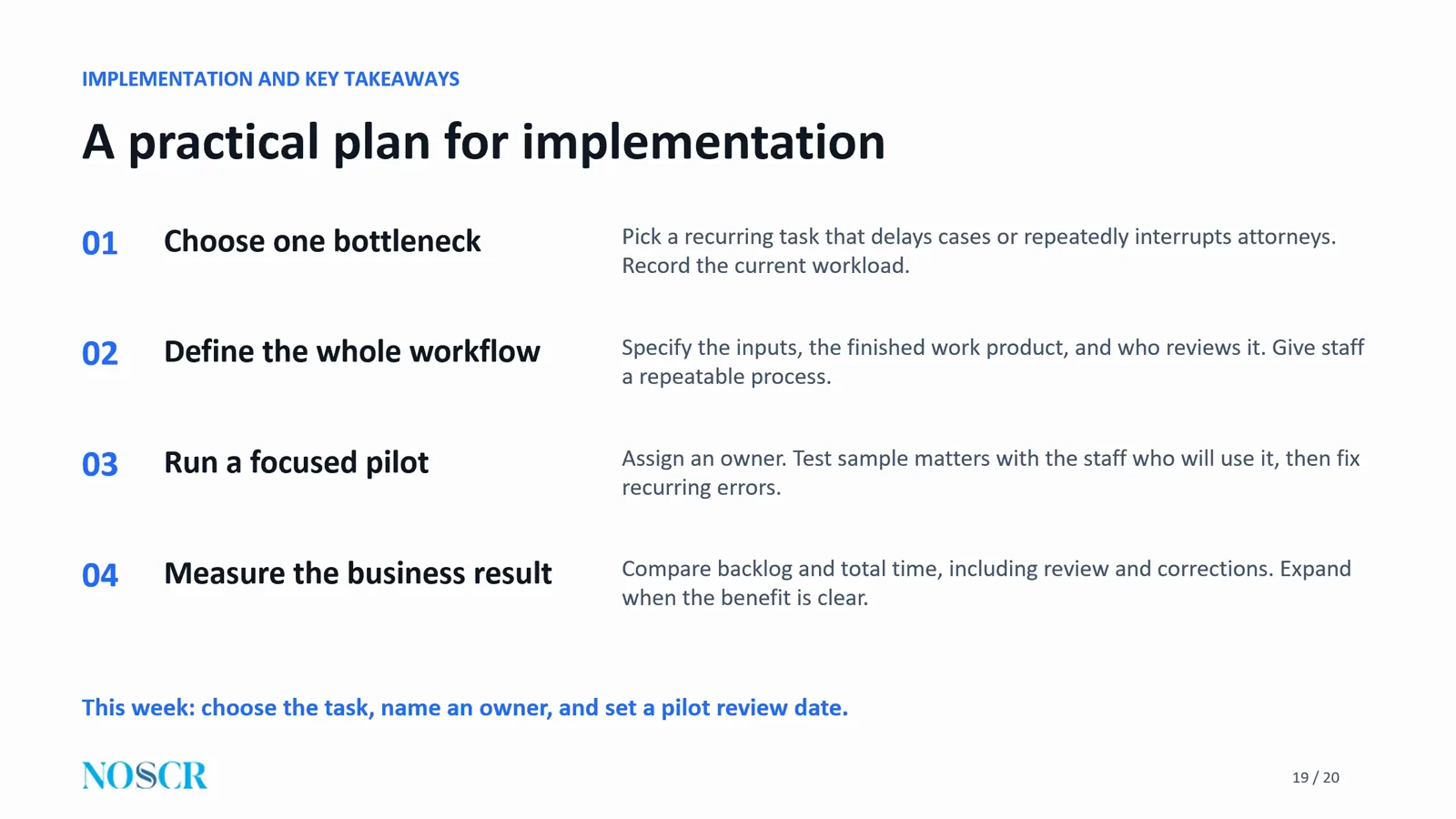
Bryan’s closing slide: a practical plan for implementation.
You do not need to automate everything. “You don’t have to implement it for absolutely everything,” he said, to become an AI-native practice. And on difficulty, he was encouraging: “I assure you, you can figure out AI. It is not rocket science.” It will take time, he said, but it is not impossible.
Frequently Asked Questions
Do you only have AI in your office, or do you still have real paralegals?
Bryan’s firm has both paralegals and lawyers, and he calls it AI native. But “being AI native, in my experience, has not reduced the need for lawyers or staff.” He said the firm is “very much a law firm.”
How realistic is it for a small firm with no developer to build an AI phone system?
Very realistic, according to Bryan. “I did it in a weekend myself without any developer.” He had asked developers what it would cost, found the quote far above what he wanted to spend, and used ChatGPT to walk him through the setup step by step. The platform has gotten somewhat more complicated since, so it may take a bit longer now. His answer: “you can absolutely do it.”
How do clients react to speaking with an AI assistant, and what if they refuse?
Anyone who does not want to use it still talks to a paralegal. But the large majority go through the full process with the assistant, and Bryan was happy with that. The reason, he said, is the first step: “If you have the warm introduction, they all seem to be fine with it.”
If our firm already has templates, how can AI still help?
Look at the other areas. Bryan gave marketing as one example, using AI to help create infographics for social media and other marketing material, which ties to revenue. Pre-hearing memos are another place to apply it. His firm keeps adding uses as it finds them.
Is it safe to put client information into ChatGPT or Claude?
For more on this question, see security questions to ask any disability software vendor. This is Bryan’s opinion, not legal advice. His view is that “as long as you’re turning off training, you’re in the clear.” He noted that some states may be stricter and that some attorneys want extra precautions. He reviewed the contract for the team plan his firm uses and considers it sufficient, and he urged everyone to check their own state’s ethics rules.
How do we know AI is actually saving time if it adds verification work?
“You’ll know it when you see it,” he said. His example was medical chronologies, which arrive in minutes instead of hours. He was clear that “I think human verification is always required,” so verification time stays, but the difference is apparent.
How can a firm make better use of denied cases and rejected inquiries?
He gave two options. You can send denied cases out for Appeals Council or federal court review, which is the work his firm does. Or you can refer lost cases to other firms, either for a lead fee or for a share of the fee on referral.
Resources From This Session
- The Federal Appeals Firm’s free AI letter generator: drafts 5-day letters and subpoena requests, the correspondence bottleneck from Bryan’s session.
- All CAPACITY ‘26 session resources, one for each session.
Watch the Full Replay
About CAPACITY ‘26
CAPACITY ‘26 was a virtual summit for disability law firms on Thursday, November 12, 2026, co-presented by NOSSCR and Chronicle. It ran six sessions on finding capacity inside the team you already have. Read the full summit recap for every session, or see the CAPACITY ‘26 page for replays and resources.
If you are weighing where AI fits in your own operations, our earlier posts on AI tools for disability attorneys and how small disability firms are using AI are good next reads, as is the CAPACITY ‘26 closing panel on hidden capacity. To talk with the Chronicle team, book a demo or contact support@chroniclelegal.com | 847-665-9612.
Full Session Transcript
The transcript below has been lightly edited for clarity and readability.
Introductions
Will Yang: I’m excited to take us into our next session, which is going to be chatting about more cases with the same team. How do we use AI to address your firm’s bottlenecks? Very excited to bring Bryan Konoski to the stage. Bryan is the founder and partner of The Federal Appeals Firm, a national practice representing Social Security Disability claimants in federal court appeals. He’s also co-founder and chief vision officer of Brief Master Inc, where he developed Brief Master, an AI platform focused exclusively on federal appellate intelligence.
Drawing on his experience integrating AI into his own practice, Bryan will share practical ways that attorneys can reduce bottlenecks, support their staff, and handle more cases without expanding their teams. With no further ado, Bryan, feel free to take it away.
Presentation
Bryan Konoski: Thank you very much, Will. Hello, everybody, thanks for joining this conference here today. I do want to take some time to talk about what it takes to handle more cases with your same team, and addressing your firm’s bottlenecks. Our experience has been that there are bottlenecks within a firm that you should attack and address in order to gain efficiency within your systems, within your firm.
Here’s my introduction slide, but you’ve already seen that, and I want to take you to Project NANDA. This was an MIT study that was done, and the end result of the study was that 95% of businesses are reporting little to no measurable bottom line return from generative AI. The reason why this is important is because, in my view, the study is a little bit skewed for a variety of reasons.
I think it is true that there are a lot of businesses out there that are struggling really badly with the use of artificial intelligence. They’re having difficulty implementing it, how to implement it, where to implement it. And the end result really is that a lot of businesses are seeing that there’s no measurable bottom line return. But that doesn’t mean that AI doesn’t have the capacity to create measurable bottom line results for businesses, and in this particular case, for your law practice.
In my view, there’s a number of ways you can look to determine whether or not the AI, as you’re implementing it, is beneficial to your practice. In my view, there’s 3 ways for this. One is, you’re looking for AI workflows that impact speed and efficiency. In other words, they move things faster. You’re trying to move things faster through your workflows, and that may have a tendency to reduce overall costs.
The second way is to work with AI in a way that there’s going to be measurable results on your revenue, impacting your revenue in a positive way. And the third way is that you’re working with AI in a way that is going to create benefits to your management, and how you manage your practice, and the workflows, and positively impacts, let’s say, your mental capacity in working on certain workflows.
The reason why I think this MIT project results only tells part of the story is because it’s not all just about what is the bottom line revenue increase. There’s speed that results in potentially reduced costs. There’s impacts that will impact measurable bottom line returns, and then there’s AI that assists in the management capacity of your practice and makes management easier. Some of that results in increased bottom line returns. Some of it does not.
AI does not always speed everything up. I think there’s a lot of misconception on that, listening to the press, that everything’s faster, faster, faster, or the death of the billable hour. I think that’s not all necessarily true. There are ways to use it to increase efficiency and speed. There are ways to use it to increase revenue, and there are ways to increase your management capacity, which may not result in speed or revenue, but could still be a massive benefit to your practice.
But here we’re talking about, I think, areas that will improve efficiency and speed. We have a few ways that I want to discuss this today. One way is through intake calls. Telephone systems, artificial intelligence by improving on your phone systems.
The second way is through correspondence. There’s general routine correspondence in the practice of law, and in the practice of a Social Security practice, that you will often run into. That’s 5-day letters, subpoena requests, and there could be others, but here today, I’m probably going to focus just on those two primarily.
And the third way is through staff training. You can use AI to create a way to train your staff when they have questions, so they’re not constantly knocking on your door with those questions. They have a place to go to ask questions, receive answers, so they have somebody there to train them regularly through the use of AI.
Again, you want to identify in your practice a specific bottleneck that provides a meaningful benefit. And then you want to see how it helps you. And that comes back to what I said in the beginning, which is you want to identify a specific bottleneck with meaningful benefits that will either increase speed and efficiency, which in turn may reduce costs, or it’s going to result in a way that’s going to meaningfully increase revenue, or it’s going to improve management capacity. Now, these three things may overlap in some regards, but you need to identify what it is, because using AI for everything is not necessarily enormously beneficial.
For instance, if a business spends many thousands of dollars creating an artificial intelligence program or workflow that’s going to just move along basic correspondence, that’s basic emails and things like that, that may not be a good use of money or time. But you want to find things where developing the AI or using the AI is going to improve your workflow substantially in one of those categories that I already addressed.
Ask yourself, where does your work get stuck in your office? Is it phones? Do clients jam up your paralegals on the phone a lot? Intake department gets stuck answering questions or talking about a lot of things that are not relevant to the intake itself. Is it general correspondence?
Is it medical chronologies? Is it preparing pre-hearing briefs? I’m sure that medical chronologies are one of those areas, and pre-hearing briefs are another. I’m not addressing them. I’m sure it was addressed previously with LexMed or other presenters.
But you have to ask yourself, where does the work get stuck in your office? And then you have to focus in on those areas and build out your systems in a way that is going to create meaningful benefits to your workflow. One of the areas I want to talk about is intake calls.
There are, I think, a lot of concerns people have about, well, if I have an intake call answered by AI, an AI receptionist, is that going to remove the human element from the intake process, or is that going to make people who call into my office want to leave? You’re not going to complete the intake call because it’s not a human. So you’re going to get that phone call, that incoming phone call. And then the client’s gonna realize, wait, this is artificial intelligence, and leave and go to another firm.
That’s a genuine concern, but there is an answer on how to get around that, and it’s actually creating a workflow that makes sense in the context of intake calls. In my view, this is my personal view, I don’t think having a strict AI receptionist answer the call to do an intake is necessarily a good idea. I don’t think it’s standing alone a good idea, because you do lose the human element, the human touch. The client may realize they’re talking to AI, they’re not going to want to complete that phone call, they’re going to hang up. And you’re gonna lose that.
I find that there is, in fact, a substantial benefit, though, to using it in conjunction with a human who actually answers the call first. First thing you want is a person that welcomes the caller and answers the call. It introduces themselves, and that they are going to use an AI assistant to help streamline the process and get them an answer much faster as to whether the firm is going to accept or decline the case. What I call this is a warm introduction to the AI assistant that you’re going to be using.
There are significant benefits to this, in my view. One, when somebody calls in, they get your intake person, your intake coordinator on the phone. And a lot of times, clients spend a huge amount of time talking about everything under the sun, besides the issues that are really important. They’ll tell you about how they stubbed their toe 20 years ago, and how they were limping around, and it was a problem for them, or they’ll talk about other conditions that are not relevant, not related to the timeframe.
Or they’ll talk about their family, or their loved ones, and how somebody they knew got Social Security Disability benefits due to some knee condition or something. Things that have nothing to do with anything. And that slows down the process, it eats up time, it costs money as you’re paying for staff to sit there, and over volumes of calls, it could be countless hours of time you’re paying for.
The benefit that I find, though, is that when you get a person on the phone, and it’s a warm introduction, the client becomes very open to actually going through the AI process. They know that there’s a human involved, they know there’s going to be an AI process involved. But when you turn that call over to the AI assistant, you eliminate all of those extraneous questions. Now the client is forced into a streamlined process where they’re answering the questions that are relevant to what you need answered to make a decision on the case.
And of course, the benefit to that is that when your staff member turns the client over to the AI assistant, that frees up their time. They’re either able to take another call, they’re able to work on something in the interim, but they’re no longer managing a series of questions or comments that have nothing to do with anything. And as a lot of you know, clients will talk about anything but what’s relevant to what you need.
That handoff, you have the warm introduction, the introduction is the AI, and then a handoff to the AI system. Once that’s done, then the firm, of course, will follow up; either it’ll be an automated transfer back to the assistant, or the firm can reach back out to the client once a decision is made. And then what you can do is when you’re using the AI phone systems, it often will create a transcript. You can download that transcript and run it through an AI program such as ChatGPT or Claude to itemize or analyze and break down the questions and answers that were given through the AI phone system.
You’ll get a transcript from the phone system, you can then run it through a program that you create through ChatGPT or Claude. It will then digest the answers, and it can assist you in flagging problems with the intake, or flagging questions that weren’t answered properly, or can even assist you in reaching a fast determination on whether you’re going to accept that case or not. What happens, you first start with a call transcript. It gets converted into intake forms or screening notes, and into a final document that then lands on your desk, where you can then make a quick decision and probably move a lot faster.
This is one of those workflows where it improves speed, it improves efficiency, it will likely reduce costs. It will get your client’s answers promptly. And, in my view, it can be highly beneficial to implement AI phone systems.
From our experience, and I’ll give you some information about how we use it, we do use artificial intelligence phone systems in our practice, and we were able to develop a phone system, and it was enormously beneficial. As you know, we do federal appeals, we also do Appeals Council, but between those practice areas, our intake system is a little bit different from what it would be for an administrative practice. The clients come to us from referrals from other attorneys and representatives. We don’t really have the same type of intake, where we have to spend time on the phone with the client gathering information about whether we’ll take that appeal or not. That comes from the documents that you send to us.
But where we do have a significant bottleneck for telephones is related to gathering information for in forma pauperis documents that we filed with the court in an effort to try to get the filing fees waived on behalf of a client who were filing in federal court. This is actually quite an enormous workload, because every client, we have to gather information from them, regardless of whether there’s going to be filing fees waived or not, so we can reach a judgment. Then we have to create an application to the court in order to ask the court to waive fees for those clients that we can do so for.
There was a period of time when we were backed up by over 60 in forma pauperis applications, probably two-plus weeks of workload, probably even more than that. We were concerned about whether we had to hire additional people for intake, in our case, in forma pauperis information gathering. We had two assistants working on in forma pauperis information gathering with a backlog of 60-plus, 60, 70 additional cases where we did not have anybody working on them yet. It was a significant concern. It was problematic, quite frankly, and it was stressful.
We were at a position where we were going to hire more people for the phones, or we were gonna figure out how to make AI work. We implemented the artificial intelligence, and within 2 weeks, the 60 to 70 backlog was cleaned up entirely. Gone. With the same 2 staff we had, no additional need for more staff, so clearly it resulted in speed, efficiency, reduced costs in that department. And it was cleaned up to the point where both of those assistants have even time to assist with other work and assist other paralegals in the office.
It was a huge benefit. For those of you wondering what system we use, because I’m sure some of you have that question, we use Retell AI. R-E-T-E-L-L AI. That’s a system we use. I created the phone system myself.
I did consult with our developers to find out costs, and the costs to create this might have been on the substantial side. But the truth of the matter is, you can do it yourself. If you sit down and you put in the time, it can be done yourself. So for those of you who are cost-conscious, it can be done. Trust me.
I was looking at well over $10,000 in development costs just for setting up this phone system. I don’t even know what the total amount would have been. I decided to figure it out myself. Quite frankly, I set up my phone system in a weekend. It can be done.
If you spend your time and try to figure it out, and you’re gonna be willing to sit down at the kitchen table, and you’re cost-conscious, you don’t have to think that this is not something you can do; it’s absolutely something that you can do. The second workflow I wanted to talk about has to do with correspondence. I said earlier that some correspondence isn’t worth developing anything around. That’s holds true.
I think some of it’s just so fast and so quick and routine that spending time trying to figure out what to develop for it may not be worth it, but when we’re talking about Social Security, 5-day letters, subpoena requests, anything that requires good cause explanations or extensions, those are things that happen routinely all the time, but some of them have legal requirements. For instance, 5-day letters, you might have to explain why you need more time, what you’re looking for. Subpoena requests may require you to comply with the HALLEX. Sometimes ALJs will deny a subpoena request just simply because you didn’t have the proper statutory requirements addressed inside of the letter that you’re submitting.
And in a volume practice, which pretty much all Social Security practices are to some extent, have a volume of cases, sometimes it’s hard to sit down and make sure that it is compliant with the rules and regulations. You want to create a workflow that will create these letters routinely and in compliance with the rules and regulations. What we did was we created a letter generator for 5-day letters and subpoenas. We don’t use them in our practice because we’re at the federal level; we don’t have a need for 5-day letters or subpoena requests.
But we created a letter generator for other administrative practices where you can obtain it right on our website. We have a lot of artificial intelligence-related workflows that we created in order to try to help other practitioners. We don’t charge for it, it’s there if you want to use it. And there is a letter generator for 5-day letters and subpoenas.
Here what I have is one example. So if you’re not using ours, and you still want to create either a plugin with ChatGPT or a project with Claude, you can create it by giving it its own instructions and working with it on its own instructions, to go through a guided correspondence assistant that will ask the questions of your, let’s say, paralegals to answer the questions, and then it will generate the letter.
Which type of request are you preparing? And then the paralegal will respond, a 5-day letter, give some additional information. Which records are outstanding? Paralegal can respond and give more information.
You can create it in such a way by creating instructions, upload it to a plugin, or upload it to a project through Claude, and it will take your paralegals step-by-step through the process. What we did was we created it to make it a little easy for everyone. We have the letter generator on our website. And here’s just photographs of it. These are side-by-side photographs.
In reality, when you run the generator, it’s a scroll, it’s up and down. But it had to be side-by-side for the slide here. It’s button click. 5-day letter, subpoena request only, or both? Reason why we have a both option is because sometimes you might be asking for more time within the 5-day letter, but also, at the same time, asking the ALJ to please issue a subpoena, because the very same medical records that are being produced, that you’re asking for production, or time to produce part of the 5-day letter, you might be having difficulty obtaining, and you may want to ask also for a subpoena.
The options are 5-day letter, subpoena, or both. You can do a number of things. You could drag and drop your letterhead, and drag and drop a hearing notice so that it could pull out the identifying information or your letterhead to create a letterhead for you, as well as to create a section on the letter that has, let’s say the BNC number, client’s name, judge’s name, and that’s why you’ve got some drag and drop. You can do it manually as well, because there’s a button set that says enter manually. Or you can try to drag and drop to make life easier without having to type it all in.
And then it’ll ask you, what are the outstanding records? You’ll type in the records that are missing, you can add additional records. And then it asks you, what is the relevance of the records you’re looking for? Because one of the requirements are you have to explain to the ALJ what’s the relevance, why are we holding this record open, why are you asking for a subpoena? And then, again, another request, what are the efforts that you made to obtain those records?
Sorry about that. For subpoena requests, again, you’re providing key facts also here. The reason why the letter generator is important is it takes you step-by-step through what the outstanding records are, what you need the subpoenas for. And then, as you can see here for the section that says to explain what the relevance is, and why you’re seeking that information, or the efforts to obtain that information.
As you know, if you leave paralegals to their own devices, they’re going to write this section up the way they write it up. You’re going to get it back however you’re going to get it back, and you’re gonna have to sit there with a red pen, or retyping half of them yourself. That is not efficient.
But with artificial intelligence, your paralegal, and you’ll have some paralegals that are great writers, and you’ll have others that are just not great writers. Your paralegal, who may be a terrible writer, may be great in other areas, but what happens is, if the paralegal writes terribly, they can write terribly right into this form. Completely doesn’t matter what they write, as long as they make it clear and coherent. You won’t have to worry about whether you’re gonna redline this yourself or redo it yourself.
In this case, this excerpt here is from Claude. Once this gets run, you’re gonna have a letter that’s completely polished; it’s gonna reference the HALLEX, it’s gonna reference the rules that are necessary, it’s going to specifically comply with the rules and regulations, so that you’re not gonna have any ALJs any longer rejecting your subpoena request because you didn’t comply with the rules or explain exactly why you need these records. That’s gonna be all done. You won’t have to worry about it anymore.
This falls, I think, within the category of increasing speed and efficiency; it’s gonna be efficient for you, but also a way that improves management. So even if the letter, theoretically, takes just the same amount of time as before, you’re not gonna have to deal with the management of this letter the same as you once did. You can either use the letter generator that we have on our website, which is free, or you can create your own workflow with either ChatGPT or Claude, and streamline the process, and stop having to deal with paralegals that can’t write.
And that’s great, your paralegal can be fantastic in any number of other regards or respects with respect to the practice, but if they’re not great when putting pen to paper, this clears that up entirely and clears that bottleneck up and moves things along faster. The third way that you can increase efficiencies in your practice is to use artificial intelligence, whether that’s ChatGPT or Claude, to streamline training of your staff.
If you create workflows through ChatGPT or Claude and train it, give it information, create almost like you create a booklet for it, explaining what the tasks are in your office that are normally done, and how they’re done, with samples and examples, just the same, pretty much, as you would give to a staff member, generally. The staff member then, once the system is set up, can ask ChatGPT or Claude, in this, which is the example I’m using here, ask the questions directly to the artificial intelligence program. Can ask a question, how do I fill out a HIPAA? And the AI system can help the assistant learn those tasks without coming to you.
The benefit here is increased management efficiencies. Whether it increases revenue, or decreases costs, really, I guess, depends on how you implement it, but I’m sure that it will increase management efficiencies, so that now you’re not gonna always have to deal with somebody knocking on your door every 5 minutes saying, hey, can you explain to me how to do the HIPAA form? Or can you explain to me how to fill out a 1696? Or, what do I do with filling out this document for Appeals Council?
How do I file the Appeals Council appeal online? Or how do I access the ERE? What do I do? And what documents do I need to get, or which section relates to medical records versus DDS opinions? All of that could be answered by the AI program without necessarily coming to you, or, depending on the hierarchy you have in your office, you might have a hierarchy of paralegals, an office manager, and then down the line from there, but you don’t necessarily have to have those paralegals constantly knocking on your door or your office manager’s door.
They can first go to the AI program. It may not eliminate all questions. They may still have to come to your office sometimes, or to your office manager’s office sometimes. Just how things are, and you might wind up tweaking the program over time to be able to answer more routine questions or questions that you see come up more often, even with the AI program you’ve implemented. But at the end of the day, what you’ll find is it streamlines management and reduces your time commitment on those tasks, or your office manager’s time commitment on those tasks.
I already went over some types of questions that could be asked. This is just a slide explaining, paralegal might ask, teach me how our firm prepares an extension request, or give me a scenario, to ask for certain facts that you need, or create a checklist on things that are missed; you can use it for that training, which I was already trying to explain. They can ask the AI program the questions.
Those are really the three major bottlenecks that I wanted to talk about. There could be many others. For us, we have AI phone systems in place, we have AI to assist with extension requests for Appeals Council, because a lot of times we need extension requests with Appeals Council, or extension motions with the court. We use it for creation of status reports. We use it to create statistical analysis of the work of our associates.
We keep track of the stats, our win-loss stats of each of our associates through artificial intelligence. I keep track of stats, win-loss stats for each of our referral partners through artificial intelligence. We have the Brief Master, which we use to assist with first drafts of briefs, and we use other artificial intelligence to help revise. It doesn’t eliminate manual tasks that attorneys have to do, such as record review, legal research, but it helps with management for sure.
We have fully integrated artificial intelligence through as many workflows as we can, and you can do the same. Other ways that we use it is we use artificial intelligence to analyze emails. It will digest our emails, it will tell us what’s been filed, whether there’s urgent filings, let’s say, on PACER that we need to take a look at.
But when we’re asking ourselves whether or not we’re going to implement artificial intelligence for something specific, we always ask ourselves the three questions that I started out with here, which is does it improve speed and efficiency? And is that reducing costs? Does it improve revenue? Or, if it’s not improving on speed, and it’s not improving on revenue, is it improving in our management capacities?
If it’s not improving in any one of those three, or a combination of those three in any meaningful way, then it doesn’t mean you have to implement AI. You don’t have to implement it for absolutely everything in order to become, effectively, an AI-native law practice. But if you’re implementing it to meaningfully change one of those three categories, it will make a world of difference for your practice over time. And what you need to do is pick something you’re gonna work on.
Sit down with it, work through it, and get that up and running first, before moving on to the next task. For instance, if you wanted to create a letter generator of your own, sit down with ChatGPT or Claude, go through it, figure out how to come up with the necessary prompts that you’re going to then train the model on, and create that. You sit down at your kitchen table, work through it, create it, and then move on. And how to do that is really just a matter of sitting down with it and asking it sometimes.
Sometimes ChatGPT and Claude is your best training model. You can ask it, what prompts are going to help me get the output I’m looking for? I need my letter to look this way, how do I get it to look that way? You can upload a letter and say, I want it in this format. What prompts are going to help you put it in that format?
And once you create enough of a template, you could put it into the training of that particular program you’re using. And it will follow the steps that you’ve given it. What I can tell you is implementation is not rocket science. You’re all lawyers. You’ve been through hard education through law school, through a bar exam; practice itself is not easy.
If you’ve been this far in your practice, and you’ve gone through all of that, I assure you, you can figure out AI. It is not rocket science. It’s not necessarily easy to the meaning that it will take some time. But it is not impossible. And everybody here that’s sitting through this can absolutely work through AI to streamline a lot of your practice.
There may be certain things that can’t be streamlined perfectly. For instance, just as an example, Brief Master, that was created over hundreds of hours of work, and I had to hire a development team to assist to bring that vision to life. So there are certain things that require much more. But the things that I’ve talked to you about here today are absolutely things that you can all do, without question.
If you’re sitting there thinking, oh, AI is complicated, I don’t know what to do, trust me when I tell you that I had no idea what I was doing either when I started, and developed what I believe to be some expertise in this over time. And it can be done. This slide has to do with a practical plan for implementation, but I think I really covered that. You really have to pick one bottleneck and move through it. Figure out your workflow.
Get that one thing you’re working on locked down, and then move on from there once it’s working properly. And then here, like I said, the four things, measure the business result. And I believe that’s important because that comes back to the Project NANDA that I put at the front. Yeah, sure, 95% of businesses are having trouble figuring out where it’s improving revenue, but there are a lot of businesses struggling really badly with it, and they’re not really understanding where they need to put the time and effort in.
You have to answer those questions. Is it improving speed and efficiency, thereby reducing costs? Is it somehow improving your revenue, or is it improving your management? It doesn’t necessarily have to improve financially if, for instance, it’s improving management. If it’s reducing that mental load that you have on a daily basis while you’re sitting there thinking constantly, there’s a value to that, even if it’s not resulting in, you know, a clear revenue increase.
I don’t think the Project NANDA study fully captured what AI can do and the benefits of AI. It also doesn’t really explain that a lot of large businesses really still are struggling with figuring out what they want to do with it. But the truth of the matter is that you can still implement it, and you can make this work for you in your practice.
Audience Q&A
Bryan Konoski: I went through all my slides, and I think we’re at the point where I can take questions from the audience and everybody that’s here. If you have any questions, feel free to ask me, and would you mind if I took the slides down at this point for the questions?
Will Yang: Yeah. The first question is from an attendee. Do you only have AI in your office, or do you hire live, real paralegals? What is the split there?
Bryan Konoski: We have 15 paralegals and 26 lawyers. Doing strictly federal, we are very much AI integrated, and I would say AI native. But being AI native, in my experience, has not reduced the need for lawyers or staff. To some extent, staff. Like I explained earlier, the phone systems surely reduced staff, but not across the board.
There’s been enormous benefits in certain respects. There’s been speed and efficiency in certain respects, and then there’s been management benefits in other respects, but we are not strictly just AI. We are very much a law firm that integrated AI to enhance our practice.
Will Yang: The next question is, I run a small firm and don’t have a developer or IT department. How realistic is it for me to build something like the phone system that you described?
Bryan Konoski: I did it in a weekend myself without any developer. I contacted my developers. The quote was a minimum of $10,000 to get it off the floor. I did it on a Saturday. You can do it.
I used Retell AI. I couldn’t figure it out at first, and I went to ChatGPT, I used ChatGPT to assist me in going step-by-step, creating instructions, and it taught me how to go through Retell AI, and I was done on the weekend. You can absolutely be done on the weekend.
I went back to the program, Retell AI, and they seem to have complicated a little bit, so it might be a little slower to move through now. They have these logic trees that they didn’t really have before. But nonetheless, the short answer is you can absolutely do it.
Will Yang: Next question is, how do clients react when you ask them to speak with an AI assistant? What happens if they don’t want to use it? Do they get sent to somebody live?
Bryan Konoski: Yeah, if they don’t want to use it, our paralegals will still talk to them, but 90, 95% of them will go through the entire process with the AI. It’s been not a problem, so long as there’s that warm introduction. If you have the warm introduction, they all seem to be fine with it, which I was extremely happy about, quite frankly.
Will Yang: An attendee asked, our firm has templates created for many of the things that have been discussed, for example, letters. How could AI help our firm be more efficient if we already have these sorts of templates?
Bryan Konoski: You just need to find other areas, so there’s always something else. For instance, you can use it for marketing. We use AI to assist us with creation of infographics that we use on LinkedIn, or Instagram, or assistance with creating marketing material. That’s one area that’s outside of the templates.
You can use it for the templates that you do use. You can use it to create pre-hearing memos. If there’s an area that you think that it can enhance your practice, I’m sure that there’s a way to use it. We constantly are adding things to use it.
For instance, we’re still in the research and development stages of Brief Master, and we’re constantly adding new aspects to that program and building upon it, but marketing is one area which we use it for, and it streamlines marketing for sure, which goes into the revenue part of how is this enhanced, and goes right into revenue.
Will Yang: An attendee asked, there’s PHI as well as PII in that intake that you shared. How can we do that in ChatGPT or Claude? Is there an enterprise-grade version that secures the data and doesn’t train or store in the, you know, in the OpenAI?
Bryan Konoski: When it comes to ethics of using artificial intelligence, I am of the belief that as long as you’re turning off training, you’re in the clear. However, some attorneys want to take additional precautions, or, for instance, I think in January, California is implementing new rules, which are a little bit more restrictive than pretty much anywhere else in the nation. I went through the contract for Claude Team. I think if you’re using, let’s say, Claude Team, and I’m using that as one example, because we use a lot of Claude, we use ChatGPT too, but our model for Team is Claude Team. If you’re using Team, I think that the contract there, I think, is sufficient, in my view.
I urge everybody to be compliant with your own state rules. I can’t give legal advice for every state in the nation, so you’re on your own and checking your own ethics rules. But I think Claude Team is good enough.
Will Yang: An attendee asked, can your templates and prompts be integrated or added to CoCounsel from West?
Bryan Konoski: I don’t know.
Will Yang: Another question is, you mentioned that AI can also create more verification work. How do I know whether or not it’s actually saving my team time?
Bryan Konoski: Well, I think it’s like one of those, you’ll know it when you see it. You really will know it when you see it, because it will be rather clear. If, for instance, you’re creating medical chronologies, whether you’re finding a way to do it with ChatGPT or Claude, or you’re using something like LexMed, and you’re creating medical chronologies, you’ll wind up with these things on your desk in a matter of minutes compared to hours. I think human verification is always required, so there will still be human verification time, but I think you’ll know it. It’ll be pretty apparent.
Will Yang: The last question for us is, if I wanted to make better use of denied cases and rejected inquiries, what would I actually need to put in place at my firm?
Bryan Konoski: If you want to capitalize on denied cases, you have a few options. You can send those denied cases out for Appeals Council review or federal review, which is how we exist. Another option is, from a financial and business perspective, some firms choose to refer those lost cases out to other firms, either for a lead cost or for a percentage back to them on the referral fee. There’s a variety of different things that you can do there that make a lot of sense. On my end, by all means, reach out to me if you want to, and we could talk about it.
Closing remarks
Will Yang: Awesome, and with that, we are at time, so Bryan, thank you so much for your time today and your presentation.