
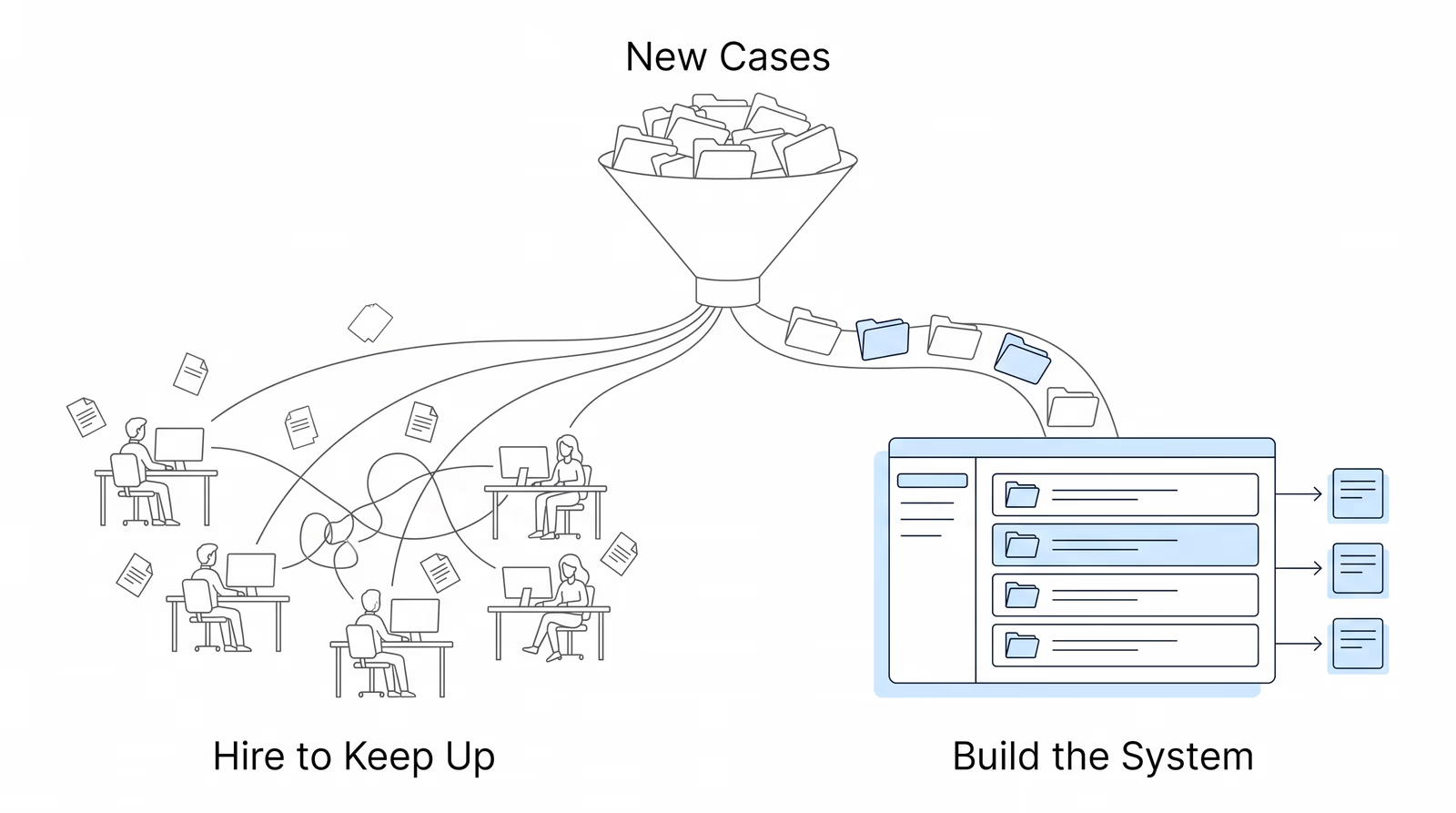
On July 15, 2026, Chronicle founder Nikhil Pai was the guest on Built to Grow, Firmidable’s webcast for law firm owners. The topic was the problem almost every growing disability practice runs into eventually: winning more cases creates an operational load the firm did not have before, and the instinct is to hire for it.
Firmidable hosted and ran the session. Its president, Nathan Chapman, opened by naming the tension honestly. Firmidable’s job is to fill the top of the funnel. But he has watched firms turn down growth because they were afraid of what it would do to their operations. He then handed off to Nikhil for about forty minutes on what the firms that scaled past 500, 1,000, and 3,000 active cases actually did instead, before returning to run roughly ten minutes of live audience questions.
The session was deliberately not a product pitch. The three frameworks Nikhil walked through are diagnostic tools a firm can run on its own operations this week, with whatever software it already uses or none at all. You can catch the replay here:
Speakers:
- Nathan Chapman, President, Firmidable (host). A 35+ year pioneer in law firm marketing, focused on data-driven, holistic legal marketing built around a firm’s own measures of success.
- Nikhil Pai, Founder, Chronicle (guest presenter). Chronicle monitors more than 235,000 cases and 11.7 million SSA documents across 2,800+ disability professionals.
Key Takeaways
- The audience confirmed the premise before the session started. In a live poll on what blocks caseload growth, 72% chose “falling behind on existing work.” The fear of having to hire more employees came second. Physical office space came last. The constraint firms feel is operational, not physical.
- Separate Judgment Work from Presence Work, then measure the split. Judgment Work needs human expertise: case strategy, medical record analysis, client counseling, hearing prep. Presence Work needs a human present but not thinking: checking the ERE, downloading spreadsheets, calling SSA for status, retyping data into a case management system. If more than a third of a case manager’s week is Presence Work, that is a systems problem wearing a staffing problem’s clothes.
- Visibility tends to break somewhere between 150 and 300 active cases. The tell is whether the caseload lives in a system or in one experienced person’s memory.
- The hiring question is really two questions. Hiring to grow means adding client advocacy, proactive outreach, and case strategy. Hiring to keep up means adding bodies to absorb Presence Work. If the job description could be partly replaced by a better system, that system is what to build first.
- Around 400 cases is where the choice gets forced. Firms that built infrastructure first grew through that point. Firms that did not spent months in catch-up mode, adding headcount that maintained capacity instead of multiplying it.
- Proactive is a structural position, not an attitude. Hearing schedules appear in the ERE before the paper notice arrives. A firm that learns about SSA activity from the mail is behind by design, not by effort.
Why Is Scaling Harder in Disability Law Than in Other Practice Areas?
Nikhil’s framing was that this is not a competence problem. Good firms with disciplined teams still lose ground as they grow, because the structure of working with the SSA is what generates the pressure.
He broke the structural problem into three parts.
The SSA does not warn you. There are two ways to learn what is happening on a case. The mail, which can be slow or lost while the clock is already running. Or the ERE, which he described as an antiquated portal that is hard to get information out of. Neither one pushes information to the firm.
Volume outruns memory. At hundreds or thousands of simultaneous cases, each with its own set of pending tasks, no mental model holds reliably. Firms reach for a case management system or spreadsheets, and things still slip.
Cases take a long time, then move all at once. The average case runs about 18 months. The pattern is that a firm files the initial application or the request for hearing, and then it goes quiet for months. Then a day arrives when the SSA has sent ten forms to the firm and the client, all needing a fast turnaround. As Nikhil put it, the dormant stretch lets a firm get comfortable right up until the moment it cannot afford to be.
This is the same dynamic Chronicle has written about in why paralegals spend 15+ hours weekly checking the ERE.
What Are the Three Failure Modes That Show Up as Firms Grow?
Nikhil named three specific ways this structure shows up in practice.
The missed deadline. Most questionnaires and notices carry a 10-day deadline counted from the day the SSA mails them, not the day they arrive. A firm might get the letter on day five. A national firm taking cases across the country may receive mail from an OHO, field office, or DDS far from its own office, and the deadline can pass before the envelope lands. He noted the SSA is generally understanding about mail delays and does not usually hold firms to it, but that misses the real cost: the client sees a passed deadline and draws their own conclusion. More on the mechanics in what happens when you miss an SSA deadline.
The client call you were not ready for. The SSA mails both the firm and the client. If the client is closer to the field office, they get it first. Then they are the one calling, either in a panic about a work history questionnaire or upset about a denial the firm has not seen yet.
William Viner of Viner Disability Law described exactly this:
We would receive calls from our clients telling us they’d been approved or denied. That doesn’t look very good professionally.
William Viner, Viner Disability Law
Nikhil’s point was that client communication is where trust is built, and the firm should be the one making the call. That is what earns the referral after the case closes. Chronicle has covered the practical side of this in how to keep disability clients informed.
The silent file. A case goes quiet and nobody notices. The quiet itself is the signal. It might mean medical records are taking longer than expected from the providers. It might mean the client withdrew and nobody at the firm knows. Either way, silence is information, and a firm without a system to surface it is not receiving that information. This is the subject of spotting at-risk cases before they escalate.
What Is the Difference Between Judgment Work and Presence Work?
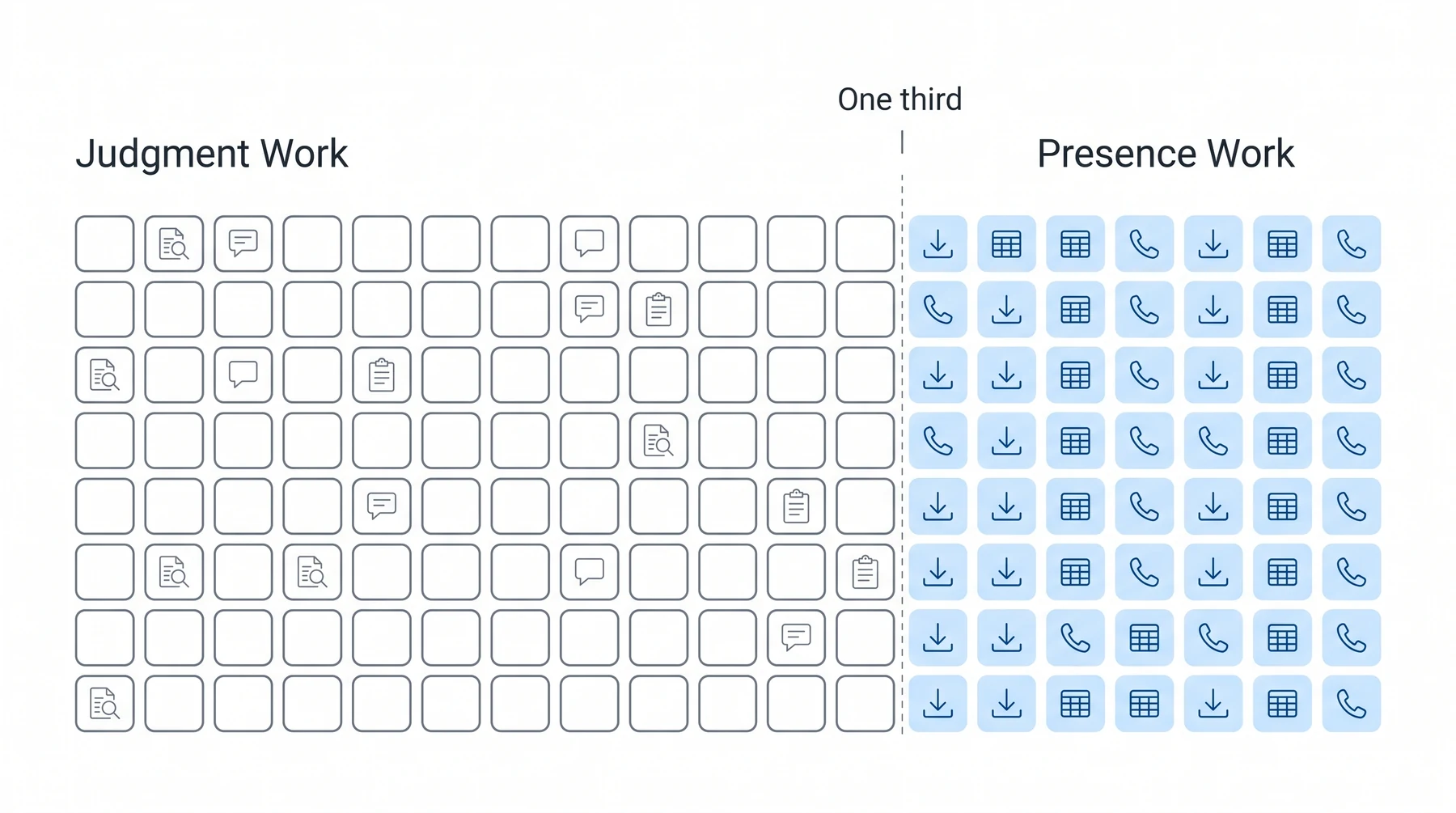
This was the first of three frameworks Nikhil invited the audience to photograph, and it is the one everything else hangs from.
Judgment Work requires human expertise. Case strategy. Medical record analysis. Client counseling. Hearing prep. Proactive outreach. This is the work a representative, paralegal, or case manager is uniquely able to do.
Presence Work requires a human to do it, but not to think. Logging into the ERE to check status. Downloading spreadsheets. Calling the SSA for updates. Manually syncing a case management system from the ERE. Answering status calls because the client called first.
The diagnostic is a ratio, not a judgment about anyone’s effort:
If a third of your case manager’s week is presence work, you have a systems problem, not a staffing problem.
Nikhil Pai, Chronicle
The trap he named is the reflex that follows. A firm sees a pile of manual work and concludes it needs more people. That conclusion costs money and time, and it does not remove the work. It just distributes it.
On the visibility question that sits underneath this, Lance White of Magnolia Disability described the shift in his own practice:
Now what it’s done is it turned constant case review into instant case review.
Lance White, Magnolia Disability
How Do You Tell If Your Firm Is Reactive or Proactive?
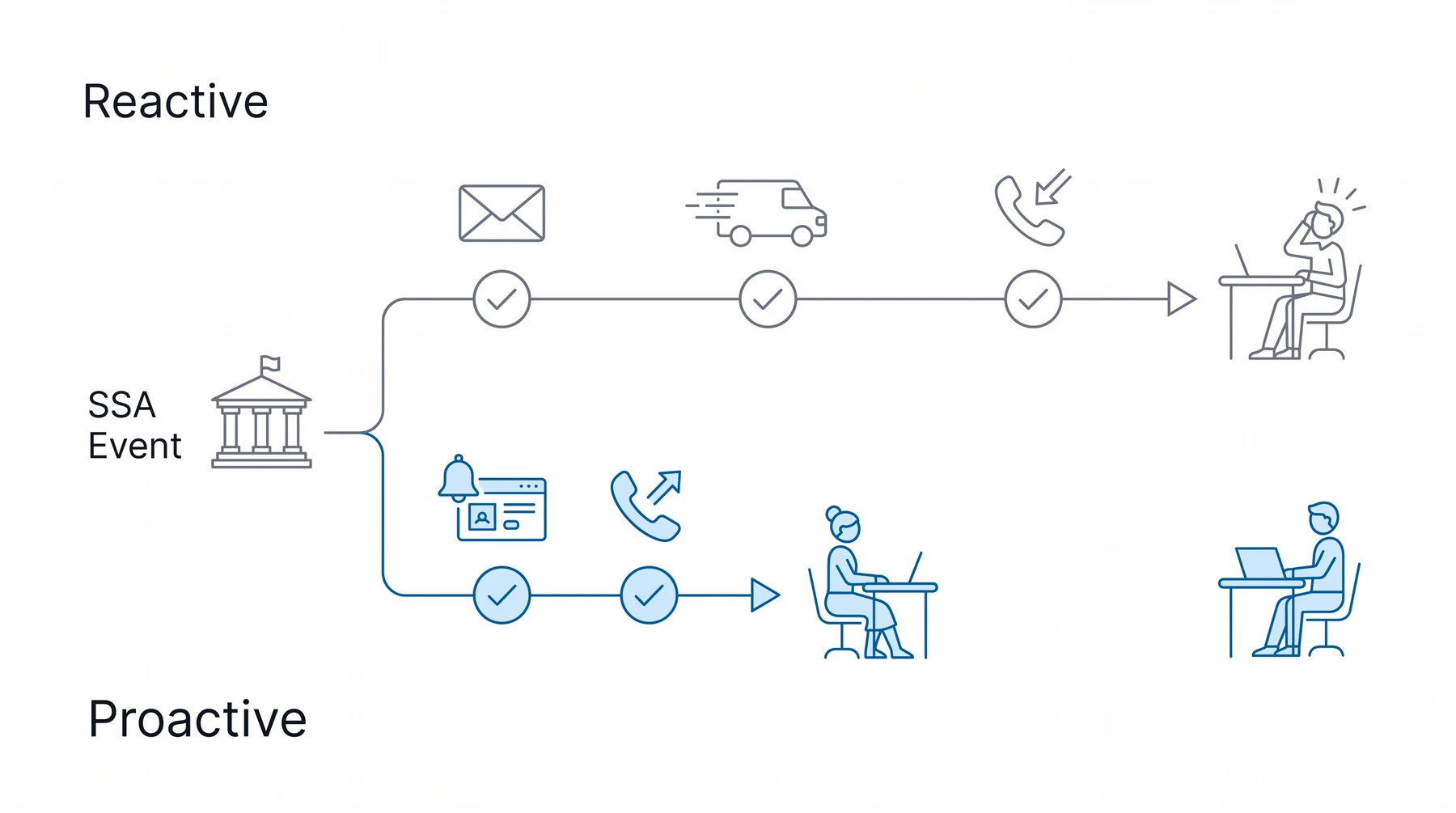
Nikhil defined the two positions structurally rather than culturally.
A reactive firm finds out because something arrived. Mail lands, or a client calls, and that kicks off the workflow. The firm is never setting its own agenda, because the agenda is being set by whatever showed up that morning.
A proactive firm finds out because a system surfaced it. An event happens at the SSA, the firm’s system flags it, tasks get created, and the firm reaches the client first.
Emily Sisbarro of Victory Disability described the difference this makes:
We’re able to anticipate things before they become problems.
Emily Sisbarro, Victory Disability
The second framework, the Proactive Practice Test, is five questions. A proactive firm answers all five in under five minutes without logging into anything:
- Which three cases need your team’s attention today?
- Which clients have a CE or hearing scheduled in the next two weeks, and have you already called them?
- How many clients called you for a status update last week?
- When did a client last tell you their own case news?
- If your senior case manager were out today, what would fall through the cracks?
Nikhil was careful about how to read a bad score:
If it takes more than five minutes to do any of these, you’re operating reactively. It’s not a criticism. A lot of firms struggle with these as they grow.
Nikhil Pai, Chronicle
The fifth question is the one that tends to land hardest, because it is really a question about whether the firm’s knowledge lives in a system or in a person.
What Should You Ask Before Your Next Hire?
The third framework is three questions to run before the job description gets posted.
- Is this work that requires human judgment, or human presence?
- How much of your current team’s capacity is going to work a system should handle?
- Am I hiring to grow, or hiring to keep up?
Nikhil connected the third question directly back to Nathan’s opening about firms leaving money on the table. Hiring to keep up means paying people to move paper between desks. Hiring to grow means adding client outreach capacity that converts more of the marketing spend into retained, won cases.
He put a number on it. At a firm running 500 to 600 cases, each paralegal was spending 15 to 20 hours a week in the ERE. That is a part-time salary per person, spent entirely on Presence Work. Chronicle has written about where that threshold sits in how to know when your disability firm is ready to hire.
The tell he offered: if the next hire could be partially replaced by a better system, build the system first.
Does Your Operation Scale With Intake, or Against It?
The fourth question is the one that ties the session back to Firmidable’s side of the table.
Most disability practices are built to handle work rather than to scale a system. Every new case adds proportional administrative overhead, so growth in intake produces growth in headcount, and margins stay flat or shrink. Nikhil called the exit reducing Presence Work per case, so that each hire multiplies capacity rather than maintaining it.
He put the inflection point at about 400 cases. That is where firms that did not build infrastructure first find themselves needing two or three hires just to keep pace, with revenue growing and the bottom line not following. For the fuller version of this argument, see how to grow from 150 to 600 cases without breaking your operations.
Nikhil then turned the question to Nathan, who has watched this from the marketing side for three and a half decades:
It’s back to that classic thing, at least in business school, we talk about whether you’re going to spend time working in your business or on your business. I have definitely seen some firms just totally soar, and some grow, and it’s nice, but what’s the difference? I think when you decide you want to start your own firm, it’s deciding I want to do more than just handle cases. I want to build something.
Nathan Chapman, Firmidable
Chronicle and Firmidable have covered this intersection before in why fragmented marketing and operations limit SSD firm growth.
What Does a Proactive Monday Actually Look Like?
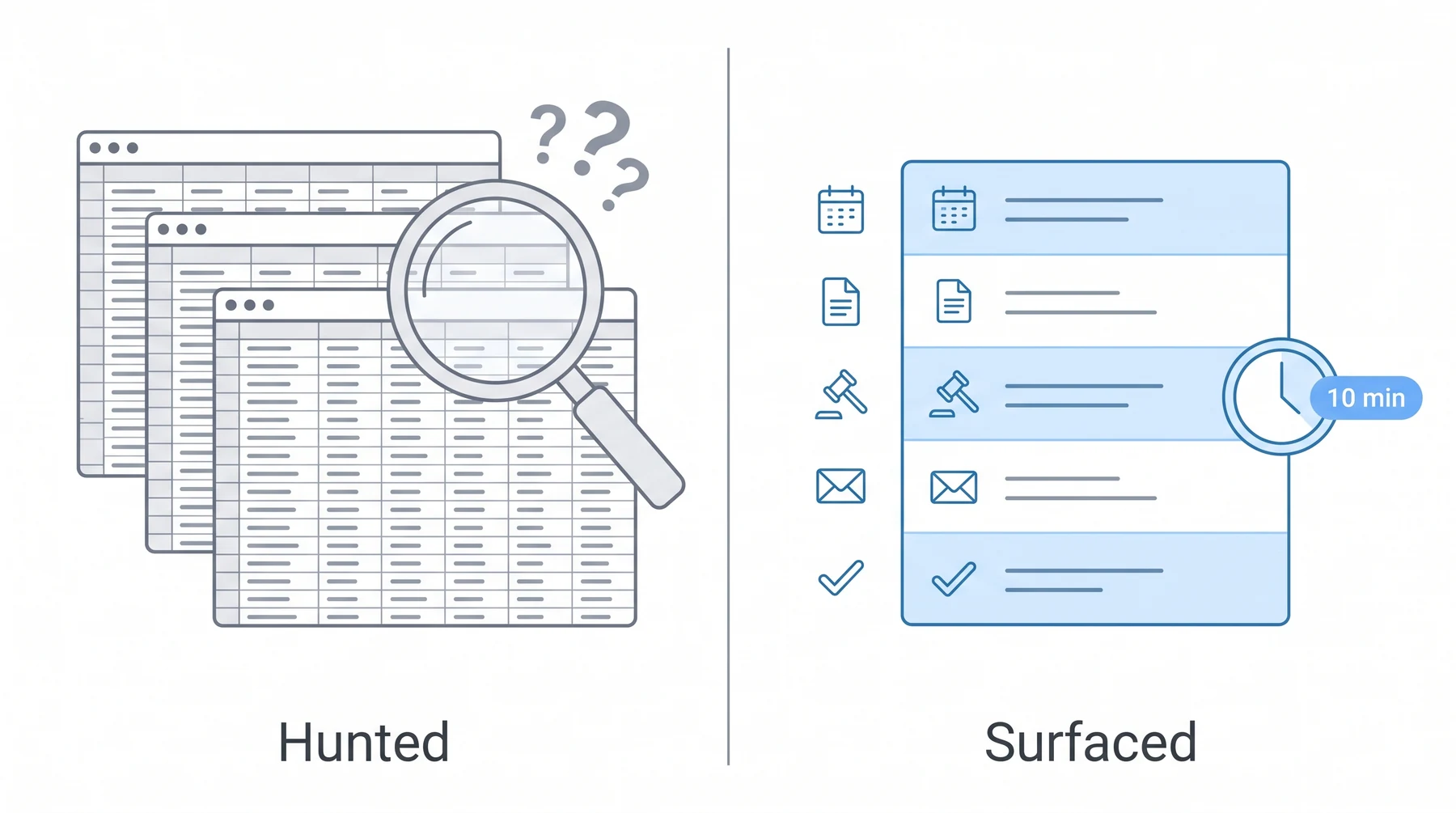
The last stretch of the session was a live contrast rather than a tutorial.
The reactive Monday. Log into the ERE. Click get status report. Choose from hearing, appeals, or initial and recon. Download each spreadsheet separately. Open them in Excel, sort by status date, and scan across columns looking for what changed. Nikhil ran this live and it was exactly as tedious as it sounds, with rows of what he called really messy data. A disciplined team does this weekly. A stretched team does it when it can. Either way, the firm is hunting for the problem.
The demo also produced an unplanned moment that made the point better than the slide did. Attempting to open a case file in the ERE, Nikhil hit an error and said the SSA had broken the site again, having tested it beforehand. That is the tool firms are asked to run their week on.
The proactive Monday. What changed overnight has already surfaced. The routine is reviewing what needs action rather than discovering what happened. Nikhil demonstrated this in Chronicle: a dashboard showing recently scheduled hearings and returned decisions with the remaining days on each appeal deadline, a recent documents feed that reads like a virtual mailbox of everything the SSA has sent, and a notification inbox that is the morning triage list.
He summarized the principle in three words he repeated twice: it is surfaced, not hunted. Then the standard he holds it to, a 10-minute triage. In ten minutes, can you know what changed and what matters today?
Related reading: ERE monitoring vs case management software and the virtual mailroom.
Attendees were offered the Monday Morning Case Triage Checklist, a five-step routine that ships in two versions: one for firms running the routine manually in the ERE, and one for firms running it in Chronicle.
Frequently Asked Questions
Can Chronicle help when the SSA does not process appointment forms correctly or establish ERE access?
No, and Nikhil was direct about it. That is an SSA-side problem, and the SSA is working on training staff to move faster, with NOSSCR and NADR pushing on it. What Chronicle can do is show which cases have been assigned, through notifications and a dashboard view, so a firm can confirm access faster instead of hunting case by case.
How long does it take staff to learn the system?
Typically under a week. Chronicle offers a team training that runs about 30 minutes, and the product is deliberately built without a lot of complex features. Nikhil noted the features were built working directly with case managers, paralegals, and representatives.
Is Adobe Acrobat needed?
No. Documents are hosted in the cloud and viewable in the browser. Firms that want a single combined PDF for annotation before a hearing can download a merged packet, but Acrobat is not a requirement.
Does Chronicle use AI, and can it summarize medical records?
Yes, in three areas. Medical chronology is available through three providers, DodoDetect, LexMed, and Superinsight, and Nikhil framed the multi-provider approach as letting firms choose the AI they prefer rather than being locked into one. AI brief writing for pre-hearing and Appeals Council briefs is available through LexMed. And hearing transcriptions come back diarized with a minute-by-minute breakdown.
What are the differences between the medical chronology providers?
Mostly depth and style. Some outputs are highly detailed, others are succinct. They also differ on price and quality. Nikhil’s recommendation was to try all three free inside Chronicle and pick by preference rather than take a recommendation.
When should a firm start looking at systems like this?
Two answers depending on size. A small firm planning to grow quickly should start as early as possible, because getting the foundation right is what lets it hire slower than it adds cases. A large firm already scrambling should not wait either, and Nikhil addressed the change-management worry directly: a good tool does not need much training, and firms are typically up and running within a week.
How hard is it to switch from another tool like Assure?
Firms can run both in parallel rather than cutting over, and Nikhil said hundreds of firms have moved across. He named the distinguishing feature as daily visibility into the e-file, so a firm knows what is being mailed out before it arrives. On cost, he said firms do not repay for cases they already have, and those cases transition over. Chronicle has a fuller comparison in why disability firms are switching from Assure.
How do you delegate proactive work without making it a top-down mandate?
Two levers. Ownership, either assigning a case end to end to one paralegal or assigning a team to a lifecycle stage, because agency is what makes someone proactive rather than order-taking. And incentives, structuring variable compensation around moving cases from stage to stage rather than around call volume, so the team optimizes for progress instead of activity.
Watch the Full Replay
Upcoming Events
Scale Without Strain: Is Your Disability Practice Ready to Grow? featuring Laura Kennedy, who has consulted for more than 5,000 law firms. A practical look at whether your operation is positioned for the growth you are planning. Wednesday, July 29 · 12:00 PM CT · Register
Disability Peers in Practice (August), Session #7. A community roundtable for disability professionals to work through what is actually happening in their practices. Thursday, August 20 · 12:00 PM CT · Register
Disability Peers in Practice (August), Session #8. The same conversation in a second time slot. Thursday, August 20 · 2:00 PM CT · Register
About This Series
Built to Grow is Firmidable’s webcast for law firm owners. Chronicle was the invited guest for this episode, and we are sharing the recap here as part of our Advancing Technology in Disability Law series. That series brings disability practitioners together with the people building tools for them, with an emphasis on frameworks that work regardless of what software a firm runs.
Our thanks to Nathan Chapman and the Firmidable team for the invitation and for running the session.
You can find every upcoming and past session on the Chronicle events calendar, and follow along on LinkedIn for recaps and announcements.
To see what daily ERE monitoring looks like applied to your own caseload, Book a Demo with Chronicle. Questions are welcome at support@chroniclelegal.com or 847-665-9612.
Full Session Transcript
The transcript below is lightly edited for readability.
Welcome and Framing
Nathan Chapman: Hello everyone. We’re now live coast to coast. Welcome to Firmidable’s webcast, Built to Grow: How High-Volume Disability Firms Scale Without Chaos, with our special guest Nikhil Pai of Chronicle. I’m Nathan Chapman, president of Firmidable Law Firm Marketing, and I’ll be your moderator for today’s webcast.
You know what makes me sad? It’s puppies. Adorable puppies left at the animal shelter. Who would do that? Seriously, who?
Oh, wait, excuse me, ladies and gentlemen. I was getting personal, and I now remember what I wanted to talk about is what is it that makes me sad professionally? That’s the question.
What makes me sad professionally is leaving money on the table. And as a law firm marketer now in my 35th year, I see this all the time. In fact, just last week I talked to an attorney who said his case levels were stagnant. He believed professional marketing was the solution. He believed correctly that Firmidable was the solution. But you know what? He was scared. He said if this works, he might have to hire more employees. He might have to actually knock down a wall to expand his office space. And even though his income was stagnant, he was afraid to grow.
And you know what? It’s not just new clients. I hear this from some of Firmidable’s best existing happy attorney clients. Things are working great. They’re making great money. But sometimes we’ll point out those ads that are working so well, whether it’s digital or television, doesn’t matter. Maybe we could reach even more potential clients if we ran more of the ads. There’s people we’re not reaching.
Now, happily, some of those firms grab that additional opportunity. But some say their team’s at capacity now. Okay, well, good, I’m glad we’re keeping everybody busy. But what if we could shift some of that work away into things more meaningful? That work that actually increases your bottom line. Could we increase capacity without adding headcount?
So what makes me happy? It’s that we have a great topic today and we’re going to address those very issues, and I’m certainly happy that you’re here with us today.
Audience Poll: What Blocks Caseload Growth
Nathan Chapman: To set the stage, let’s start with an audience poll. All right, you should see it now. The question is, when you try to grow your caseload, what obstacles do you encounter or anticipate? And you can choose more than one. Is it A, hiring more employees? B, onboarding new employees? C, more physical office space needed? D, falling behind on existing work? Or E, loss of quality of your work?
Remember, you can vote for more than one.
All right, so it looks to me like the very highest was D. 72% of you said falling behind on existing work, with a close second the fear of needing to hire more employees. Dropping back some into third would be onboarding new employees, fourth loss of quality of your work, and last of all physical space.
Okay, well, that’s helpful. That is definitely the challenge.
Introducing Nikhil Pai
Nathan Chapman: So I’m happy now to introduce today’s presenter, Nikhil Pai. Nikhil leads the team behind Chronicle, a platform helping SSD firms automate case tracking, ERE monitoring, and document workflows. Chronicle currently monitors more than 177,000 cases and 7.5 million SSA documents across 2,100 disability professionals. If there’s anyone who knows how to scale a disability practice, it’s got to be Nikhil. So with that, I will now turn it over to Nikhil. Nikhil, thanks for being here today.
Editor’s note: the figures spoken here are Chronicle’s pre-June-2026 numbers. The current approved figures are more than 235,000 cases and 11.7 million SSA documents across 2,800+ disability professionals.
Why Scaling Is Structurally Harder in Disability Law
Nikhil Pai: Excited to be here today, and thank you Nathan for the introduction. I think this will be a really great session. And the reason why I’m so excited about this is in disability law, scaling a business is a uniquely hard challenge. There’s a lot of nuances that are specific to the field that don’t exist in any other field, which is why we’re so passionate about trying to solve these problems.
Honestly, it comes down to the structure of working with the SSA. Rather than having an easy back-and-forth communication with the SSA, they have it set up so it’s naturally difficult to actually get the information you need to move cases forward. So it’s not about competence. It’s not about understanding the law. It’s structural. It’s just that the way you interact can make it slow and difficult.
And so the way we think about how that structure actually works against you in disability is the SSA doesn’t warn you. When it comes to actually getting any information, you have two options. One, the mail. It’s waiting on the mail for any notices, any decisions, any deadlines. You get this piece of mail that comes at you. The USPS can be slow or lose your mail, and the clock starts and you don’t even know what’s going on. Otherwise you have the ERE, which is an antiquated portal that’s just hard to get information out of.
Second is volume outruns memory. As you scale your firms, you have hundreds of cases going on at a time, hundreds to even thousands. And that number of cases and the number of tasks that you have to do for each case quickly outruns your ability to remember every single client. There’s just no good mental model to hold onto that amount of information. For many people, they turn to a case management system or other tools, spreadsheets, but as you know, it’s really easy to lose track of all your cases and let things slip by.
Last is the amount of time it takes to process a case. Cases on average take 18 months. They can take even longer. And what often is the pattern is you file that initial application or that request for hearing and then it goes silent, and there’s many months of just waiting around. And then suddenly that day comes where the SSA has 10 forms out to you and your client that you need to quickly turn around, and your team is left scrambling. That dormant state lets you be complacent until those pieces of mail come out and suddenly you’re scrambling. So that structure really makes it hard for growing firms to stay on top of their cases, just given the way that the SSA likes to work.
Three Failure Modes
Nikhil Pai: For us, we see three main failure modes for firms as they’re scaling.
First is the missed deadline. Most of the questionnaires or notices have a 10-day deadline from when they’re mailed out. And unfortunately, that’s the thing: the SSA counts the clock starting from the second they mail it out, not when it arrives to you. And so for many folks, that either means they get the letter on day five, or if you’re a national firm taking clients from across the country, often that mail comes out from the OHO or the field office or the DDS processing the case. And if you’re across the country, that deadline may have passed by the time you even get that piece of mail.
Luckily, the SSA is pretty understanding of the fact that mail can be slow and they don’t hold you to that deadline. But when you think about that client relationship, the fact that your client may see that the deadline has passed leaves them upset and just isn’t a great client experience. So the missed deadline is a big one.
Second, building off of that, is the client call you weren’t ready for. Because the SSA is mailing both you and your client every single notice or questionnaire, your client may get it first. They may be closer to that field office, DDS, or OHO, and so they get that piece of mail first and they are the one calling you saying, “Hey, I just got the work history questionnaire, what do I do?” And they’re in a panic. Or they get a decision first and they call you saying, “Hey, I got denied.” And it’s not a great look when your client is informing you about a decision rather than you getting to inform them. So that client call happens a lot. We want you to be ready for it. And that’s a big failure mode.
And then third is the silent file, which is what we just discussed around dormancy of cases. Cases suddenly go quiet. You’re not tracking them, but that quietness might actually be an important signal that things are moving slower than you expected, or there’s actually something that you didn’t expect at all. That could be the fact that they’re waiting to get medical records from all of the providers they reach out to and it’s taking longer than expected, and that’s slowing down your case. Or it could be the fact that your client actually withdrew and you didn’t know about that. Just the fact that these things are slipping by and you’re not able to stay on top of it may mean that there’s actually something worth doing about that case. So the silent file is also a signal that you need to be doing something with that case.
Great quote from one of our firms we work with, Will Viner at Viner Disability Law: “We would receive calls from our clients telling us they’d been approved or denied. That doesn’t look very good professionally.” So you really have to think about it. If you’re delivering top-notch client communications, you should be the one reaching out to them rather than the SSA. And that’s how you build that trust in your relationship with your client, so that they can be easier to work with and ultimately feel good about referring you to their friends and family when the time comes after the case is finished.
So, a poll that I want to have you think about. Which does your firm feel the most? The missed deadline, things slipping by without you knowing about it? The client call you weren’t ready for? The silent file? Or all of them, or none of them? Just think to yourself which of these is the one you’re facing. And it could be all of them, which would be an important signal. We’ll tally those and let you know afterwards what we’re hearing from folks. But often it’s all of them, is what I hear from firms that I’m working with.
The Four Questions High-Volume Firms Answer First
Nikhil Pai: So let’s start with the framework on how to think about this. High-volume firms, as you scale from 150 to 3,000-plus active cases, answer the same four questions.
Question 1: Can You See Your Entire Caseload at Once?
Question one: can you see your entire caseload at once? Understanding your cases is the foundation of how you understand your practice and what’s going on. If you can’t see it all at once, that’s a bad sign.
Three ways to think about this. Are you manually monitoring the ERE? If you manually monitor the ERE, it only shows you what you think you need to look for. And the visibility breakdown happens from 150 to 300 active cases. The biggest signal is: is this all in your head? Is this all in your memory? Or do you have some system in place to track what’s going on with every case and how you review that each week?
Lance White at Magnolia Disability said it turned constant case review into instant case review. That’s something that Chronicle provides, but we’ll also show you other ways to do that.
So first, are you able to think about your entire caseload at once and see it in one place?
Golden Nugget 1: The Two Types of Work
Nikhil Pai: This then takes us to our first framework for thinking about this. There’s two types of work at a firm.
There’s judgment work, which is what requires human expertise. Case strategy, medical record analysis, client counseling, hearing prep, or proactive outreach. This is the kind of high-value work that you as a representative, paralegal, or case manager are probably doing that requires human expertise.
And there’s a second type of work, which is presence work, which is something a human does but doesn’t really need to think about. Logging into the ERE, checking for statuses, downloading spreadsheets, calling the SSA for updates, manually updating their case management system from the ERE, or answering status calls because a client called first. These are just manual work that’s not that high value, but you need to get it done.
These are the two types of work that a lot of firms can think about, of what they are doing on a day-to-day basis. Ideally, they’re doing a lot of judgment work, but a lot of firms end up doing a lot of presence work.
So if a third of your case manager’s week is presence work, you have a systems problem, not a staffing problem. That means they’re spending a lot of time doing manual work that could be automated with better systems. And it doesn’t necessarily mean you have to hire more people, which is the trap many firms get caught in, just feeling, oh well, we have a lot of this manual work, let’s just hire more people. It’s not a good use of time or your money.
Question 2: Are You Reactive or Proactive?
Nikhil Pai: Second question: are you reactive or proactive?
A reactive firm, rather than staying ahead of things, gets something in the mail, it’s already late, they find out the client calls them, and they’re scrambling. Very much driven by mail or client calls, and then that kicks off some workflow. You’re being reactive rather than proactive. You’re not able to manage your staffing and your time well because you’re always caught scrambling on these.
Versus, are you proactive, where there is something that happens at the SSA and your systems actually surface it to you? They create the tasks or the workflows that you want to follow for each thing, and you can reach the client first.
And so a great quote from Emily Sisbarro at Victory Disability: with the systems they have in place, “We’re able to anticipate things before they become problems,” rather than being reactive because a client called them.
So always think about that. Are you waiting for things to hit you with deadlines that are just days away, versus being proactive where your team’s already ahead of it before the SSA even reaches out to you, because you have that visibility into what’s going on?
Golden Nugget 2: The Proactive Practice Test
Nikhil Pai: So, another nugget here: the proactive practice test. Think about this every day.
Are you able, within five minutes, to think about what three cases need your team’s attention today? So you already know off the bat what you need to be working on.
Which clients have CEs or even hearings scheduled in the next two weeks? Have you already called them? Are you able to proactively shepherd your clients through these?
And third, how many clients have called you for a status update in the last week? Are you able to answer those questions without having to jump around, or without having them alert you of things going on rather than you being able to alert them when they call in?
And then fourth, when did a client last tell you about their own case news? How often are you caught with them telling you about what’s going on rather than you being able to tell them?
And last, if your case manager was out today, what would fall through the cracks? Do you have redundancy in place where your team is able to cover for someone who’s out because they have that full case visibility, rather than you losing that information?
If it takes more than five minutes to do any of these, you’re operating reactively. It’s not a criticism. A lot of firms struggle with these as they grow. And it’s just a starting point to say, okay, these are problems. What can I do, and what systems can I get in place with my team or the current staff to actually start addressing some of these, rather than just feeling, oh well, to address all these I need to hire more people?
Question 3: What Are You Actually Hiring For?
Nikhil Pai: So then question three: what are you actually hiring for?
When you think about staffing up, which adds overhead, it takes time. It takes time to train people. You have to make sure you’re actually doing it for the right reasons.
So the wrong reasons we see many firms have is, as I’ve mentioned, adding bodies to manage presence work. They’re manually tracking documents. They’re scanning mail. They are doing data entry in your case management system. That’s the wrong reason to be hiring people. That just means you’re trying to use people to fix a technology problem, rather than relying on technology that can solve it for you without that overhead.
The right reason would be, we want to actually uplevel our client experience. We want people to be able to call clients and really take the time to hear them out, hear their stories, find those nuggets to prepare for the hearing. We’re doing proactive outreach, intake conversion, following up with folks who called in, who are leads who haven’t retained yet. Or case strategy: taking the time to really do a deep dive on the evidence, look at the medical records in depth, and actually find those nuggets that could help win the case and prepare you as the attorney representative to be ready for the hearing.
A great quote from Diane Haar at Hawaii Disability Legal Services on wanting her people connecting with clients rather than standing around scanning. Which is why we all get into this field of law, the ability to help clients and help these people who really need it. You want your staff being hired to help with that problem, which is client communications and service, rather than just pushing paper around.
So the tell really is, if the next hire could partially be replaced by a better system, that’s a system to build first rather than adding more headcount.
Golden Nugget 3: Before Your Next Hire
Nikhil Pai: So, before your next hire, three questions before you post a job description.
Is the work, or the JD that you’re putting out, something that requires human judgment or human presence? Is it something that requires someone to actually be thinking about the case and the client and delivering service, or are you just putting a JD out to fill out data in some system manually?
How much of your team’s capacity today is going to work that a system should be handling? Thinking about your staff today and what their breakdown of time is, could their time actually be something that could just be handled with better systems, so that way you can take their time back to be doing human judgment work? That’s a good tell there. As we mentioned before, if a third of their time is spent on just doing manual systems updates, you could probably automate that and get more out of your current team before your next hire.
Third, am I hiring to grow or am I hiring to keep up? Which was what Nathan was really teeing up at the beginning, of what makes him sad. People who are leaving money on the table because they’re just hiring more people to keep up with all of these manual processes of moving paper from one desk to the other, versus hiring people to grow their firm, to be able to do more client outreach, to really take those marketing leads and service them better so that they retain at a higher rate and then win at a higher rate.
Another way to think about it: if you’re a 500-to-600-case firm, each paralegal spending 15 to 20 hours a week in the ERE, that’s a part-time salary that is presence work that you could be doing with better systems rather than hiring someone else.
So once again, think about this. Are you hiring people to just keep up with pushing paper around, or are you hiring people to actually deliver better client service?
Question 4: Does Your Operation Scale With Intake, or Against It?
Nikhil Pai: Question four: does your operation scale with intake or against it?
Especially if you’re hiring folks like Nathan and Firmidable to really juice your marketing, really start getting a lot more leads in the door. Is your operation actually able to handle those new leads? Or are you going to end up hiring more people, and therefore you’re actually not getting better margins as you scale your firm?
Most firms are built around handling work versus building a system and a set of tools that can actually scale with that nonlinearly. So the exit isn’t another hire. If you’re always hiring people to scale with your intake, that’s not the right work. They’re doing presence work. You want to be able to hire fewer people. You want to be able to hire slower than you add new leads.
So 400 cases is the inflection point we see, where most firms are scrambling, where they didn’t get the systems in place first. They added a bunch of new cases and now they feel like they have to hire two or three more people just to keep up, and that means their revenue and their bottom line isn’t growing.
So you really want to make sure you have your systems in place first as you start scaling your marketing spend, to make sure that you’re not just adding leads to add headcount and not grow your bottom line.
And Nathan, I’m curious here, given you really think about scaling marketing spend, how do you often see firms struggle with this problem of scaling their intake with their operations?
Working In the Business vs On the Business
Nathan Chapman: [?] It’s back to that classic thing, at least in business school, we talk about whether you’re going to spend time working in your business or on your business.
I’ve been doing this long enough. I have definitely seen some firms just totally soar, and some grow, and it’s nice, but what’s the difference? I think when you decide you want to start your own firm, it’s deciding I want to do more than just handle cases. I want to build something. And so you have to spend time and put effort and resources into that building part. And the ones that do that, and maybe even ultimately hire somebody else to go do the hearings, those are the ones that have done the best over the years from what I’ve seen. So I think everything you’re saying here is falling neatly into that.
Nikhil Pai: Absolutely. That’s a really great point. You have to build this machine and you have to build this business that can actually scale.
Reactive Monday vs Proactive Monday
Nikhil Pai: Another way to think about this is, how do proactive firms actually work? What is the contrast? What are the best-in-class examples?
As we all know, Mondays are the go day. You open up your computer and you have 100 emails, and the question is how do you handle that?
A reactive Monday that we see with many firms is logging into the ERE, downloading the status report, hunting for what changed, fanning it out, and maybe only doing that once a week. So you don’t actually even check midweek what’s changed in the ERE, what’s changed on the status report. You’re doing it once a week. And so you’re very reactive. You get clients calling in because maybe they got a decision midweek that you didn’t check the status report for yet and you missed.
Versus a proactive Monday, where your systems have already flagged to you in the morning on Monday what has changed, what’s important, so that you can quickly go down that quick review and know what’s going on without having to scramble or hunt and peck for what’s changed. So that’s what a good proactive Monday is, and it can actually happen every day, where every day is proactive and you have your system surfacing to you what’s going on.
For most folks this could be a notification inbox as a task list. So some way of triaging and understanding, in a fraction of the time, what do I need to do, versus spending your whole Monday being reactive to what’s going on.
So with that being said, I’m going to do a quick live demo of a proactive Monday, of what it can look like for a best-in-class firm.
Nikhil Pai: All right, you’re still able to see my screen, right?
Nathan Chapman: We can.
Live Demo: What Checking the ERE Looks Like Today
Nikhil Pai: Awesome. All righty. So I’m going to start with what is the classic example. What do most firms currently do today when they’re being reactive, or maybe they actually do this a couple times a day, which is a good place to be in, but it could be better.
So we’ll start with the ERE. Either you’re having someone in your mail room open up each piece of mail and scanning it and trying to read each one and know what’s going on, or you open the ERE. Most firms do a couple things each week.
First, they’ll go to the status report. In the ERE you can click get status report, you choose the three different reports, you get hearing, appeals, or initial and recon. You open that up, you download the spreadsheet, and then you go back and you do it again for each of these. I’ll get the initial and recon one as well. I’ll go down here and download the spreadsheet. Once again, it’s very important you download the spreadsheets, to have way more information than in the ERE. And that will download.
And just to give you an example of what that looks like: I now have this giant spreadsheet in Excel. We all know and love it. I’ll zoom in a little bit. And I now have to go down this list and try to find out what’s new. Luckily they have the status date. I can sort by the status date and try to see. I’ll go across and they have these headings. I’ll be like, okay, what hearings have been scheduled? It’s not easy to see what’s new. They’ll go down and see what decisions have come in.
So at least for most firms, what they’ll do is they’ll start by sorting on this status date. So I’ll sort newest to oldest. And this is an old one, says from 2024, but I’ll be able to see what’s new. I’ll go across and try to hunt and peck and understand what has changed on these.
Same for the initial and recon list. It’s the same giant spreadsheet. And if you don’t know, they recently expanded this about a year ago to have a lot more information. And once again, I will go across this sheet and see what has come in, what has closed, what CEs have been scheduled. And they have these really crazy columns with all of the info requests and the CEs, where I can go here and see a third-party letter was set up, and a CE was scheduled. Once again, it’s really, really messy data. Maybe I can find one down here. Nope.
But as you can imagine, the reason why I show you in Excel is this is the way most firms do it. It’s messy. It’s complicated. It’s hard to keep track of.
The next step you’ll do is once you have the five cases you’re like, hey, something’s going on with these, I should dive into them. What a good firm will do with their routine, if they don’t have automated systems in place, is they will actually go into each case file in the ERE. So I’m going to go back to the ERE home and I’ll open the case file. So I’ll click access claimant electronic record, I’ll enter some passcode. It sometimes does not work.
Oh no, I just tested this beforehand and they have broken the site again. So I won’t spend too much time on this then.
But you know there’s a list of documents in the ERE that shows you exactly all the evidence, but also all the case documents, which are the notices they’re mailing out to you. So the reason why good firms will spend time looking at this is they’ll be able to actually see what’s coming in the mail first. But it requires them to go one by one into each case to see the list of documents and try to see what was recently added, so that they can know what’s going on and be proactive about this.
So that is the old-school way, really relying on doing this check a couple times a week to know what’s going on with all their cases. And that really helps them stay proactive rather than reactive. That’s a system they’ll set up. They’ll have a case manager or paralegal do it, or they’ll do it themselves if they’re a solo. But as you can see, it takes a lot of time.
Live Demo: Monitoring in Chronicle
Nikhil Pai: The alternative is you set up an ERE monitoring tool, and there’s a couple tools that have the market. Obviously I work for Chronicle, so I’m going to show you Chronicle today. But what Chronicle does is it monitors the ERE on your behalf. So you don’t have to hunt and peck. You can know exactly what’s going on and be very proactive with your cases.
The first thing they’ll do if they are doing the proactive flow with Chronicle is they’ll just log into their dashboard and they’ll see exactly what has been recently scheduled for hearings, what’s upcoming. So I can know on my docket what hearings I need to prepare for.
I’ll be able to see my decisions. The most important thing is you file your appeals on time. I can see for my initial and recon cases what the decisions were, if they were favorable or unfavorable. Same for hearing and same for appeals. So I can now know what I need to work on and how my clock starts for those appeals deadlines. If I actually click into these, Chronicle shows you how many days you have left for each appeal, so that you know how many days you have before the deadline has passed.
I can also go down and just quickly see what has changed on Stash Reports, and then also recent access. The other important thing is once you’ve intaken someone, you’ve signed that 1696 and submitted it, what cases has the ERE actually assigned to you for access? So you now can actually go review those cases.
And then the last one, which is the most valuable for most firms, is our recent documents section. Chronicle is opening that e-file in the ERE every single day and scanning for what documents are new. So I can actually view now and see, did a new medical record come in? Did a notice of hearing come in that I need to fill, or even the earnings reports that I can now calculate SGA? This is like a virtual mailbox, so I can now stay on top of every piece of mail that the SSA is sending out and see it in Chronicle and actually view them right here. So I don’t have to actually open it up or download the document and keep track of it. So right here I can see a request for medical records and keep track of that.
I can also jump into any client. So for example, if the client is calling in, this is live and up to date, so I know exactly what the status of their case is. I can see the office it’s with, what phone number it is in case I need to call them to get any additional updates. I can see what CEs were missed. Super crucial if you’re working on initial and recon cases at scale. If a client misses a CE, that’s a bad sign and you need to remediate that. You’ll be able to quickly see at a glance what CEs were missed, what hearings are coming up, if anything was canceled, and the full list of documents.
But to take that even a step further, I don’t want you hunting around and pecking in Chronicle. We have a great notification system where you can follow cases, turn on those notifications, and that means if I am a proactive firm, what I’m actually doing is I’m checking my inbox, and that’s surfacing to me exactly what cases have had changes.
So I can see here, here’s a bunch of notifications from Chronicle for the cases I’m following and care about, especially if I’m at a large firm. I can just pick and choose which cases I care about. I can now see a hearing was scheduled, and I can click into that and I get a full update of what’s going on with that case right in my inbox. And that is my triage list every morning. I’m checking my email inbox to see what new things have come in.
Another example, unfavorable decision. I now know I need to actually go create a to-do for myself to go file that appeal. So it’s all in my inbox at a glance, so I know what’s going on with my cases. I can be proactive.
And this system really scales well as you add more and more cases, because you have one system and one place to look where everything’s going on, and you can break that up between case managers and they can each get their own set of notifications.
So that is the proactive Monday, where I’m able to see a notification list that I can turn into tasks each day to know what is the most important thing to be working on for each of my cases, and I can triage them in a fraction of the time.
And just to recap that: each SSA event, whether that’s a status change, a hearing being scheduled, a CE, is one row that I don’t need to dig through, and I immediately know what’s happened. It’s surfaced, it’s not hunted. That’s super important. You saw those giant spreadsheets out of the ERE. I want to be able to quickly know what is important rather than having to hunt for what’s important, or having to wait for the mail. So once again, it’s surfaced, it’s not hunted.
And then 10-minute triage. In 10 minutes, can I know exactly what I need to do today? What is the most important? What has changed? Rather than having to have a client call in and having to scramble because of that client call.
The Monday Morning Case Triage Checklist
Nikhil Pai: So if you want to have that triage list I just went through, we have a great tool for you. You can scan this QR code. We break down this routine for you. Whether you’re using Chronicle or not, we have both versions of it, of how to use the ERE most effectively, or use Chronicle to have that Monday morning case triage checklist complete.
So with that, last thing to say: build the system before the chaos. Remember, you’re building a machine, you’re building a scalable business. So that’s something to think about as you scale your intake. You need to have the right systems in place.
And with that, I’ll hand it back to Nathan.
Live Q&A
Nathan Chapman: All right. Well, now’s my favorite part. We’re going to do some live Q&A, unscripted. No telling where this is going to go.
Here’s one for you. How could Chronicle help with the problem of SSA not processing appointment forms correctly and establishing ERE access? Can you all help?
Nikhil Pai: Great question. That is one of the questions I get most often right now as I do demo calls or talk to my firms. Unfortunately, Chronicle can’t do anything about that. It’s a problem at the SSA. They are working on training their staff to be a little bit faster, but NOSSCR and NADR are talking constantly to the SSA to try to get this problem solved.
The way we think about what Chronicle does is it gives you peace of mind of knowing what they have assigned. We give you notifications, or that dashboard box that shows you which cases have been assigned. So at least you can check those off a little faster, rather than having to hunt and peck to understand what they have assigned.
Nathan Chapman: Okay. And how long do you find it typically takes staff to learn?
Nikhil Pai: Yeah, so honestly not more than a week. We offer a team training that’s about 30 minutes, but we’ve built our system to be very intuitive, so that your staff can just pick it up from day one and start getting value out of it. There’s not a lot of complex features. We try to make everything as easy as possible. And what we really pride ourselves on is we’ve worked directly with case managers, paralegals, and representatives to build the features you saw today, given that they are the ones who know what they need.
Nathan Chapman: Okay. Somebody asked, is Adobe Acrobat used or needed?
Nikhil Pai: Adobe Acrobat is not needed. We actually host all of the documents in the cloud and they’re viewable out of your browser. You can still download a merged packet. So if you want all the evidence combined into one large PDF that you can download and view in Adobe Acrobat for annotating prior to the hearing, you are able to do that with Chronicle, but there’s no requirement to have Adobe.
Nathan Chapman: Okay. I’m actually going to combine two questions. There’s some people asking about, is AI helping you provide more valuable information? Somebody said, anything to even help them summarize the medical records within your system?
Nikhil Pai: Yeah, that’s a super great question. I know it’s the topic du jour right now, which is AI and how does AI help with the disability practice.
I didn’t show it today in our live demo, but Chronicle does offer a couple different AI capabilities to help with the case management process. First, we do offer medical chronology. We actually offer three different providers through DodoDetect, LexMed, and Superinsight. We really believe that you should be able to choose the AI that you want. So we have access to your evidence, we make it easy to use whatever tool you want. Those three providers are available through Chronicle and they will summarize the entire medical record for you in a couple different ways.
And then we also offer AI brief-writing services. So if you want a pre-hearing brief or an AC brief, those are also provided in Chronicle through LexMed. And they’re really great products, and you can try them out if you want for free in Chronicle. So it’s super easy to see if you like them and compare them to your previous briefs.
And then the last AI feature we offer is hearing transcriptions. So if you’re post-hearing, you want to do a post-hearing brief or just review what happened for your own notes, we offer AI transcriptions that are diarized and give you minute-by-minute breakdowns of the whole hearing. So it’s really easy to search. And so those are the couple different AI features available in Chronicle today to help with the case.
Nathan Chapman: And I’m going to combine a couple of questions again. One was, when do you recommend firms start exploring solutions like this? And somebody else said something like that, but especially, we just talked about, their team is already feeling stressed and maxed out.
Nikhil Pai: Yeah. So I’ll take this from two different perspectives.
If you are a small firm that’s growing, we actually recommend you try this as soon as possible. And we don’t say this because we’re trying to sell Chronicle. We honestly think that if you’re starting a new firm and you’re planning to grow quickly, getting that foundation right is so important. These tools are not expensive to try. They scale with you. They’re not expensive from the get-go. And so getting those systems in place and really dialing it in helps you scale faster, because you don’t have to hire more people and you can really lean on the skills that you have around working the case, rather than having to spend a lot of time hiring and building systems and scrambling in the latter part of your growth story. So definitely, as early as possible, try these tools out.
And then if you are already a large firm that’s struggling, obviously, pick it up. Change management is hard. It’s obviously hard to think about, well, I’m introducing a new tool to my staff and we have to train them on it. A good tool doesn’t need a lot of training, and we at Chronicle like to think our tool is quite good. And we’ve had a lot of success stories where within a week firms are already up and running. So don’t worry about that. We handle a lot of the training and a lot of the handholding to make sure your staff is up to speed when this tool is implemented. So definitely don’t wait if you have a large staff that’s scrambling. Get this tool in place and we’ll make sure that you don’t have to worry about the change management.
Nathan Chapman: And what about, somebody said, how hard is it to switch to Chronicle if they’ve been using another tool like Assure for a long time?
Nikhil Pai: [?] Yeah. So we try to make it as easy as possible to switch off of other tools. We’ve had hundreds of firms at this point move off of Assure to Chronicle, or even use them at the same time. It’s not an either/or. You can run both systems in parallel. So it’s super easy. Everything that Assure does, Chronicle also does. And then there’s a lot of bells and whistles on top of that. So don’t worry about the change from Assure.
And the key thing to remember here, and the difference between Chronicle versus Assure, is really the added value of daily visibility into the e-file. Knowing exactly what’s getting mailed out so you can be proactive versus reactive is the key to what makes Chronicle special and helps your firm scale faster.
And then lastly, I’ll just say on a cost side, because everyone’s obviously worried about switching software, there is no additional switching cost from Assure to Chronicle in terms of repaying for cases. We’ll take all the cases that you have in Assure and transition them to Chronicle for you.
Nathan Chapman: Somebody asked, what are the differences in the medical chronology providers available that you mentioned?
Nikhil Pai: That’s a great question, and I could spend a whole webinar talking about the differences. It’s really up to your own personal taste, and that’s why we provide multiple providers. Everyone has their own nuances of what they want to have in a medical chronology. Some want them to be very detailed. Some want them to be very succinct and concise.
The reason why Chronicle provides three different options is so that you can try each of them for free and see which one you like and want to move forward with. So my best recommendation: try them out, because they’re all just a little bit different on the output they give, different in the price and the quality. So definitely something you want to test and apply your own personal preferences to.
Nathan Chapman: Okay. And I’m going to do one last one, and it’s kind of a human one, so I like this. Do you have any recommendations on how to delegate more of the proactive work to other people on the team, aside from just making it a top-down mandate?
Nikhil Pai: Yeah. So I think there’s two ways to think about this.
One is just systems and processes. You have to give your team agency to work cases and feel like they own it. So what I’ve seen some firms do is they either assign cases for the full lifecycle to one paralegal and say, this is your case and you own this end to end. Or they do it by function, so a team owns initial, a team owns hearing, and a team owns appeal. But that ownership is what really gives people agency to feel like they can be proactive around cases rather than reactive, rather than saying, hey, your job is just answering the phone. That’s not a good way to help someone be proactive. You want to say, you own this set of cases or this segment of the lifecycle, and your job is to get them from point A to point B, rather than being overly prescriptive about what they need to do.
The other way we also see done is just aligning incentives. If you are open to it, you can always do some sort of variable comp of, hey, you get paid when your cases get from A to B, rather than saying you get paid for the number of calls you do. So that way they’re working smarter rather than just doing these menial tasks all the time. So having some sort of bonus structure where, based on the number of cases they get from intake to initial complete, that’s what you’re getting bonused on.
Closing
Nathan Chapman: All right, awesome. Well, there are a lot of questions coming in, so I think that means you hit a nerve today. So this was a good topic.
Tell you what, if we couldn’t get to your question today, we do have a list of them. We’ll reach out on our own afterwards, and you have our contact info up there also. So feel free to reach out to us individually.
Thanks so much to everybody for participating. Everyone today will get a copy of the recording. You’re also going to get a survey on the presentation. Please do provide your feedback. We want to provide the kind of content that you find valuable, so we need to hear back from you.
On behalf of everybody here at Firmidable as well as at Chronicle, thanks for joining us today. Now, go out there and get some great new clients.