
If you are thinking about putting any part of intake or SSA paperwork online, the question underneath every other question is whether claimants will actually use it. Most firms have no numbers to answer that. They have a hunch about older claimants, a worry about phones, and a story about one client who never opened the link.
At CAPACITY ‘26, the Disability Law Tech Summit co-presented by NOSSCR and Chronicle on November 12, 2026, James Vancel of Benny put numbers on it in his session, “Insights From 50,000+ Disability Applications on Claimant Engagement.” He analyzed how claimants moved through a fully self-serve digital application across more than 50,000 disability applications, and he framed the data as benchmarks for any digital process, whether or not it runs on Benny.
Chronicle co-founder Will Yang hosted. It is one of six session recaps from the day; the full CAPACITY ‘26 summary links them all.
You can catch the replay here:
Speakers:
- James Vancel, Co-founder and CEO of Benny, the SSDI and SSI application platform that works alongside a firm’s existing case management tools. Benny has supported more than 50,000 disability applications.
- Will Yang, Co-founder and Head of Growth, Chronicle, hosted the session and read the audience questions. Will leads Chronicle’s community, partnerships and events, including Disability Peers in Practice and the Disability Heroes podcast.
Key Takeaways
- Claimants engage quickly, and they do it on their own schedule. Many finish within a day of logging in, and a large share complete outside office hours.
- Age changes how claimants complete an application, not whether they do. Older claimants take more sessions and more time, with completion rates that do not drop.
- Claimants stall at the start and in work history. Past those sections, almost everyone finishes, so that is where support belongs.
- Small tested changes beat guesses. A single prompt about missing providers changed the quality of what came in, while reminder wording mattered less than sending the reminder.
- Digital still needs a human at both ends. A conversation before the invite, a person watching messages, and an advocate reviewing before anything is filed.
They care deeply about this application, we just have to give them the right tools that can meet them where they are.
James Vancel, Benny
Most Claimants Finish Within a Day or Two of Logging In
Vancel started with the question he hears most from firms: can my claimants do this? His benchmarks come from a self-serve flow where claimants get an invite by text and email and work through the application alone.
Most of the speed shows up on the first day. Once claimants log in, he said, “about half are completing it in one session.” He treats that as a benchmark any firm can measure for itself: “you should be seeing close to half of your people completing it within a day, from when they log in.”
The rest arrive in a long tail. Some people get the invite and plan to do it over the weekend, and others come back after a health emergency or a move. Vancel’s point was that a digital process has to be measured over weeks, not hours.
A Digital Application Still Takes Real Time, and Claimants Should Be Told
An initial application can span a day or two, but the time a claimant spends in it is what counts: “they’re really sitting down for about 60 minutes.” Function reports are shorter. Vancel was candid about what that means for messaging: “Digital is not necessarily going to save your claimants tons of time.”
What it buys is flexibility. He suggested telling claimants the truth about the length: “There are 300 questions in this application. We wish that wasn’t true, but that is how Social Security has designed it.”
Claimants Who Take Longer Are Thinking It Through, Not Lost
Claimants who take longer are usually not lost. Vancel described people going back to check a doctor’s name, find a paper record or confirm a work history before they continue. In his words, “intake is not necessarily a singular event.”
Claimants Finish Applications at Night and on Weekends, Not Only in Office Hours
This was the slide Vancel called the most impactful of the data he pulled. Most completions happen in business hours, but not all, and the gap is large enough to matter for how a firm staffs and communicates.
He said: “We are seeing about 40% are completing it outside of traditional business hours.” He described who they are: “They wake up in the middle of the night, they’re in pain, they’re thinking about, oh, I need this benefit, I really need to go through with it.”
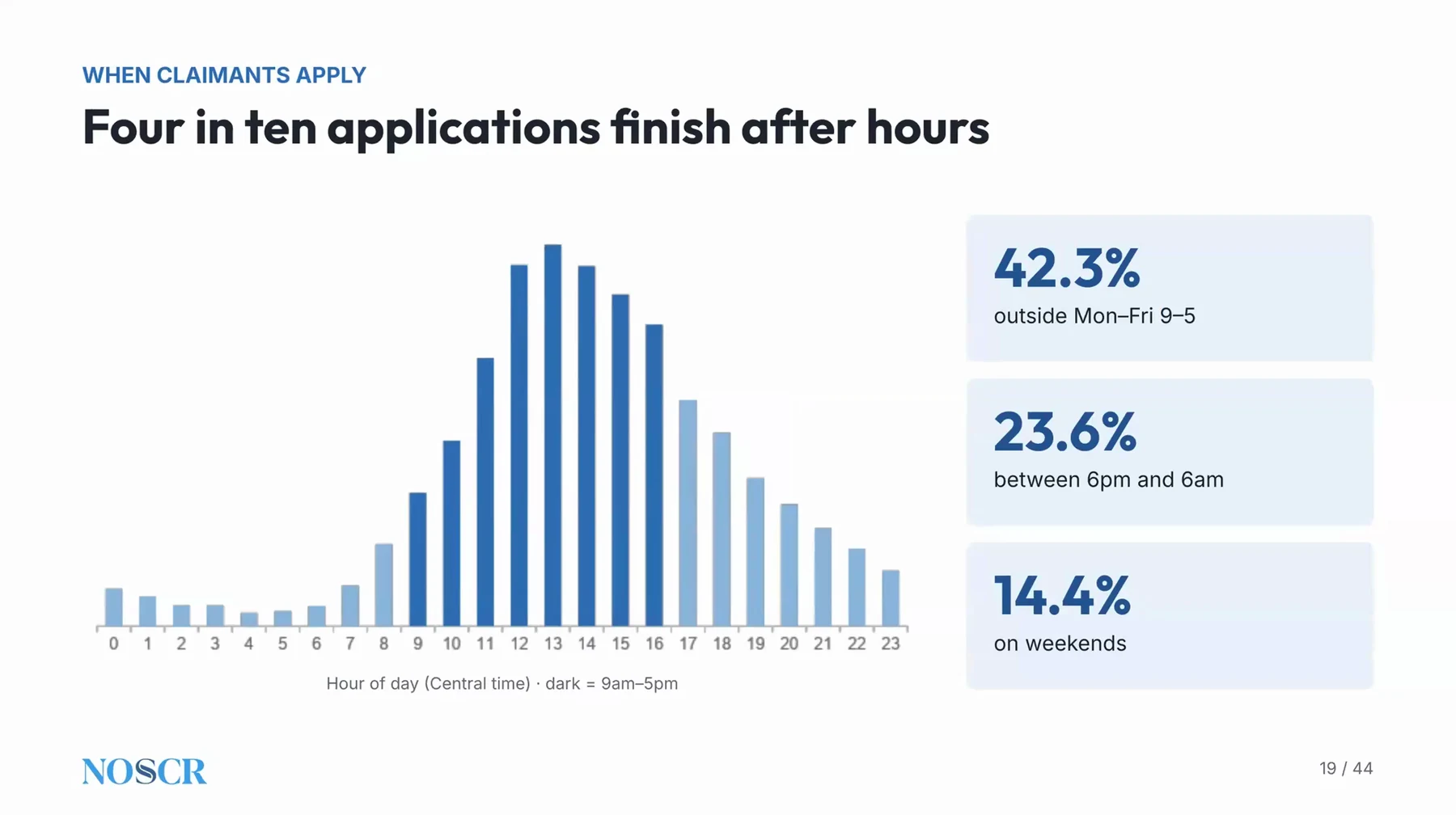
Benny’s slide on when claimants apply: completions by hour of day, with after-hours and weekend shares.
The takeaway for a firm is availability. A claimant who is ready to answer at night needs a way to continue without waiting for an office to open, and a clear sense of when they will hear back.
Older Claimants Take More Sessions but Finish at the Same Rate
Firms often assume that an older caseload rules out a digital process. Vancel’s data says the picture is more specific than that.
Completion rates did not move with age. As he put it, “We don’t see meaningfully different completion rates amongst older populations.” What changed was the path. Older claimants took longer to start, spread the work over more sessions and spent more total time.
The Extra Time Is Small
Vancel expected the gap to be bigger. He said older applicants spend more time, but “it tends to be about an extra 15 minutes.” He offered two readings: they may be more thorough, or digital may be a little harder for them. His team did not claim to know which.
Most Claimants Use Their Phones, Including Older Ones
Device use was another surprise. Vancel said “We thought it would be closer to 80% are mobile.” The actual figure: “around 70% are completing it on their mobile phones.” Older claimants skewed toward desktop, but he noted that “As much as we think, hey, older applicants definitely aren’t going to be able to do this on their phone, we tend not to see that.”
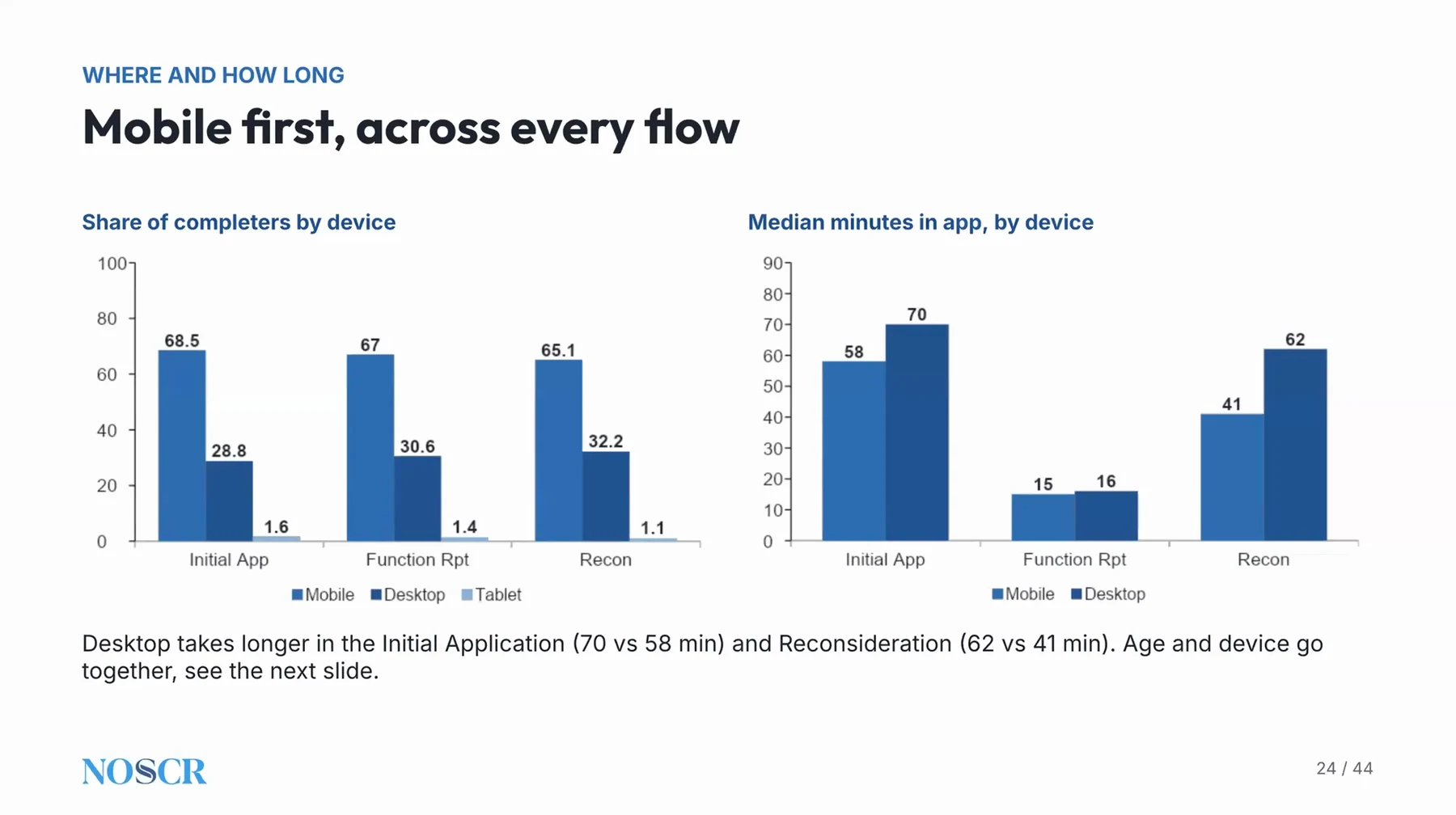
Benny’s slide on device use: share of completions and median time in the app, by device and form.
Claimants Stall at the Start and in Work History, So Put Support There
Vancel looked at the claimants who did not finish and found the stalls were predictable. Some log in, see how long the process is, and stop. Others ask for help and want to talk to a person.
The work history section is the heaviest part. He said “There are about 70 questions per job,” which is where some people get overwhelmed and need help. Past the heavy sections, momentum returns, and “the completion rates are pretty much 100%.”
Most Texts Are Updates, Not Cries for Help
Benny gives claimants a two-way text channel to their advocate. Vancel said “About 50% of our claimants do text,” and the content was not what he expected. Most messages were confirmations that the claimant was working on it, and a smaller share were requests for guidance. A slice came after submission, asking what to do about something received from SSA.
The practical advice was to keep the channel open and answer it. For more on handling claimant contact without drowning in calls, see how to keep disability clients informed and the CAPACITY session on stopping status calls. A smaller group of texts asked for a phone call, which he said firms should honor.
Keep a Human Route Open for Claimants Who Cannot Finish Digitally
Vancel was clear that a digital process cannot reach everyone. In his words, “there’s gonna be 15% who just can’t do this, and they always need to be available.” The firm’s job is to know who falls into that group early and move to a call without making the claimant feel they failed.
Unguided Claimants Write Long Narratives and Edit What Is Suggested
A common worry is that a self-serve application produces thin information. Vancel shared a few quality indicators, and the message was reassurance with a caveat about review.
Claimants wrote at length when asked to describe their lives. He reported that “We tend to see the median response length for each question is around 400 words.” He read that as a sign that applicants want to tell their story, and that the process should make it easy to do so.
Edits Are a Sign Claimants Are Reviewing, Not a Flaw
Benny pre-fills parts of the function report from claimants’ own narratives, and Vancel treated the edit rate as a quality check, not a problem. He said: “If this was 100%, I’d actually be very concerned about the quality of our applications, because it would mean no one is reviewing this.”
The same logic applies to any form a firm pre-fills or automates. Claimants who change an answer are checking it against their own memory. For more on how much a claimant should say on a function report, see the workshop recap with Maryjean Ellis.
Small Tests Improve a Digital Process More Than Debate Does
Vancel encouraged firms to test small changes instead of debating them. Benny runs A-B tests as a matter of routine, and he shared two results.
A Prompt About Missing Providers Produced More Providers
The number and specificity of medical providers drives which records SSA requests, so the team tested a flow that asked which provider treats each condition and flagged conditions with no provider listed. Claimants could ignore the flag and continue.
The result: “We tended to get about 40% more providers in those applications.” Benny rolled the flow out to every application. Vancel’s broader point was that “small nudges like this do have a meaningful impact on the overall quality of the application.”
Sending the Reminder Matters More Than the Wording
The team also tested reminder schedules, including a longer one, a more urgent one and a more supportive one. Results were not dramatic. A short schedule that stopped early did worse, which is why Benny dropped it.
His conclusion was that “the actual reminder is the most important part.” Applicants interviewed afterward did not care much about phrasing. They needed the prompt to go back to the application.
An SSI Claim Needs an Escalation Path, Not a Single Fax
The last section addressed a pain point Vancel said advocates raise often: getting an SSI claim on file in the first place. Benny has run its own experiments on it.
Only a small slice can use the online route. “As much as SSA has digitized this process, it tends to only be about 15% of applicants actually can go through the exclusively online process.” For everyone else, the claim starts with a completed form 8001 sent to SSA.
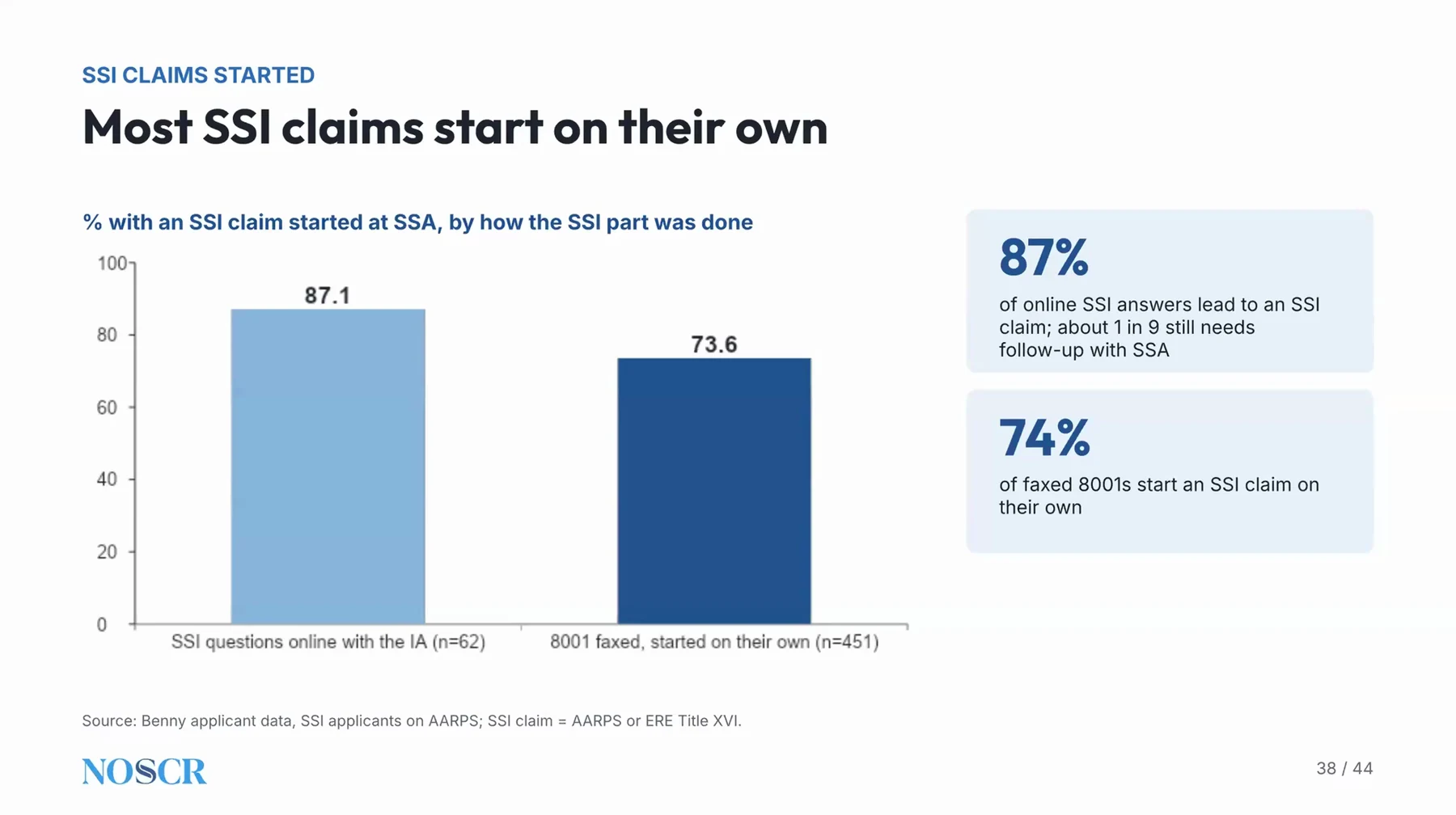
Benny’s slide on SSI claims started, by how the SSI portion of the application was completed.
One Fax Does Not Always Start the Claim
Vancel said a share of faxed 8001s are never picked up. “But, 73% is not great. We’d like this to be 100%.” Because these are valid claims, his team tested what to do next.
The steps they found to work, in the order they use them: “you fax it, you re-fax it, then you send a letter.” If those fail, the team schedules a call with SSA and brings the claimant onto the line to complete the application by phone.
Vancel noted that some field offices object to a faxed form because of how they read their own rules on electronic signatures, and that mailing a physical copy of the signed form made a difference there. His framing for any firm: try the digital route first, then have a defined escalation path.
For Your Practice: Measure, Plan for Exceptions, Test One Change at a Time
You do not need Benny to use these benchmarks. Any firm sending a form, a questionnaire or an intake packet to claimants can measure the same few things, and Vancel’s data suggests where to start:
- Track time to first login and time to complete, not only whether the claimant finished.
- Check when claimants respond, and make sure someone can answer, or at least acknowledge, outside office hours.
- Plan for the claimants who cannot do it digitally, and make the call-back easy.
- Run one small test at a time, such as a prompt in a form or a reminder schedule.
- Keep a person reviewing what goes to SSA.
- Compare your numbers with other firms’ figures in automation benchmarks for disability firms.
Chronicle is ERE monitoring software built for Social Security disability firms. If you want to see how it fits into your operations, book a demo.
Frequently Asked Questions
How should a firm prepare claimants for a digital application?
Vancel said the work happens before the invite, in the conversation where the claimant signs the retainer: explain that the digital route is meant to make things easier, can be done on their own time and has a text channel for questions. He noted that on a long intake call, “it is hard for an applicant to think through every single medication.”
Does a digital application replace the intake team?
No. Vancel said: “You absolutely need a human who is manning this process and engaging with people.” He sees digital as a way to make staff more efficient, not to remove them. Another CAPACITY session looked at where AI removes work and where it adds it, in the recap on AI bottlenecks.
Why might only a few invited claimants complete the form?
The question read aloud was: “Out of, for example, 20 invites, only one actually completes the form.” Some claimants were worried it was spam. Vancel’s answer: “there always needs to be a human conversation up front. That is really important.” Claimants should know who the firm is and how to reach it, and firms that use the link only as a last resort after repeated calls tend to see lower login rates.
Does an application go straight to SSA?
Not in Vancel’s process. He said “we never send anything to SSA without your explicit approval,” and a person on the firm’s team reviews the full application, with flagged items called out, before it is sent.
How is a digital application different from a claimant applying directly with SSA?
Vancel said SSA’s online application is “not optimized for a user experience,” with no mobile-friendly layout and no way to go back. Without an advocate’s review, he noted, work history can be filled in ways that hurt a claimant later, which leaves the firm less able to defend the application at a hearing. The shift toward SSA self-service is also covered in client communication at large disability firms.
What should a firm ask a vendor about client data and AI?
Vancel recommended asking for zero data retention from any technology provider: “You should demand that from any technology provider you are engaging with.” He added that firms using their own AI tools should make sure their data is not used for training, and that claimants should be told a human reviews everything before it is submitted. For the wider privacy questions, see security questions to ask any disability software vendor.
Resources From This Session
Watch the Full Replay
About CAPACITY ‘26
CAPACITY ‘26 was a virtual Disability Law Tech Summit held on November 12, 2026, co-presented by NOSSCR and Chronicle. Six sessions looked at the capacity disability firms already have and how to use it. Read the full summary of the day or visit chroniclelegal.com/capacity for the rest of the program.
Questions? Reach us at support@chroniclelegal.com or 847-665-9612.
Full Session Transcript
The transcript below has been lightly edited for clarity and readability.
Introductions
Will Yang: All right, everybody, this is the second session of the day, so in this next session, we’re going to be talking about insights from 50,000 disability applications on how claimants engage with a digital process. Really excited to bring James from the Benny team onto today’s stage. James is the co-founder and CEO at Benny, the SSDI and SSI application platform that works alongside a firm’s existing case management tools. They’ve supported more than 50,000 SSDI applications, and this session is going to draw on data that shows how claimants are actually moving through a digital application. This is something that we’re really excited to share, so James, feel free to take it away.
Presentation
James Vancel: Awesome. Well, thanks, everyone. Excited to be here with you today. When the NOSSCR team and Will and Nikhil asked me about what would I be interested in sharing, I did have a section, which I will go over at the end, about starting SSI claims, and I’m gonna go deep on that. But I thought it was a really unique opportunity.
We’ve now been in operation for a couple years. We’ve done around 50,000 applications, and supporting hundreds of law firms and going through that process. As everyone’s thinking about technology and how our claimants are going to engage with technology, I thought it’d just be really interesting to share a bunch of information and data on data the users were interacting with in terms of what they do, how they interact with it, what the trends are, just to provide some benchmarks for anyone thinking about a digital process or digitizing different aspects of their process and what they should expect.
That’s really what we’re gonna go through. I’ve analyzed all the data over mostly the last year, but since we got started, and just seeing where everyone is and what’s going on. Excited to be here with all of you today. To start, I’m gonna give a quick primer on Benny.
Again, this information should be generalized to any digital process. I think what we’re trying to do here is provide benchmarks around any form of digitization, so if you’re doing things on retainers, if you’re doing things on CE visits, whatever it is, whether it’s Benny-related or not, I’m hopeful that you can use this information to think about what you should expect and ways to improve that process. But for those who don’t know Benny, I’m just gonna give a quick one-minute spiel on what we are to help set the context of the information we’re seeing and where that comes from.
Our real focus is on digitizing all of the claimant-facing side of the disability application process. We do this a couple ways. One, we do a lot of suggestions, so as people are filling out information, there are things that we can infer from information they provided before to help speed up and simplify the application. You tell us when you worked and the dates and months and the average wage. We can fill in a lot of the subsequent information on your total earnings for the year and things like that.
We do a fair bit of this in the work history and the function report, capacities that we have, but just to give a sense, I’m going to talk a little bit about what users accept in terms of suggestions, what they edit, what they change, so just giving you some context on that. We do a fair bit of guidance and nudging for applicants, so as they’re going through the application, we just try to give them some context on what SSA really means. What’s the question behind the question? What are they really trying to get out of this question?
This, again, is to just inform the applicants so they know this is the first time they’re doing this. They’re probably never going to do it again in their life. We all have tacit knowledge on what is the reasoning for this question, so we just try to provide that to the applicants as well, so they have some better information as they’re answering the questions.
Then, once it’s done and completed, we always highlight things that the advocate should review and should be thinking about. These are ones that might be inconsistent, they might need some further probing, just areas where the applicants may not have the full context, and you as the expert can dive in. As you’re reviewing the application, we try to call out those fields. Lastly, we have a one-click submission to SSA to load all this information and minimize data errors, just to get that information up to SSA.
That’s just to set the context of the data we are seeing. Again, throughout this presentation, the goal is just to think about an overall digital process, whether that’s application, function report related, or any other aspect of the disability process. That’s really just to orient you on there.
What we’re going to cover today is really how claimants engage. When do they respond? How long do they take? What are some of the challenges they face? When they ask for help, what does that look like?
What do they put in? What do we see when they’re unguided and on a fully digital process? What’s their process? What are they providing? What information are they giving us?
We are a tech firm, so we run lots of A-B tests. How can you improve this process? What can you change? I’ll go through a little bit of what that looks like and how you guys can do that for different aspects of your process, but some of the things we’ve learned in doing that as well.
In the last section, I’m going to talk a little bit about, as much as we’d love for this whole process to be digital, it is not. There are still some very human elements of it, and we’re trying to see how can you couple digital to help streamline some of those inevitably manual processes that SSA probably won’t automate at any point soon. That’s what we’ll cover. I’m hoping you’ll take away some insights, some benchmarks, some thoughts on how you can think about digitizing different parts of your process, and some lessons learned from our side.
Starting, how claimants engage. From looking at 50,000 apps, the number one question people ask us when they start thinking about using Benny is, can my users do this? I’m dealing with older populations, I’m dealing with less tech-savvy populations, I’m dealing with potentially SSI, low-resource populations. And we don’t get everyone. I would say these are our benchmarks, looking across it.
We get about 88% of people click the link that is given to them. We invite people via text and email to complete the application, and then they go through it fully self-serve. About 12% just never respond, never click the link, never do anything. That’s gonna happen.
Most of the applicants who come through our portal have had some contact with an advocate, so they’ve discussed their case, they know they want to apply for it, so they’re higher intent than just people coming off the street, but they still are pretty early in the process. We don’t get everyone. That is just an inevitable thing you’re gonna have to manage. There’s always a fallback to, we need to call, we need to follow up, we need to find other means of getting in touch with these people.
Of those who do click the link and log in, we do see about 83% complete within our initial benchmark of 30 days. We tend to see most complete very quickly, and I’ll go through that, about half complete within the first day, so they’re completing it right away, but then that’s our tale. We do have people who come in after they have a health emergency, they’re moving, there’s a lot of things going on in their life, so it ends up around 90% is our completed total numbers, but what we look at is, in that urgent period, what are we seeing? The median time from the initial request to a completed application is about 3 days. We’re seeing about a day, day and a half to actually click the link, and then another day and a half to actually complete the full application.
We see this is pretty consistent across forms. We see higher completion rates with some of the simpler, more straightforward forms. We do 8001s often as a separate standalone request after the application is filed, and we get higher completion rates on those, because people have already completed the application, they clearly have some intent. We see this as the best way. I’m gonna talk a little bit about starting SSI claims from that vantage point.
Function report’s very similar. We’ll talk about how long it takes. The function report is quite fast and expedient with Benny, and so we see pretty high completion rates amongst that. Initial apps and reconsideration, we get around that 83%, 82% is what we’re seeing.
Most do respond quickly. We see about half, 45%, complete within the first day. Once they log in, they are sitting down, they are completing the application in one session. I’ll split out the number of sessions people take on a later slide, but we do see a lot of people fill it out right away.
This is urgent, they care about it, they’re focused on it, they get it done within a day. Then we see that trickle in over up to 7 days, and then there’s a long tail from 7 to 30 days of people coming in. Now, again, this is over 50,000 applicants across a wide selection of how they’re filtered, which we don’t have control over, because advocates do that process themselves. So there’s some variance here, but this is generally what we see as the trends.
In terms of breaking it out by form, as well as total time spent in the app, we tend to see it reflects what we understand as the complexity of these processes. And people are doing this on their own, they’re not guided by someone, so the app does its best to help them. But we tend to see initial apps, people are spending about 60 minutes. That’s the average time of completion, active time in the app of what we’re seeing.
While it may take them a day or two to complete, they’re really sitting down for about 60 minutes in total to get the application end-to-end completed. Recon’s a little bit faster, it’s a little bit easier. Recon and requests for hearing are the same from our perspective. It’s the exact same set of questions, so we kind of bundle those two.
Function reports we’ve made quite easy and quite simple. That’s around 15 minutes. Digital is not necessarily going to save your claimants tons of time. It can, with the function report, but mostly it’s going to allow them the flexibility to do this on their own, and that’s an important thing in messaging to claimants.
It’s like, hey, there are 300 questions in this application. We wish that wasn’t true, but that is how Social Security has designed it, and we do need to go through these, so it is going to take time. And we need to be thoughtful and do this as best as we can, but we want to make it flexible for you to do when you can. Similarly, since the function report is easier, we tend to see the time to completion as much faster, so on average, about a day.
This varies a lot by age, as could be expected. Completion rates don’t vary, which is really interesting to us. We don’t see meaningfully different completion rates amongst older populations. We do see meaningfully different time to completion and total time spent.
Older applicants are taking longer to get started, they are spending more time, they’re on average spending more sessions, so they’re doing it over multiple intervals, they’re taking breaks. And they are doing it in a way that accommodates their needs. We tend to see younger applicants get in right away. The median hours from the invite to the first login, it’s usually a few hours. They’re getting the invite, and they’re logging in, and they’re going straight away.
Older are taking their time. They see it, they’re like, oh, okay, I need to be ready, I need to go get all my information, I need to think about this, and then they sit down and do it, and so that’s a little bit longer. In terms from long in to completed, we see a very similar trend.
Amongst younger applicants, we’re seeing, hey, they clicked the link pretty quickly. Once they get in, they also complete it pretty quickly. That’s 4 to 8 hours is what we’re seeing on the younger population, which makes sense. And this is going to be interesting to monitor how this changes over the next 10, 15 years, as more and more people are more digitally native and more used to this.
Our older applicants do take longer, but it’s a little bit longer in terms of total time in the app, but it’s mostly explained by taking it in smaller chunks and doing more sessions. That’s typically what we see, is that they’re breaking it up, they’re spending a little more time, they may be confirming more information, because it may be in paper, it may be in their old filing system, they’re less digitally native overall, so it’s just taking them a little more time to get that information. Older claimants do spend longer, but it’s not massively longer. We thought it would be much higher given the amount of time that they take to submit the application, which is meaningfully higher, but it tends to be about an extra 15 minutes. So we’re seeing younger applicants are completing around 50 minutes, and older applicants are taking a little over an hour.
Potentially they’re being more thorough, potentially digital is just a little bit harder for them. But we don’t see this result in big changes in the total completion rates. We see those are pretty consistent across, and even actually a little bit higher amongst the older populations. They care more, they know maybe more, that this is really important, they potentially feel they have a stronger case. We actually see slightly higher overall completion rates, but they’re a little more thoughtful in how they complete it, which is interesting for us.
Diving into how many sessions they take, this we also find is interesting. The one session pretty much lines up identical with the complete in one day. Those people are sitting down, and they’re just whipping through it. They’re not necessarily completing it much faster in terms of total time in the app, but they are just higher intent, and they’re gonna do it much faster.
This is an interesting benchmark we tell people when they join Benny, or when they do anything: you should be seeing close to half of your people completing it within a day, from when they log in. Some people may take a while to log in, they’ll get the invite, but like, oh, I’ll do it over the weekend. But once they log in, about half are completing it in one session, just get it done, complete it, they’re focused, they care about it.
We do see other people take their time, and they go back and check things. They’re doing it over multiple sessions. And I think that comes to one of our broad themes: intake is not necessarily a singular event. It is really a process, and people are really thinking about it, and they want to do this as best as they can, and they want to think about it as best they can.
We do see older people tend to take more sessions. They take their time. They’re thinking about it, and taking breaks, and going back and checking their doctors, and making sure they’ve filled out their work history accordingly.
This one, I think, is probably the most impactful slide of the data we pulled. This is when people complete the application. Unfortunately, a lot is in business hours, so for those who don’t have a fully digital process or 24-7 availability, you’re probably covered for a lot of your applicants, but not all. We are seeing about 40% are completing it outside of traditional business hours.
That is, between 6pm and 6am, you get about a quarter. They wake up in the middle of the night, they’re in pain, they’re thinking about, oh, I need this benefit, I really need to go through with it. About 15% are on weekends, so they’re coming in on times when your office might not be open. This is really important to think about in terms of when are we available, how do we make our services more widely available to our claimants, so that they can access the information they need to provide us on times that work for them.
In terms of where people drop off, this is looking at that 15% who don’t complete within 30 days, where do they get stuck? And this is somewhat predictable and not that surprising to us. Some log in, they get to the first page, they see this is gonna be a process, and they just stop. That’s gonna happen.
We prime people at the beginning, this is gonna take 45 to 60 minutes, it is a process, there’s a lot of questions, we need this information. And some people just ask for help, move in a different direction. They want to talk to someone to complete it. That’s fine, we understand that. You always need to have that option available.
Our belief is that digital can help with the majority of cases, but we always need to have a kind of human person available to be able to handle those. The work history is also a pretty meaty chunk. That’s where we’re seeing a lot of people. There are about 70 questions per job, and we’ve tried to make it as simple as possible, but there’s a lot to think about. It’s where some people can get overwhelmed, and where we see they sometimes need help.
The promising thing is once they get through the meaty sections, the completion rates are pretty much 100%. We see a few people drop off at the end, but very, very limited. Once they get through the meaty sections, they’re pretty happy to complete the application.
About 50% of our claimants do text. We have a two-way channel, any claimant can always text and get in touch with their advocate. This is what we see: about 50% are texting. Of those, the vast majority of texts are not, I need help with the application.
Roughly 60% of those are just like, great, I got it, I’m on it, I’m working on it. Some come after the application is submitted, so hey, I got this thing from SSA, what should I do? Various questions like that. But about 20% are asking for guidance, support, help. Having those channels available is really important to ensuring the completion rates.
The other encouraging thing with this is that those who text are much more likely to complete. It’s a sign of intent, those are the people you want to support because they are going to complete the application. We see about a 5-point bump on those who have texted ever, in terms of their likelihood of completing the application. It’s a good sign.
You want to have those channels available, both for filtering and understanding who is likely to respond to this and be engaged. But also, how can we help them as they’re going through this, and how can we provide them the support they need? In terms of what they text about, we’ve tried to bundle these into some reasonable, sensible groups.
It’s hard, we’ve parsed a ton of texts that sometimes are random. There’s the occasional, stop, I hate you. Very, very limited, but those do happen. Any digital process is going to have that.
But the vast majority are, about 10% are asking for a call. They want to move to a kind of a human process. That’s great. I think most of our firms honor that and support that. Some are having questions and clarifications on just, hey, which doctor should I include?
I’m not sure how to answer this marriage question, we weren’t formally married, but we were living together for a long period, things like that. Others are just wondering, hey, what’s gonna happen after this? When I submit, what happens next? What’s the next step? Building this channel and creating this option is really helpful, but as long as you’re responding to it and using it with your applicants.
In terms of the medium, we do see most are mobile first. This actually surprised us. We thought it would be closer to 80% are mobile. It tends to be around 70% are completing it on their mobile phones. 30% are engaging on a desktop device, and then a few are doing a tablet, which we can detect from our app.
We tend to see that this is correlated with duration, so people on their desktop are taking longer. We don’t think it’s actually harder, we just think, potentially, they’re also the people who are being a little more thoughtful, spending a little more time on their application, and really filling it out as robustly as they can. We do have people who spend hours and hours on these applications. They want to get it right. They pine over which doctors they should include, which medications they should include, and spend a lot of time on this.
But the vast majority are getting through in about an hour. But we do see that is increased with the device they use. That’s hopefully some good benchmarks as you’re thinking about any digital process, just what we’ve seen from 50,000 applicants, in terms of responsiveness, when they use it, how they use it, lots of interesting benchmarks around that.
In terms of what we see of what they put in, sorry, I’m not sure why that’s a little blurry, but we tend to see pretty good numbers in terms of total information, so we’re also not that concerned that the quality of these applications is lower. We tend to see, on average, about 4 providers, about 5 and a half medications, and 2 jobs. These skew a little bit with age. Older applicants have less jobs, which makes sense, because it’s just in the last 5 years, so there tend to be more career employees who were in one job over the last 5 years and need a disability applications filed at that point. Medications also goes up with age, which is not surprising.
But we’re pretty comfortable with these in terms of the overall quality of the applications that are submitted. We do see slightly higher, speaking to the thoroughness with the application, desktop users are answering a little bit higher with number of providers, they’re spending a little more time. That gap shrinks a little bit as you get to older age, so the kind of number of providers is pretty consistent, but we do see people might have more time, or being a little more thoughtful, spending more time. It’s hard to unpack whether it’s the device or just the selection that is associated with the device, that desktop people might be a little more thorough and a little more intentioned as they’re going through this.
But we do see slightly higher number of providers and total information shared. We also see that older people are more likely to use a desktop, which also makes sense. This tends to go up, particularly in the 60-plus range, that they’re mostly using a desktop device. Not mostly, but much higher than younger users.
But still, about 60% of them are using their phone. As much as we think, hey, older applicants definitely aren’t going to be able to do this on their phone, we tend not to see that.
For those who don’t know our function report process, we ask the applicants to give us three open-ended narratives about what’s going on in their life. We then feed that to an AI agent that tries to pre-populate as much of the function report as it can. What it does is: tell us why you can’t work based on your conditions. Describe a typical day in your life. Talk about what has changed since your conditions became severe, or noticeable.
And people give us pretty robust narratives. We tend to see the median response length for each question is around 400 words. People want to tell their story. They want to be robust, they want to really share a lot of details, which would take a very, very long time for an agent to listen to, parse, record, just make sure it’s captured sufficiently.
We’re actually really encouraged by this level of detail, because it shows that applicants really want to engage in this process. And even with 400-word responses, the average completion time is around 15 minutes. People can tell their story quickly, in 5 to 10 minutes, and then they can move on and figure out which questions they’ve already answered, which ones they need to review.
In terms of what is suggested, this is also one of our quality metrics. How discerning are applicants being? Showed you at the beginning that in the function report, for example, they will tell us a narrative, and then we will try to pre-fill as much of the full questionnaire as possible from what they told us, and then they will review and edit based on what their understanding of their case and what they want to review.
We tend to see the function report still has a lot of editing. The structured fields are yes-no questions or numerical answers, whereas the free text is where they can enter their own narrative, and we’ve tried to provide a synthesized narrative from what they told us. Our function report model is very focused on repeating verbatim what they’ve told us and trying to fill that in. It tends to only suggest answers for around 60-70% of the application. The rest, we don’t hear, they don’t mention.
Very common question that no one tends to mention in their narrative is, do you take care of any pets? That one is almost never entered, and so they have to answer that. But what we tend to see is they’re accepting the vast majority of the structured fields, because those are coming from the narrative, but they are editing the narratives quite a bit, which is good. If this was 100%, I’d actually be very concerned about the quality of our applications, because it would mean no one is reviewing this, no one’s making sure this made sense. It’s the human layer on top of the AI, just to make sure that, hey, this is accurate to what I recall, this is how I want to present my case, and make sure I’m doing it.
Work history is another area where we do it. We’re pulling data from the ORS and the DOT, so we’re saying, hey, based on this job you listed, here’s the typical responsibilities for that job, and based on what you told us and what you do every day, here’s how we’ve matched that up. There’s still a lot of review and editing that goes on there. They tend to accept around 70% of the hourly allocations and responsibilities for that job, and around 55% of the actual narrative components for that job.
We feel encouraged by this. It means, yes, we’re giving a lot of leeway to the applicants, but they are taking this seriously, and they are making sure that this is done as specifically to their case as possible. That’s the high level of kind of what we see.
I want to talk a little bit about testing and SSI to dive a little bit deeper on those. We’re constantly testing stuff. This is a digital process. That’s the advantage of digital: you have data on everything, and you can try to generalize.
We’ve done a few experiments that I wanted to share, but I encourage anyone who’s doing a digital process, you should always be testing things. You should always be thinking about how could we make this better, how could we increase the quality of what we’re receiving, as well as make it easier for the applicants.
One we did is, the number of providers and the specificity with the providers we get is really important. That’s going to dictate the medical record requests that are pulled by Social Security. We added a new flow, which we A-B tested, so we randomized, about half got this flow, half got our old flow. Our old flow, we just asked, hey, list your medical providers. You can Google search them, and we’ll fill in all the information around there.
The other, we would have them list, which of your conditions that you listed are treated by this provider? Then we have a check at the end to say, hey, you listed some conditions, but you don’t have a corresponding treatment provider. Did you forget someone? They weren’t forced to go back at this point, they could continue and say, no, I’ve got everyone, let’s move on.
But just that little nudge to say, hey, oh, I forgot, I didn’t mention someone for my DDD or my asthma, let me go back and add another provider. We tended to get about 40% more providers in those applications. Small nudges like this do have a meaningful impact on the overall quality of the application. Whether you’re doing a digital or a non-digital process, doing this type of experimentation is really important, because you’ll find how can you improve the process.
At scale, we tend to see that this leads to a much higher share of people listing 3-plus providers, entering more providers on average, so just increasing this. We ran this experiment about 3 or 4 months ago. We’ve applied this generally. Every application goes through this flow, because we think it was better, and we had the data to show that it was better.
We also test a lot of reminders, and this we don’t have as strong of results in the positive side, just to see what type of reminder schedule is most likely to lead to the highest completion rates. Do we want to bother people endlessly? Do we want to frame the messages differently? Do we want to do a bunch of things?
Our standard reminders are 1, 3, 5, and 7 days, I think 1, 2, 3, 5, and 7. We send 5 reminders over the course of a week, and I think 1 at 10, so 6 reminders total. We tested some variations on this. We did an ultra-long one that would go for 28 days. We did one that was more supportive, one that was more urgent.
We did one that was shorter, that just really focused at the front end, hey, messaging day 1, 2, 3, and then letting it go until day 16. We didn’t find hugely impactful results on this. We did find the short was very negative, and so we stopped doing that obviously. But it just goes that the actual reminder is the most important part, but the content and the language in it was less important. As we did some qualitative research with applicants, we did find that, hey, they didn’t care as much about the language in there, they just needed the reminder to go back to the application.
The last little section I’m going to talk about is, hey, this is all nice and getting data in, but how does this translate to results, and what are we seeing, and how can we incorporate technology to support some of those final results? For those who don’t know, Benny does some direct representation. We mostly do it to dog food our own products. We want to learn the entire process and figure out how we can support throughout. We have a few distribution channels, mostly focused on SSI applicants, which we by default offer to attorneys first.
When people come in, if any attorney wants to represent them, we happily refer them out. But there are a large number who are not the most attractive of applicants, so attorneys aren’t interested in retaining them. Then we take them through the initial and recon phase, with the hope that they will be representable at the hearing, because their case will be more developed. From that we’ve been able to learn a lot about the actual submission process post-application, and what we could do to improve that.
Again, just to provide some benchmarks, we tend to see that on AARPS and ERE, most are getting linked by day 60. We do send a lot of reminders around the attestation process. As a third-party app, they do need to sign and send back their application, but we see it’s pretty slow in a lot of ways. A lot get matched almost instantly within the first week, about a quarter, and then the rest, it’s a slow tail that really moves up from day 30 to day 60.
But the interesting thing I wanted to dive more into is the SSI process. Pretty much 100% of the Benny applicants we support are SSI, and often SSI only. For those, this has been a pain point lots of attorneys and advocates have talked to us about: how do I get the SSI claim started?
We tend to see those who file online, which is a small sample. As much as SSA has digitized this process, it tends to only be about 15% of applicants actually can go through the exclusively online process, which is they’ve never been married and they’ve never applied for SSI before. We tend to see about 87% of those claims get started automatically, without any other pushing.
For those that don’t, we complete a full 8001 and fax that in. For those, we tend to see about 73% get started without any further intervention. SSA honors that they take it, they start the process and get things moving. But, 73% is not great. We’d like this to be 100%.
These are valid claims that we want to see started. We’ve done a bunch of experiments on what we can do after that point. What’s the escalation matrix?
Do we call SSA and schedule the appointment directly for them, and our three-way in the applicant to complete the SSI application on the phone right then? That has pretty good impact. We tend to see about two-thirds of the applications get started that way.
Do we just re-fax the 8001? Maybe they didn’t get it, maybe it went to a different field office. That actually was more effective than we thought. About 30% of those claims got started.
Then, should we try a physical copy of the 8001? Some field offices, they’re actually fine with the e-signature on the 8001. They don’t like the fact that it was faxed in, because that renders the e-signature not compliant with the POMS. I disagree with that.
However, some field offices feel strongly, and so us sending a physical letter with the signed 8001 actually had a pretty high impact. When we think about a digital process, a lot of what we’re saying is, great, let’s try this first, then how can we have an escalation matrix to get to the highest number of claims started as possible?
This is our waterfall that we do: you fax it, you re-fax it, then you send a letter. If all else fails, you schedule the call and try to 3-way in the claimant to complete that on the point. From that, we’ve seen about 97% of SSI applicants process started, and so we’re encouraged by that. I think I’m at time. I did 30 minutes, 32, I think we’re feeling great.
I’ll pause there. My big takeaways for anyone thinking about a digital process is really, your claimants want to be involved in this process. They care deeply about this application, we just have to give them the right tools that can meet them where they are.
Always be thinking about experimentation, tweaking small things. It can have big impacts, just how you frame something, how you nudge someone, it’s really important. It’s not all digital, it never will be, but how can digital help some of these processes that ultimately are going to be manual, so you can track, follow up, and move forward with things? I think that’s it.
Audience Q&A
Will Yang: Awesome, thank you so much for that presentation, James. We’ve got a couple of starter questions in the chat to kick us off. The first one, though, that we’ve got is, how should someone prepare their applicants for a digital process?
James Vancel: I think that’s a great question. I think a lot of it is about the messaging before the invite comes. Most of these cases, someone’s had a human conversation with them, signing the retainer, getting them screened, and making sure they’re a good fit for your firm. Really saying, hey, we’re doing this to make it easier for you, highlighting the benefits, it’s available 24-7, you can complete it whenever you want, you can text us if you have questions, just trying to give them a sense of, this is to help you.
We have to do this anyway. I can schedule a 2-hour phone call with you if you want to, but I hope this will be easier for you. And just really priming them around how this is beneficial for them, and likely going to lead to a higher quality application.
I’ve sat on many intake calls. If you’re an hour and 15 minutes in, it is hard for an applicant to think through every single medication. They want to be done, they want to stop talking to you, they would like to just file the application. Having it on their own time is something that often leads to higher data quality.
Will Yang: Another question is on the earlier thread from the panel, it also is continuation, which is, does this replace somebody’s intake team, or where should they be thinking about being technology versus staff-led?
James Vancel: Our take is absolutely not. You absolutely need a human who is manning this process and engaging with people. As much as it’s digital, a lot of the communication is still very personal and very specific to their case, and there needs to be someone who’s available to respond to those messages and engage with them in a very specific human way. As well as, there’s gonna be 15% who just can’t do this, and they always need to be available to support them through that process. We view very much Benny and any digital process as augmentation, and trying to help staff be more efficient, and you able to provide more service to your claimants, but I don’t think we’re in the world, nor do I think we’ll ever, or in the near term, be in a world where the entire process is completely digitized.
Will Yang: And this may be a foundational question to answer, but an attendee was asking, where are clients going to get to the application through Benny?
James Vancel: When firms join Benny, they create a client on our portal, and then they send the intake, which they click a button, that will send a text and an email to the client’s phone and email, where they will then click and log in from there. This is going direct to their preferred communication medium, and then you can track it on Benny, basically, as they’re completing the application process. It’s on their device, whether it’s phone, email, whatever they prefer.
Will Yang: An attendee is really impressed with Benny, and it’s been an awesome tool. However, they’ve had some difficulty in getting clients to complete the forms. Out of, for example, 20 invites, only one actually completes the form. Some are worried that it’s spam. What are your top suggestions from what you’ve told folks here?
James Vancel: I think we really feel strongly that there always needs to be a human conversation up front. That is really important. They need to know who you are, they need to know they can contact you, they need to have a good, warm glow feeling, and ideally sign the retainer paperwork, too. You don’t want to invest all this time in an application if you don’t know you’re going to represent them.
That’s what we tend to see as the best practice: having that conversation, really making them feel good, saying, hey, I do need some information to file your application. We need to complete this. We can do it on a phone call, but to be honest, I think it’s gonna be easier for you through this link, if you can go ahead and give it a try. We tend to see pretty high response rates from that.
Again, we have some firms who use this as a last-ditch effort. They’ve tried the calls 10 times. We get lower login rates for them. This is my blended average across everyone, but we tend to see that the login rate is pretty high, and we attribute that to attorneys and advocates doing a very good job of being communicative with their clients.
Will Yang: An attendee asked the question, does an application filed with Benny go straight to the SSA, or does it come to her for a final review?
James Vancel: Yeah, great question. We never send anything to SSA without your explicit approval. Once the application’s done, it goes to someone on your team who reviews it. We flag certain things we think might be worth your eyes on them, but then we also will show you the entire application, so you can obviously go through it. I think that part’s really important in whatever digital process you do, so there always needs to be a human from the advocate team reviewing things.
That’s the benefit of digital: you’re putting the work on the claimant, but you’re still able to spend the time you might have spent on the phone actually reviewing it and making sure it’s the highest quality submission possible. That always happens. Nothing goes to SSA without your explicit approval. You have to click a button, you have to click three buttons, because we make you review things, but it’s just to confirm that you’re comfortable with it, that you’re happy, that it’s good to go. If you’re thinking about any digital process, having a quick review, hey, we’re going to send out 200 CE invites, or reminders, just making sure those make sense, and that a human is reviewing everything.
Will Yang: An attendee asked, does Benny integrate with Filevine and Chronicle to initiate initial recon filing?
James Vancel: We don’t do recon filing yet with Chronicle. We should. Nikhil and I have talked about this, it’s on our roadmap. We do it for the supplemental forms, but that would be a very easy, nice one to add in there, which we should be doing. Maybe I’ll put Nikhil on the spot, we can prioritize this the next couple months.
With Filevine, we don’t as much. With case management, they’re all so unique. We do integrate with Filevine, Litify, Prevail is coming very soon, a number of others, Salesforce on its own, mostly to import data and then to send final data.
Case management’s incredibly complex, these entities have figured it out. You all have customized your case management very well. Our goal is just to make sure that data is yours and should live in your final case management.
Will Yang: The next question that we got was from an attendee, which is, how do you manage the “I don’t want AI doing my application as I’m worried about where my info is going, or where it’s going to be stored”?
James Vancel: Yeah, great question. We’re working actually very hard on getting HITRUST certified over the next couple of months, to make sure that we’re following all HIPAA and SOC 2 protocols, but that will be the final certification to make sure everything is as secure as it could be and adherent to all of the government regulations at the highest level. We have zero data retention with all of our AI models. You should demand that from any technology provider you are engaging with. You should try to get it for your own firm if you’re using your own version of Claude or OpenAI, to make sure that your data is not being used for training purposes.
I think otherwise, it’s about making sure you’re understanding the terms, condition, and privacy policy. Ours is complying with CCPA, California, which is the most strict. So applicants always have the right to delete their data, remove things. The data is co-owned by both the firm and the applicant, so either party has the rights to do whatever they want with that data in terms of deletion or removal. That’s important.
In terms of messaging to clients, I think it’s about really clarifying that everything has to be reviewed by a human. We do use AI to help and automate some processes and make it easier, but that everything is ultimately going to be reviewed by your advocate before it’s submitted.
Will Yang: An attendee asked, how time-consuming or expensive is it to set up Benny?
James Vancel: Not super time-consuming. We’re usage-based, very similar to Chronicle, so it’s about how much you use it. My goal here was not to pitch Benny. I’m happy to talk to anyone who wants to do it, and we love all the advocates we work with.
My goal was for, hopefully, people to think about any digital process and just some benchmarks around that, but if anyone wants to talk, I’ll drop my email in the chat. We’re happy to talk. Also, if you just want to talk about your building your own system, or you’re thinking about digitizing this process, we’re nerds on this, we love all the various ways this could be improved and automated, and always happy to chat.
Will Yang: I think what might be useful, and there’s still a couple more questions that we’ll continue to work through, James, is if you want to go to that other slide that we have prepped for, just follow-up information. Folks, if you want to reach out to James, his email’s on the screen right now, and also you can learn more at Benny’s site there. Another person asked, how does completing an application through Benny differ from a client just going on to do the SSD online application directly with the SSA themselves?
James Vancel: Yeah, it’s a great question. I’m sure it’s one many of you get from your applicants as you’re helping them complete initial applications. They say, I can just do this myself. It is a hard process online, it is not optimized for a user experience. It has been designed to optimize for the highest fidelity data that is the most accurate.
It’s not mobile-friendly, there’s no navigation, you can’t go back once you’ve finished something. A lot of applicants do this. You guys all see this. About 70% of applicants are completed without representative support.
So people do figure this out, and some are willing to do. It is not going to get your eyes on it, which can make or break a case. They’re going to fill out their work history however they want to, and, as we see as they come through, lots of people think they’re supervisors, and they probably aren’t, and that’s probably going to hurt them in the comparable job placement and things like that at a hearing.
We always recommend for anyone who comes, you should have an advocate reviewing your case. That’s really important, and Benny is a tool that allows you to do that as easily as possible. But they can go do it themselves, that is an option. I think they’re gonna have a less fruitful experience, and you are going to have less confidence in your ability to defend that application once you get to a hearing, if you get to a hearing.
Will Yang: This is a more specific question for people that may already be using Benny, but as a user, an attendee mentioned that they haven’t seen the after-submission processes or workflow. Is this in beta test, or is it already live on general release?
James Vancel: We’ve been testing on our own to try to figure out how to optimize this, but I think that’s our goal. We’ve added a lot of the posts, we’ve added a bunch of new forms, like DAC applications, Widow’s benefits, SSI 8001, things like that, to try to just improve this, but we’re gonna try to start adding, hey, can you get an e-signature really quick? Can we escalate this way?
Great, it doesn’t look like, it’ll require deeper integration with Chronicle, but we always love that to see if it’s actually on AARPS, so that you can escalate the follow-ups and things like that. But we’re working through that. We were testing it on our own to see what we could do and what were the results of that.
Closing remarks
Will Yang: Awesome. If folks have any final questions in the chat, feel free to put them in now. I think I’ve tackled the bulk of them, just doing one final pass-through. While I’m doing that, James, do you have any final threads or thoughts that you want to share with folks today?
James Vancel: No. We were thrilled to work with all of you, thrilled to be part of this community. Thanks so much for the invite to join today. Hopefully it’s some useful things. We want to see lots of ideas on how other people could digitize different parts of this process.
There’s a lot of data that needs to be collected from claimants, and so we’re always open to new ideas and trying to add them as best we can as a small team. But I just thought it’d be useful for people who are starting on the digital train, or trying to think about how they might automate small pieces of their workflow. Hopefully, these are some useful benchmarks and get people going.
Will Yang: Awesome. Well, with that we are at the top of time for Benny’s session. James, thank you so much for hopping on today.