
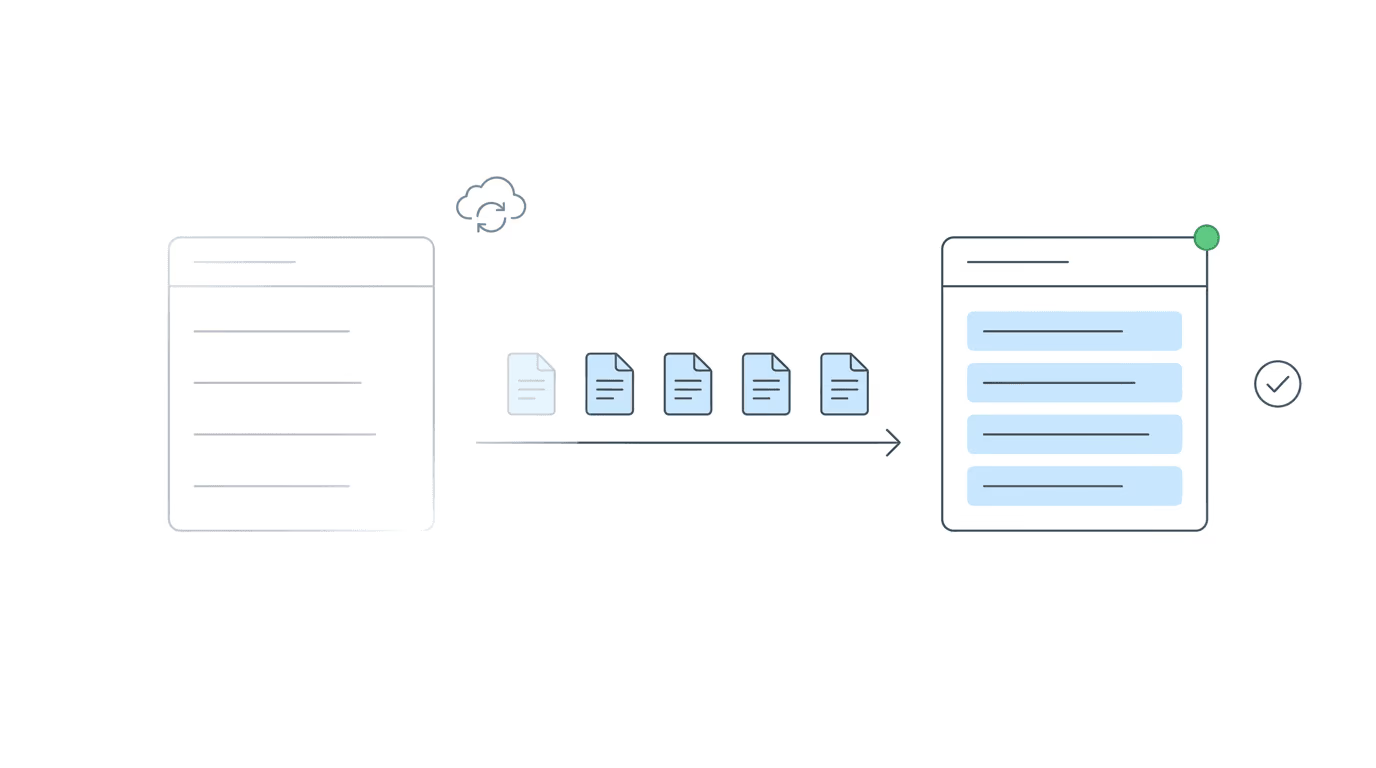
The #1 reason SSD firms delay switching ERE monitoring tools is fear. Fear that years of case history, document downloads, and status records will disappear the moment they leave their current platform. That fear is reasonable. With Chronicle, it’s also unfounded. Chronicle provides a free case backfill for firms on annual contracts who participate in a case study: historical ERE data imported into your account for cases already active when you sign up. Your team starts with context, not a blank screen. This article covers how the backfill works, what it covers, and what a transition from Assure or Atlasware actually looks like on the ground.
The Switching Objection That Stops Most Firms
It’s not pricing that keeps firms from switching ERE tools. It’s not the feature comparison, either. When SSD firms evaluate moving away from Assure or Atlasware, the conversation eventually arrives at the same place: “What happens to everything we already have?”
That question isn’t frivolous. A disability firm managing several hundred active cases has built up real context in its current tool: status history, downloaded documents, records of what’s been checked and when. The idea of starting from scratch while also handling a full active caseload is a legitimate operational concern, not a negotiating position.
The stakes matter here. Missing an SSA notice, losing track of where a case sits at reconsideration, not knowing a questionnaire was posted two weeks ago; these aren’t inconveniences. They create rework, affect client outcomes, and sometimes cost clients their cases. So when a firm is evaluating an ERE tool migration, the continuity question deserves a direct answer.
There’s also something more psychological at work. Firms that have been on Assure or Atlasware for years have built their routines around those tools. The daily rhythm of how staff check cases, how alerts get routed, how hearing prep is staged: all of it exists in relation to the current platform. Switching means disrupting that rhythm, and the prospect of losing institutional knowledge (the “we know where everything is” feeling that builds over years in one system) is harder to quantify than a feature list comparison. The case history question is partly about that feeling. The backfill addresses the factual part; understanding the scope of what Assure actually stores addresses the rest.
Firms already using Prevail or another CMS often ask the same underlying question: see do you need Chronicle if you already use Prevail for a direct answer to how monitoring layers fit alongside existing systems.
Chronicle’s answer is the free case backfill.
What a Case Backfill Actually Is
A case backfill is the process of importing historical ERE data into your Chronicle account for cases that were already active at the time of signup. Chronicle doesn’t hand you an empty dashboard and ask you to build from today forward. It pulls relevant case history from the SSA’s ERE (case status, document records, key event data) so your team has context on active cases from the moment they log in.
What this means on day one: paralegals and case managers are not looking at blank records. They see status history, documents already posted to the ERE, and the current state of each monitored case. That foundation is what makes daily monitoring useful immediately rather than weeks later, as data gradually accumulates through normal use.
Being specific about what’s included matters here. The backfill pulls ERE source data (case status records, eFolder documents, notices, SSA-generated correspondence already present in the system). What it doesn’t include is anything proprietary to your previous tool: notes entered directly into Assure or Atlasware, internal annotations, fields that existed only within that platform. Those lived in the tool, not the ERE. For most firms switching from Assure, this distinction matters less than expected, because Atlasware is built for hearing prep rather than continuous case monitoring across the full lifecycle. The “notes” concern often turns out to be about hearing-prep artifacts that are SSA documents anyway.
The backfill is available to firms on an annual Chronicle contract who agree to participate in a case study. It’s not a premium migration service or an upsell; it’s a structured exchange: Chronicle removes the biggest friction point in switching, and the firm documents what changed in their operations after the move.
Why Chronicle Offers It Free
Chronicle’s value as a monitoring platform depends on context. If a firm’s active cases begin with no history, the daily monitoring alerts Chronicle generates become harder to act on; staff have to reconstruct the prior status picture before they can understand what changed, and whether it warrants action. A cold start undermines the monitoring loop. The backfill solves that.
There’s also a simpler operational reason. The friction of switching tools is real, and it affects whether firms that would benefit from better monitoring infrastructure actually make the move. A firm that delays the switch because the transition feels too disruptive continues operating with tools that no longer fit their caseload. Removing the data continuity objection is part of building something firms can realistically adopt.
The structure of the offer reflects that logic. Firms that qualify (annual contract, participation in a Chronicle case study) get the backfill as part of standard onboarding. Chronicle gets documented evidence of what the operational shift actually produces. That exchange is more useful to both sides than a discounted first month.
That said, a backfill isn’t a substitute for the discipline of the transition itself. The next section covers what actually needs to happen for the migration to go well. Among the objections that delay ERE tool migrations, data continuity is the most common and the most emotionally loaded. Resolving it with a concrete product feature rather than a sales assurance is a different kind of answer.
What the Transition Actually Looks Like
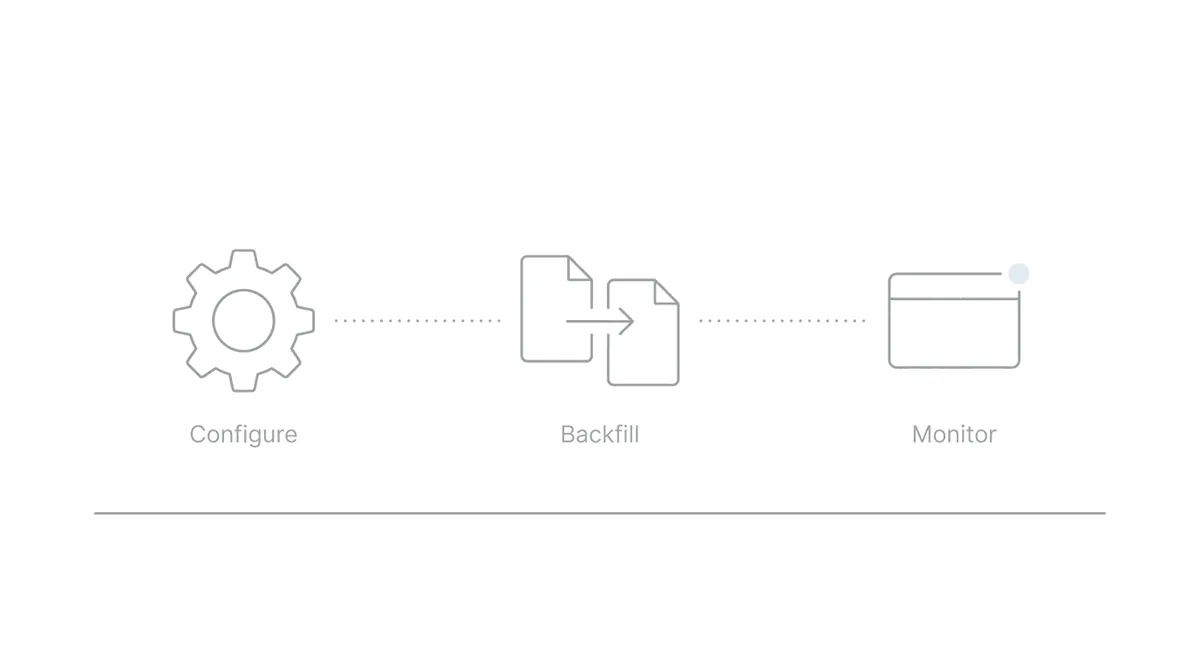
An ERE tool migration is a workflow change. Workflow changes require planning. Here is what the process generally involves for a firm moving from Assure to Chronicle.
What the firm provides. Chronicle connects to the SSA’s ARS system for your firm’s cases. This requires the same credentials and access setup that any ERE monitoring tool requires. Your firm’s case list needs to be established within Chronicle so the platform knows which cases to monitor and backfill.
What Chronicle handles. Once your account is configured, Chronicle runs the backfill, pulling ERE data for your active cases and populating the dashboard with status and document history that already exists in the SSA’s system. The onboarding team manages this process; you don’t need to export files from your old platform or migrate records manually.
CMS continuity. Switching to Chronicle does not require switching your case management system. Chronicle is not a CMS. Chronicle is CMS-agnostic; it works with Prevail, any CMS with an API, or no CMS at all. Your CMS continues managing internal tasks and firm execution. Chronicle monitors the ERE. Those are complementary functions. Most firms run Chronicle alongside Prevail, Clio, Filevine, or their existing platform without any disruption to CMS workflows. For more on how these categories fit together, see ERE monitoring vs case management software.
Staff adjustment. The core change for staff is that people who were manually checking the ERE for status updates can stop doing that. Chronicle checks the ERE and e-file daily for each monitored case and surfaces what changed. For most teams, the adjustment is less about learning the tool and more about trusting that it handles the routine checking without staff logging in to verify. That trust tends to build quickly once the backfill data validates against what the team already knows about their cases.
Running both tools in parallel. Some firms run Chronicle alongside their existing tool briefly during transition, using the overlap to verify that Chronicle’s backfill and daily alerts align with what they were tracking before. This is optional. The transition schedule is yours to manage. A step-by-step guide for using Assure and Chronicle at the same time covers exactly this parallel-run setup for firms that want a structured overlap period.
What you’re not doing during transition. You are not exporting case files from Assure. You are not manually moving documents. You are not rebuilding a case list from scratch. The backfill addresses the most time-consuming part of any ERE tool migration, and your CMS continues running without interruption. The operational pieces that need to change are the habit of manual ERE checking and the routing of alerts. Both happen naturally once daily monitoring is running and the backfill data is visible.
Comparing the Data Continuity Picture: Assure vs. Chronicle
This part often surprises firms considering the switch: the case history they’re worried about losing from Assure is frequently less comprehensive than they assume. It’s not that Assure stores no useful data. It’s that the data it stores is organized around a specific purpose (hearing preparation), and that purpose doesn’t map onto continuous operational monitoring.
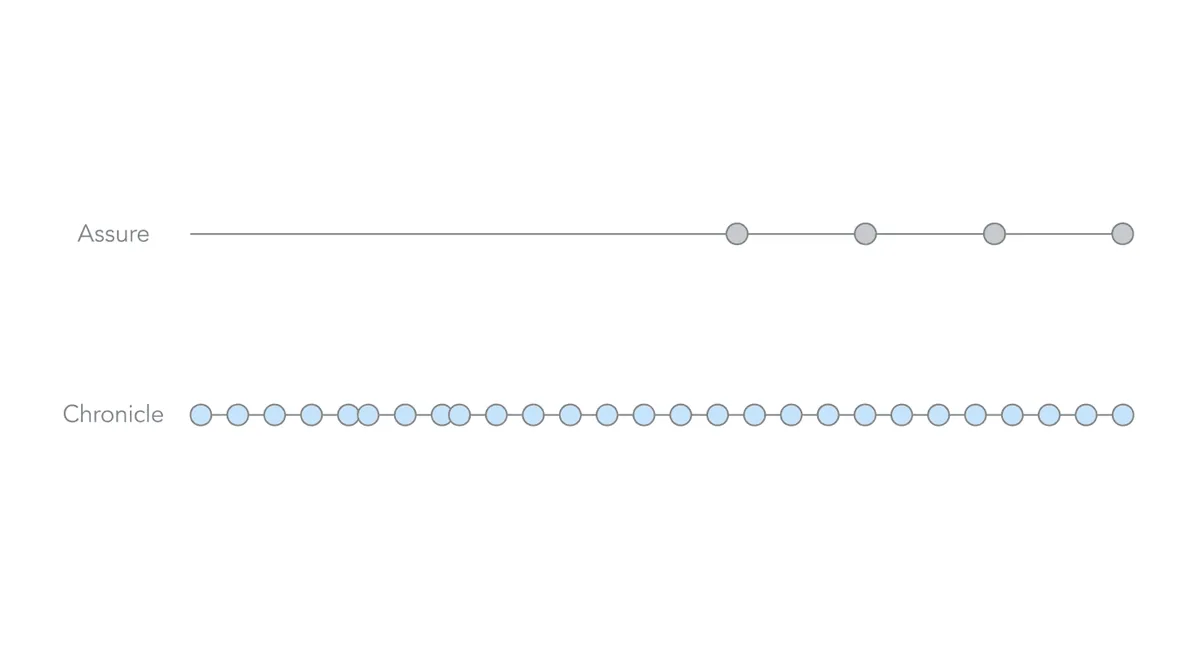
Assure’s Atlasware Cloud is a hearing preparation platform. Its ERE access is designed for hearing-centric workflows: pulling the e-file in advance of a hearing, organizing exhibits, and preparing the case file for presentation. Atlasware typically pulls the e-file on a fixed schedule in the pre-hearing window, a limited number of times. Outside those scheduled pulls, updating the record requires manual intervention, which can take hours. That’s a specific use pattern.
For firms that have relied on Assure primarily for exhibit review and hearing prep, the historical record in Atlasware reflects that scope: document snapshots organized around hearing prep cycles, not continuous daily status monitoring. A firm can believe it has comprehensive case history in Assure when what it has, more precisely, is hearing-stage snapshots. The two are not the same thing.
Chronicle’s daily monitoring covers more stages. Because it checks the ERE across the full SSD lifecycle (initial applications, reconsideration, hearing, post-hearing), the record it builds over time is continuous at each stage. The backfill provides the starting point; daily monitoring builds from there. For a closer look at how these coverage models differ, see full-lifecycle SSD monitoring. For a direct comparison of how ERE access tools handle document coverage at each stage, SSD ERE access tools compared runs Atlasware and Chronicle side by side.
The practical implication: what a firm trades away when leaving Assure is a hearing-prep-centric snapshot history. What it gains with Chronicle is daily monitoring across every active case at every stage, starting from a backfilled baseline. Firms making this comparison sometimes find that the data loss concern was partly about the idea of starting over rather than the actual scope of what they’d be leaving behind. Both Chronicle and Assure monitor the ERE; the difference is workflow stage coverage. Assure is primarily optimized for hearing prep while Chronicle supports the full SSD lifecycle. For a full side-by-side breakdown, see Assure vs. Chronicle compared.
How Firms Actually Describe the Switch
Michele Marois of Anderson Marois & Associates had used Atlasware and Assure for years before switching. Her evaluation of Chronicle was short. “I was sold immediately,” she said. “I had been a person who had been from Atlasware to Assure for as long as it existed. It was not a hard decision to make. The product was just superior.”
After the switch, her firm’s staff monitor Chronicle multiple times per day. One specific workflow change she cited: the ability to act on denials earlier. “We don’t even have to wait for a denial letter. We can enter the date of the denial, download whatever denial document it is and get that appeal filed…” That’s downstream from daily ERE status monitoring rather than waiting for mail arrival or a scheduled hearing-prep pull. Anderson Marois & Associates reported 15-20% less admin work after implementing Chronicle.
J. Shay Guess of SAM G Enterprises put the manual ERE experience before Chronicle plainly: “Before Chronicle, we were constantly passing two-factor codes back and forth, getting kicked out of ERE, and struggling to keep track of updates.” The 2FA routing alone (forwarding passcodes between staff who need ERE access) is a recurring tax on firm time. Chronicle’s automated daily monitoring removes that cost for routine status checks entirely.
The pattern that shows up across firms that have made this switch: the transition is less disruptive than anticipated, and the shift from reactive to proactive monitoring happens faster than expected. The backfill gives staff immediate context to work with. That context (the ability to see where each case stands from day one, without reconstructing it manually) is what makes the operational shift possible without a standing-start delay.
The underlying reason this shift happens quickly is structural. When staff no longer need to manually log into the ERE to check case status, and when alerts arrive automatically for changes that matter, the workflow naturally reorients around what the monitoring surfaces rather than around the act of checking. Firms that have made this migration consistently describe the change in posture as more significant than the tool change itself. The disability law firm dashboard software guide covers what a well-structured visibility layer looks like after that reorientation takes hold.
FAQ
Will I lose my case history if I switch from Assure to Chronicle?
No, for firms that qualify. Chronicle’s case backfill is available to firms on an annual contract who participate in a Chronicle case study. If you meet those conditions, historical ERE data for your active cases is imported at onboarding at no additional cost. Your team starts with case status history and ERE documents already populated in the dashboard. What the backfill doesn’t include is proprietary data that lived only in Assure’s system (internal annotations that were never part of the SSA’s ERE). For most firms, this matters less than expected, because Assure’s ERE access is primarily hearing-stage snapshots rather than continuous daily history.
How long does the Chronicle case backfill take?
The timeline depends on your caseload size and account configuration. Chronicle’s onboarding team manages the import as part of standard setup. Your onboarding contact can give a realistic estimate based on your case volume. It’s not a weeks-long process for most firms, but the specifics vary.
Does switching ERE tools require switching my case management system?
No. Chronicle is CMS-agnostic; it works with Prevail, any CMS with an API, or no CMS at all. Your CMS continues managing internal tasks and firm execution. Chronicle monitors the ERE. Those functions are complementary. Most firms run Chronicle alongside their existing CMS without disruption to existing workflows.
What data does Chronicle import during the backfill?
The backfill pulls ERE source data already in the SSA’s system for your active cases: case status history, eFolder documents, SSA notices, and correspondence that has already been posted. It’s ERE data, the same information your staff would see if they logged into the portal manually. It doesn’t include data specific to your previous tool’s proprietary interface or internal note-taking features.
Can I run Assure and Chronicle at the same time during the transition?
Yes. Some firms run both platforms briefly during transition to verify Chronicle’s backfill and daily monitoring align with what they were tracking before. There’s no barrier to a parallel-run period. When you’re confident in coverage, you can discontinue the previous tool on your own timeline.
What to Do Next
If data continuity has been the reason your firm hasn’t switched ERE tools, that objection is answered by the backfill. Chronicle pulls your active case history from the ERE at onboarding. Daily monitoring builds from there, covering the full SSD lifecycle rather than hearing prep windows alone.
For a fuller comparison before making a decision, see Assure alternatives for SSD firms and switching from Atlasware.
Chronicle is an SSD ERE monitoring and analysis platform. It checks the ERE and e-file daily for each monitored case and keeps your firm aligned with SSA activity at every stage. Getting started doesn’t mean losing what you’ve built.