If e-File monitoring stops working or documents are not appearing, check three things first: your firm's portal credentials, the session status, and whether the client is set up correctly for monitoring.
Credentials and account state
Invalid or outdated ERE credentials stop monitoring immediately and do not retry automatically. Ask a manager or admin on your team to verify the account state in your firm's portal settings.
Expired or changed ERE passwords must be updated before monitoring resumes. If the ERE required a password update, enter exactly the eight characters it retained — see fix ERE login after a password update.
Locked accounts or accounts that require a password update also block new sessions.
Only managers, admins, and billing owners can manage ERE credentials. See roles and permissions for details.
Invalid SSN alerts
An SSN marked invalid alert on the client detail page means the ERE does not recognize the submitted Social Security number. This can happen when a case was originally filed on paper, because the SSA E-File system may not match the paper record to the electronic file.
To resolve the alert, open the client detail page and choose one of the available actions:
Mark SSN valid — tells Chronicle the existing SSN is correct and to retry monitoring.
Edit SSN — updates the client record with a new SSN for monitoring.
Marking or editing the SSN does not guarantee the ERE will accept it. Repeated attempts may trigger an SSN lock or a Max invalid SSN pause, which stops document refreshes. If this happens, see fix a locked ERE account.
If the invalid SSN alert keeps appearing, test the SSN directly in the ERE to confirm the electronic file exists before retrying in Chronicle.
Withdrawn case warnings
A Case may have been withdrawn alert means the ERE no longer shows an active record for this client on the status reports. Review the case status in your primary case management system or the ERE directly. If the case is still active, you can manually refresh the file using the refresh e-file button. In most cases you will need to contact the SSA to fix this.
Common issues
A client's documents appear under another client
First check the SSN on the affected client record. If the wrong SSN was entered, Chronicle would pull the other client's documents under that record.
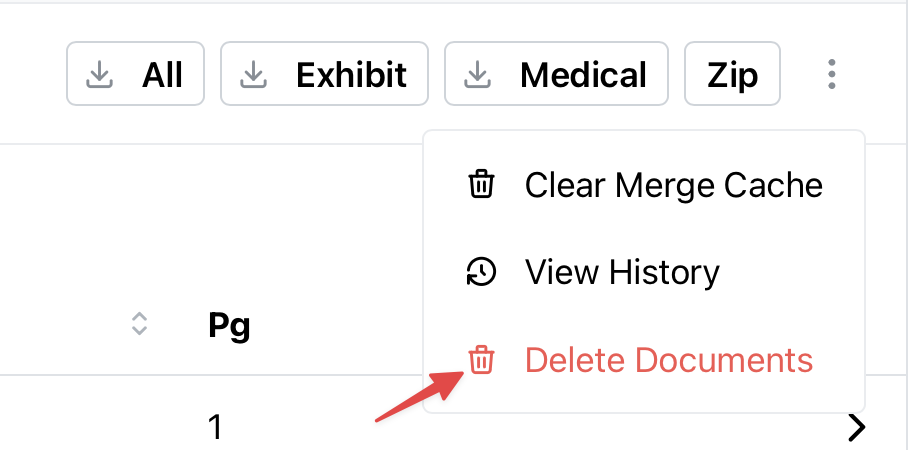
To resolve this, click "Delete Documents" by clicking the three dots in the Documents tab in the client document where the wrong documents are downloaded.
Then, input the correct the full SSN to refresh the data pull. This resolves most cases where the wrong SSN has been input for a specific client.