
Centerville Software Solutions describes its CV1 product as “Built exclusively for Social Security Disability firms.” Chronicle is built for Social Security disability practices too. So if you run a disability law firm with a few thousand open claims, and both vendors want a demo, “purpose-built for SSD” will not settle the decision. Something else has to.
That something is where the specialization lives. This Centerville CV1 vs. Chronicle comparison reports what each vendor publishes about itself, checked on October 8, 2026, with a page reference or a dated screenshot for every Centerville claim it cites. It is not a verdict on your behalf. It is meant to help you ask sharper questions in your own demos and decide what fits your firm.
At a glance
Centerville CV1 is a Salesforce-native CRM and case management system for Social Security disability firms. Centerville sells it alongside separate products for document assembly, e-signature, forms, texting and accounting, and adopting it means moving your case management onto CV1. Chronicle is an SSD ERE monitoring and analysis platform that checks the ERE and e-file daily for each monitored case and works alongside the case management system you already run.
Both are built only for SSD. The difference is how many jobs each one takes on. CV1 takes on case management, ERE retrieval, documents, texting, accounting and more; Chronicle does one job, ERE monitoring, alongside the CMS you already chose.
CV1 may fit a firm that wants one vendor from intake to accounting and is ready to replace its CMS anyway. Chronicle fits a firm whose CMS works and that wants daily ERE monitoring without a migration.
Quick Comparison: Centerville CV1 vs. Chronicle
| Centerville CV1 | Chronicle | |
|---|---|---|
| What it is | Salesforce-native CRM and case management system for SSD law firms | SSD ERE monitoring and analysis platform |
| Practice-area focus | Social Security disability only | Social Security disability only |
| Your current case management system | Replaced. Centerville offers assessment, data migration and configuration | Kept. Works alongside any CMS, or no CMS at all |
| Platform requirement | Built entirely within Salesforce | None. Does not require switching CMS platforms |
| Integrations and partner ecosystem | No third-party case management integration named. Lists Centerville’s own products (Mergelex, SignumOne, Formata, SMS Plus, LedgerIQ) and offers custom integrations as a service | Direct integrations with Clio and Filevine. Integrates with Litify, which is built on Salesforce. Medical chronologies through Dodo or LexMed |
| ERE check frequency | Not stated on the ERE page. The home page says “real time” and “On-Demand or Scheduled” | Daily, ERE and e-file, for each monitored case |
| Do staff still log into the ERE? | Asked in Centerville’s FAQ, but the answer does not say | Routine checks are automated, so staff do not need to log in to look for updates |
| ERE uploads | Described (“complete download and upload history”) | Yes, from a client’s page, with a tracking number and an emailed receipt |
| AI features | Medical summaries, matter analysis, mail, audio QA | Medical chronologies (through Dodo or LexMed), Prehearing and AC brief drafts, hearing transcripts |
| Other modules | Document assembly, e-signature, forms, SMS, accounting (separate Centerville products) | Virtual mailroom, deadline monitoring, hearing preparation dashboards |
| Published customer count | None found on its site | 150+ SSD firms |
| Published scale | None found on its site | More than 335,000 cases and 12 million SSA documents |
| Named customer stories | None found | Published at chroniclelegal.com/customers |
| Published pricing | None found on its site (demo request) | Published at chroniclelegal.com/pricing |
| Security report and published terms | Site describes SOC 2 as both Centerville’s own and Salesforce’s. No privacy policy or terms found on its site | Its own SOC 2 Type 2 report, issued to Chronicle Technology, Inc. and audited every year. Privacy policy and terms of service published |
Sources for CV1 cells (centervillepro.com, captured October 8, 2026): Centerville’s home page, CV1 product page, integration page, ERE page and product suite page.
What Are Centerville CV1 and Chronicle?
What Is Centerville CV1?
In its own words, CV1 is “Centerville Software Solutions’ all-in-one case management platform for Social Security Disability law firms” (centervillepro.com). The product page calls it “Salesforce-native case management built for SSD law firms” and explains that because CV1 is “built entirely within Salesforce,” “there are no integrations to maintain” (CV1 product page).
Around CV1, Centerville sells separate products and services, listed in full in the next section. The company appears on its own pages as Centerville Software Solutions, Centerville Pro and Centerville One, and the product as Centerville Legal CRM (CV1).
What Is Chronicle?
Chronicle is an SSD ERE monitoring and analysis platform. It checks the ERE and e-file daily for each monitored case. When something changes, whether a new document, a questionnaire, a notice, a hearing event or a status update, Chronicle detects it and summarizes what changed.
Chronicle is CMS-agnostic. It works alongside any CMS, or no CMS at all, with direct integrations for Clio and Filevine. Chronicle integrates with Litify, which is built on Salesforce, so firms on Litify can keep Salesforce and add Chronicle.
Chronicle can also upload documents to the SSA’s ERE directly from a client’s page. More than 150 SSD firms use Chronicle, and it monitors more than 335,000 cases and 12 million SSA documents.
Both Are Built for SSD. The Difference Is Where That Specialization Lives
Centerville CV1 and Chronicle are both built only for Social Security disability firms, so practice-area focus cannot decide between them. Narrow by practice area is not the same as narrow by job, though. The question that separates these two products is how many jobs each one takes on.
A product that frames itself as everything tends to end up doing nothing exceptionally well. That is a general pattern in software, not a verdict on any one vendor, and it is why specialization has real value. So the useful question for any vendor is plain: what are you world-class at? If the answer is unclear, choosing an all-in-one means accepting a compromise on every piece of it.
Breadth is not the problem by itself. Case management is one place where breadth is a strength: multi-practice systems like Clio, Filevine and Litify serve many practice areas, and that gives them a scale of investment and an integration ecosystem a single-niche CMS would find hard to match. The healthy stack pairs a broad CMS that is excellent at case management with specialists for the SSD-specific jobs.
There is a second kind of compromise, and it is easier to miss. A platform without a real set of integrations or partners walls a firm in. Every new need has to come from the same vendor, and leaving means moving everything at once.
We have written separately about why ERE monitoring and case management are different jobs. Here the question is how much of your firm each vendor asks to own.
Option One: One SSD Vendor for Every Job
As of October 8, 2026, Centerville’s own pages describe this scope for a firm that adopts CV1:
- CRM and case management from “Intake to resolution,” built entirely within Salesforce (CV1 product page)
- ERE retrieval and monitoring (ERE page)
- AI medical summaries, matter analysis, mail and audio QA (home page)
- Document assembly (Mergelex), e-signature (SignumOne), intake forms (Formata), client texting (SMS Plus) and accounting (LedgerIQ) (product suite)
- Implementation services: “Implementation, training, optimization, custom integrations, reporting, and ongoing support” (integration page)
- HR and business services, described as “comprehensive HR services and business support” that run “From talent placement to operational strategy” (about page)
That is the scope a firm hands to one vendor. The buyer’s question is simple to ask: which of these is the vendor world-class at, and what is it built on for the rest?
Centerville’s integration page is direct about this path. Its headline reads “Switch to CV1 With a Plan Built Around Your Firm,” and the page says Centerville will help your firm “assess its current systems, migrate data, configure workflows, train your team.” Further down: “We migrate and validate your firm’s data.”
The same page describes the architecture. “CV1 serves as the central case-management platform while connected products extend its capabilities.” The connected products it lists are Centerville’s own. As of October 8, 2026, the page names no integration with Clio, Filevine, Litify, MyCase or Prevail, though it offers “custom integrations” as a service (integration page). CV1 itself is built entirely within Salesforce.
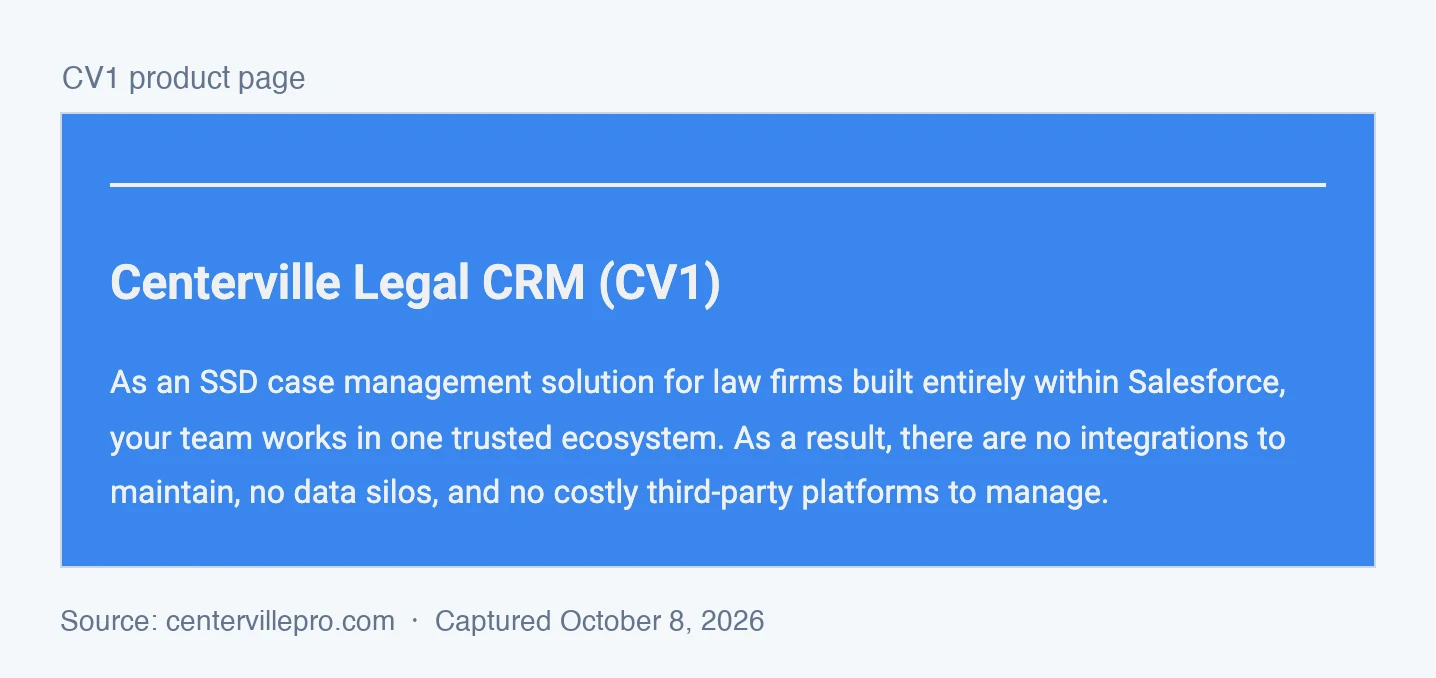
Centerville presents that as a benefit. Its product page says “there are no integrations to maintain, no data silos, and no costly third-party platforms to manage” (CV1 product page). Weigh it against a simple test: what happens when your firm needs a tool Centerville does not make?
For a firm on any of those systems, CV1 is a replacement rather than an addition. Some firms want exactly that, and we come back to who they are below.
Option Two: One Job, Alongside the CMS You Chose
Chronicle’s specialization is one job: knowing what the SSA is doing to every monitored case, and acting on it. Its features, from daily ERE and e-file checks to the virtual mailroom, serve that job.
For everything else, Chronicle works with specialists. Case management stays in the CMS the firm already chose for that job. Chronicle has direct integrations with Clio and Filevine, integrates with Litify, and does not require switching CMS platforms. Medical chronologies come through partners, Dodo or LexMed.
The strongest objection to this route is the one Centerville’s pages make about “generic legal software”: it does not understand SSD. For the SSD-specific jobs, that is fair. At The Disability Champions, ERE access through the CMS was time-delayed: request access, then wait. The fix was not a new CMS. Staff there use Chronicle from start to finish of their workflow alongside their CMS.
What Firms on Litify, Filevine and Clio Report
| Firm | CMS | What changed |
|---|---|---|
| Walker Firm | Litify (built on Salesforce) | Matched 3,500 cases between Litify and the ERE within days of adopting Chronicle |
| Garza Law Firm | Filevine | Completed its Filevine integration setup in under 90 minutes |
| Desert Disability | Clio Manage | The integration surfaces DLI and onset dates in weekly docket meetings |
| Hawaii Disability Legal Services | Clio | Chronicle document events trigger Clio stage changes that create staff tasks |
| Law Office of Katherine Siegfried | Clio | Reported saving about 10 hours a week |
In each case, Chronicle works alongside the firm’s case management system rather than replacing it.
Walker Firm is the clearest case for a high-volume reader. The Hermosa Beach firm runs 3,500 active Social Security disability cases with about 40 staff, on Litify. Before Chronicle, there was no reliable bridge between what Litify said and what the ERE showed. The gaps surfaced at the worst moments: wrong claim types discovered at hearings, cases held for years on claims that were not viable.
Timothy Walker-Dupler spent years trying to build ERE-to-Litify matching himself. He first saw Chronicle at a NOSSCR booth, when he was not looking for an ERE solution. Months later, with the matching project still stuck, he called back. What he couldn’t solve in years of trying, Chronicle resolved in a single phone call, and all active cases were matched between Litify and the ERE within days.
I’d been trying to get this set up for like, for years on my own. And like being able to do it like 30 minutes after one phone call made it like, made it an obvious decision for me in the firm.
Timothy Walker-Dupler, Walker Firm
Litify stayed the place where work happens. Chronicle became the SSD layer feeding it. Emily Sisbarro at Victory Disability described what Chronicle does as a way to “connect the ERE to a case management system for an all-in-one platform.”
One more point for firms that have already chosen Salesforce. Litify is built on Salesforce, and Chronicle integrates with Litify, so a firm that wants Salesforce can keep it and add Chronicle. Choosing a platform and choosing SSD specialization are separate decisions.
Head-to-Head: ERE Monitoring, Case Management, AI and Proof
ERE Monitoring: How Often, and Do Staff Still Log In?
Centerville’s ERE page is titled “Monitor ERE activity without checking every case manually,” and it says “CV1 ERE monitors the SSA system for all and any changes to documents, status changes, hearing info, and deadline-triggering events” (ERE page). As of October 8, 2026, the page does not state how often each case is checked. The home page says “CV1 receives ERE case status updates in real time” and lists a feature called “On-Demand or Scheduled Data Retrieval.”
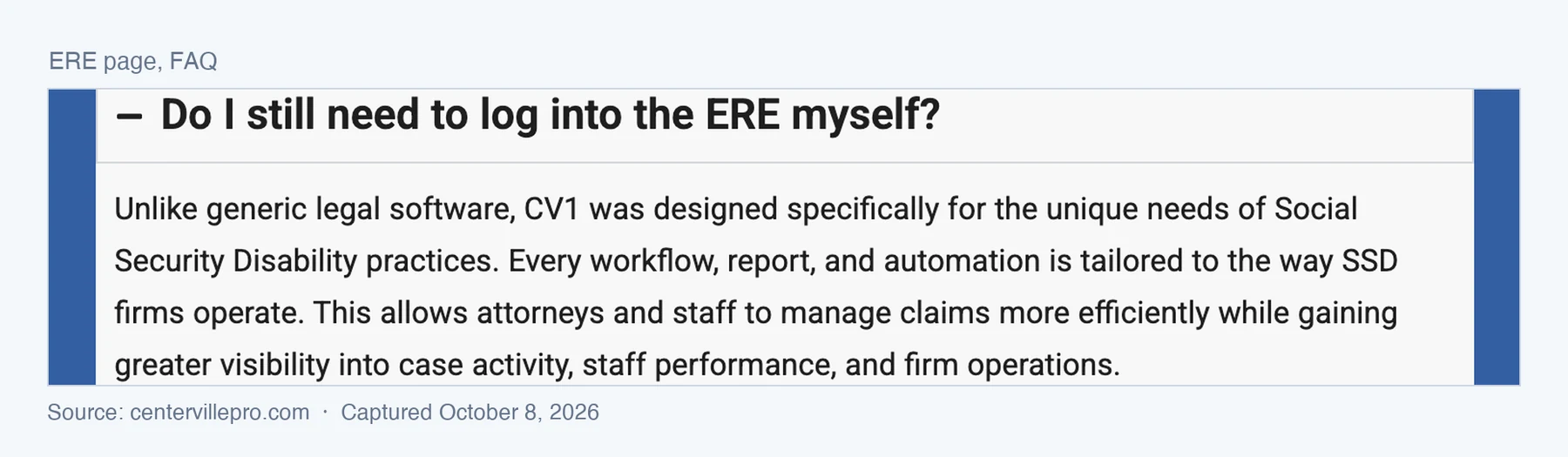
The ERE page’s FAQ asks the question most buyers ask first: “Do I still need to log into the ERE myself?” The answer begins “Unlike generic legal software, CV1 was designed specifically for the unique needs of Social Security Disability practices,” and does not say yes or no.
Chronicle monitors the SSA’s ARS (Appointed Representative Services) system, commonly called “ERE” in industry parlance. It checks the ERE and e-file daily for each monitored case, and it automates routine ERE document checks so staff do not need to manually log in to look for updates.
Ask in your demo
How often is each case checked, by what method, and with whose credentials?
Case Management and Integrations
CV1 is the case management system. Intake, matters, documents and client data live in it, on Salesforce, next to Centerville’s own add-on products.
Chronicle sits next to the case management system, through the Clio, Filevine and Litify integrations, or alongside any other CMS, and works with Dodo and LexMed for medical chronologies. For Walker Firm, the integration’s value was data integrity. Walker-Dupler’s advice to other firms is that “you should think about how much time that takes to rectify the data and fix those problems. Because if they were easier to identify, they’d be easier to fix. And that’s what this tool and the integration allows you to do, faster and easier.”
Ask in your demo
Is the integration with my CMS live today, and can I talk to a firm using it?
AI Features
Centerville’s home page names four AI features: “AI Medical Summaries,” “AI Matter Analysis,” “AI Mail” and “AI Audio QA,” and says “AI automatically routes mail, analyzes documents, and creates hearing summaries” (centervillepro.com). As of October 8, 2026, we could not find a description of the model behind these features, a sample output, or a human review step on its site.
Chronicle’s AI work is tied to specific documents. It can draft a Prehearing Brief from a LexMed medical chronology and generate an Appeals Council brief from an ALJ decision, and it can generate transcripts of hearing recordings.
Ask in your demo
Show me the AI output on a real disability file, and where it was generated.
Security, Privacy and Published Terms
A disability file holds medical records, Social Security numbers and the credentials a firm uses to reach the SSA. So the security question is not whether a vendor mentions SOC 2. It is whose audit report it is, and what the vendor publishes about how it handles your data.
A SOC 2 report is an independent auditor’s attestation issued to a specific company. A Type 1 report looks at how controls are designed at a point in time; a Type 2 report tests whether they worked over a period, usually several months. Software built on a platform such as Salesforce can rely on that platform’s SOC 2 report, but the platform’s report covers the platform, not the vendor’s own staff, processes and code.
Why the name on the report matters. A SOC 2 report covers only the company named on it. Salesforce’s report tells you how Salesforce protects its data centers, its platform and its own employees. It says nothing about the smaller company that builds software on top of Salesforce and sells it to your firm. Pointing to the platform’s report is like a tenant pointing to the building’s fire inspection: it covers the building, not what happens inside the unit.
For a disability firm, what happens inside the unit is where the risk sits. The vendor’s own report is the only one that tests:
- Who on the vendor’s team can see your clients’ medical records and your SSA portal credentials, and how that access is granted, reviewed and removed when someone leaves
- How the vendor reviews and releases changes to its own code
- How the vendor watches for a breach, and what it does when one happens
- Background checks and security training for the vendor’s staff
- How the vendor vets its own subcontractors, such as the AI services that read your files
If the report on offer is in the platform’s name, none of that has been checked by an auditor.
As of October 8, 2026, Centerville’s pages describe its SOC 2 position four ways:
- “Centerville Software Solutions is SOC 2-certified” (home page, FAQ)
- A “SOC 2-certified platform” (home page)
- “It is supported by Salesforce SOC 2 compliance” (integration page)
- “SOC 2-certified infrastructure and encryption” (ERE page)
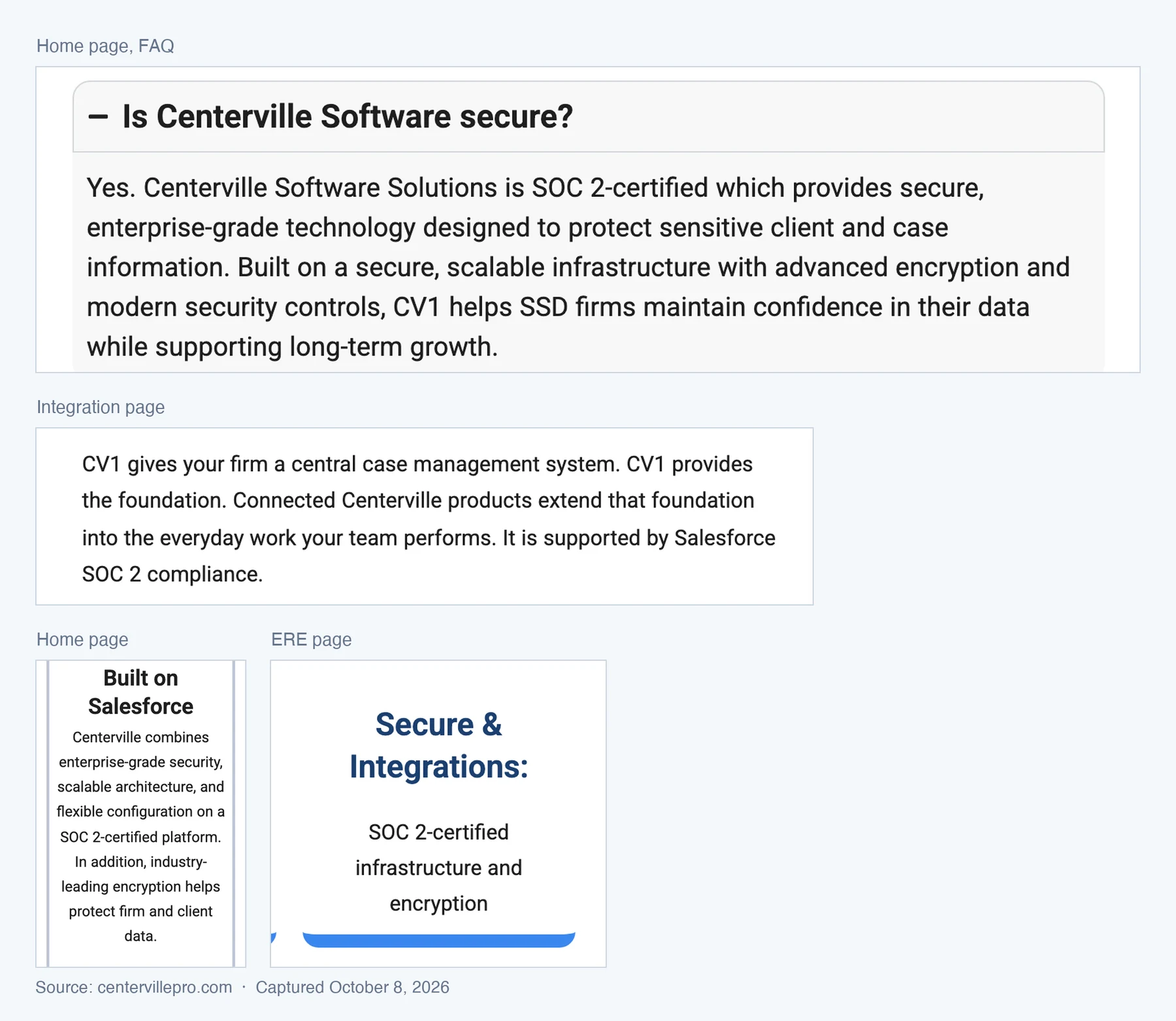
The first describes an audit of Centerville. The third describes Salesforce’s. Only the report itself shows which one a firm would be relying on. Centerville’s home page says the company itself is SOC 2-certified. If it holds its own report, that report will show it. We have not seen it.
As of October 8, 2026, we could not find a privacy policy or terms of service on centervillepro.com, or a statement of how SSA portal credentials are stored and who can access them.
Chronicle has its own SOC 2 Type 2 report, issued to Chronicle Technology, Inc. It covers the Security criterion, the audit is repeated every year, and firms can ask Chronicle for a copy. Chronicle’s privacy policy and terms of service are published on its site.
Ask in your demo
Whose name is on the SOC 2 report, which type is it, and what period does it cover?
Can I read your privacy policy and terms before I sign?
Where are my SSA portal credentials stored, and who can access them?
What Each Vendor Publishes: Customers, Scale, Pricing
As of October 8, 2026, we could not find a customer count, a case count, a named customer firm, a case study or pricing on Centerville’s site. Its calls to action are demo requests. Chronicle publishes that more than 150 SSD firms use it, that it monitors more than 335,000 cases and 12 million SSA documents, named customer stories, and its pricing.
Centerville’s suite page says its software fits “Whether you’re handling 50 cases or 5,000.” For a firm at the top of that range, the useful follow-up is which firms of that size run CV1 today.
A missing number on a website proves nothing about a product.
It does mean the buyer has to ask, and get the answer in writing before moving thousands of open matters.
When CV1 May Fit, and When Chronicle Fits
When Centerville CV1 May Fit
CV1 is a reasonable choice for a firm that values one vendor and one login over the strongest tool for each job, and is ready to replace its case management system anyway. A firm still running on spreadsheets, or on a system it has outgrown, faces a migration regardless. For that firm, moving onto an SSD-only CRM is not an extra cost.
It also fits a firm that has decided to standardize on Salesforce and wants implementation, migration and training bundled with the software. Centerville sells those services. Ask for the Salesforce licensing terms in writing, since we could not find them on the site.
A vendor that has not yet published answers to the questions below is not necessarily a weak product. The answers just have to come from the sales process.
When Chronicle Fits
Chronicle fits a firm whose CMS works and that does not want to migrate thousands of open matters to get better ERE visibility, whether that CMS is Clio, Filevine, Litify or something else. It fits a firm that wants the ERE and e-file checked daily without staff logging in. And it fits a buyer who wants to see published scale and named customers before signing.
Eight Questions to Help You Decide
No comparison can make this decision for you. These questions can help. Each one has an answer a vendor can put in writing, and the answers will show you which setup fits your firm. Ask them of every vendor you evaluate, Chronicle included.
Eight questions for every vendor
- What is this vendor world-class at?
- How do you access the ERE, with whose credentials, and how are they stored?
- How often is each case checked, and what triggers an off-cycle check?
- Is the integration with my current CMS live today, and can I call a firm using it?
- Which third-party systems do you integrate with today, and what happens to my data if I leave?
- What is my total first-year cost, including platform licenses, migration and training?
- Whose name is on the SOC 2 report, which type is it, and what period does it cover?
- Are the firms in your testimonials independent customers, and can I call one?
For switching costs and the rest of the evaluation, see how to evaluate legal software before you sign.
Frequently Asked Questions
What is the difference between Centerville CV1 and Chronicle?
The difference is scope. CV1 is a Salesforce-native CRM and case management system for Social Security disability firms that replaces your current case management system. Chronicle is an SSD ERE monitoring and analysis platform that checks the ERE and e-file daily for each monitored case and works alongside your existing CMS. Both are built only for Social Security disability.
Is Centerville CV1 good for SSD firms?
That depends on what the firm wants to change. CV1 fits disability firms that want one Salesforce-based system from intake to accounting and are ready to migrate. As of October 8, 2026, we could not find customer counts or pricing on Centerville’s site, and its ERE page does not state how often each case is checked. Ask for those answers in writing before you move your case data.
Does Centerville CV1 integrate with Clio, Filevine or Litify?
Its site does not name one. As of October 8, 2026, Centerville’s integration page lists Centerville’s own products and offers custom integrations as a service, but names no third-party case management system, because CV1 is designed to be the case management system itself. Chronicle has direct integrations with Clio and Filevine, and integrates with Litify. Walker Firm matched 3,500 cases between Litify and the ERE within days of adopting Chronicle.
Is Centerville CV1 SOC 2 compliant?
Centerville’s site says so in two ways that point to different companies. Its home page FAQ says “Centerville Software Solutions is SOC 2-certified,” and its integration page says CV1 “is supported by Salesforce SOC 2 compliance.” We have not seen the report. Ask for it: it names the company audited, the type and the period. Chronicle has its own SOC 2 Type 2 report, issued to Chronicle Technology, Inc. and audited every year.
How often do CV1 and Chronicle check the ERE?
For CV1, we could not find a published number as of October 8, 2026. Centerville’s ERE page does not state a frequency. Its home page says “CV1 receives ERE case status updates in real time” and lists “On-Demand or Scheduled Data Retrieval.” Chronicle checks the ERE and e-file daily for each monitored case, so staff do not need to log in to look for updates.
Can a disability firm on Salesforce use Chronicle?
Yes. Chronicle integrates with Litify, which is built on Salesforce, so firms on Litify can keep Salesforce and add Chronicle. Walker Firm’s Litify plugin matched all active cases within days of adoption, without the firm changing its case management system.
Every vendor in this comparison is built for SSD. Chronicle is trusted by 150+ SSD firms nationwide. We have reported what each vendor publishes; the right choice depends on your firm, your CMS and the answers you get in writing. If your CMS already runs your firm, you can add daily ERE monitoring without replacing it. Book a Chronicle demo, bring the eight questions above, and ask us every one of them.