
Import Atticus referrals from a CSV
Upload the CSV you received from Atticus to match referrals to existing Chronicle clients and add confirmed matches to Atticus document sharing. You’ll need a Chronicle admin or account owner role and a connected Atticus integration with setup complete. Connect Atticus to Chronicle.
Upload the referral list
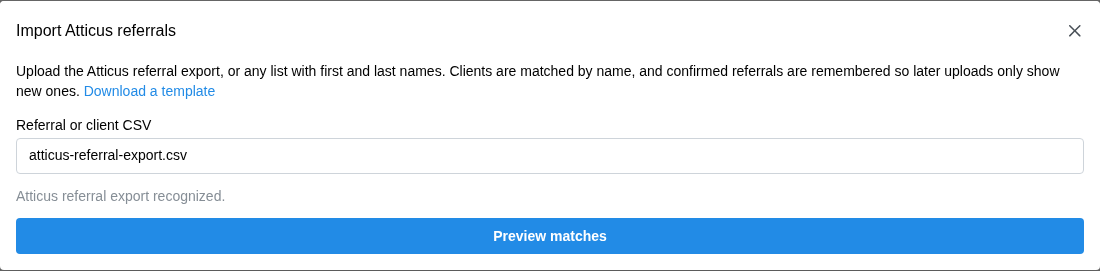
Use the original Atticus export as sent. You can also upload your own CSV with a first name and last name for each row. Each file can be up to 1 MB and contain up to 5,000 rows.
Go to Settings > Integrations > Atticus.
In Overview, find Clients and click Import Atticus referrals.
Under Referral or client CSV, choose your file.
If you’re using your own CSV, select the First name column and Last name column. Map any optional columns you have. Date of birth and SSN last four help check the match, and referral IDs let Chronicle recognize saved referrals on future uploads. Keep any leading zeroes in SSN last four. Use Download a template if you need a starting file.
Click Preview matches.
Review the matches
Chronicle starts with first and last name. When available, date of birth and SSN last four help verify a match or flag a conflict. The preview leaves your sharing selection unchanged.
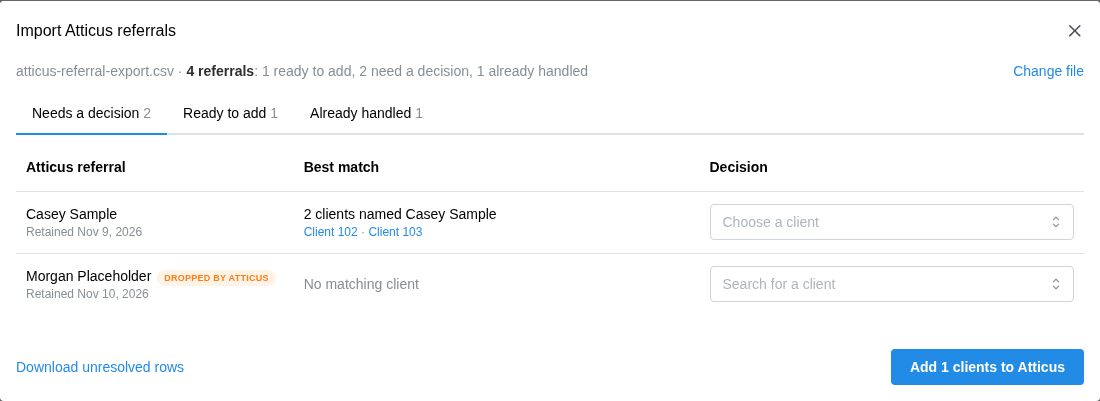
Needs a decision shows rows that need your review. Compare the available match details and choose a suggested client, search for another existing client, or select Skip this referral. Use Show earlier referrals from previous uploads if you want to revisit older referrals listed there. Review any Dropped by Atticus or Removed from Atticus earlier labels before choosing a client.
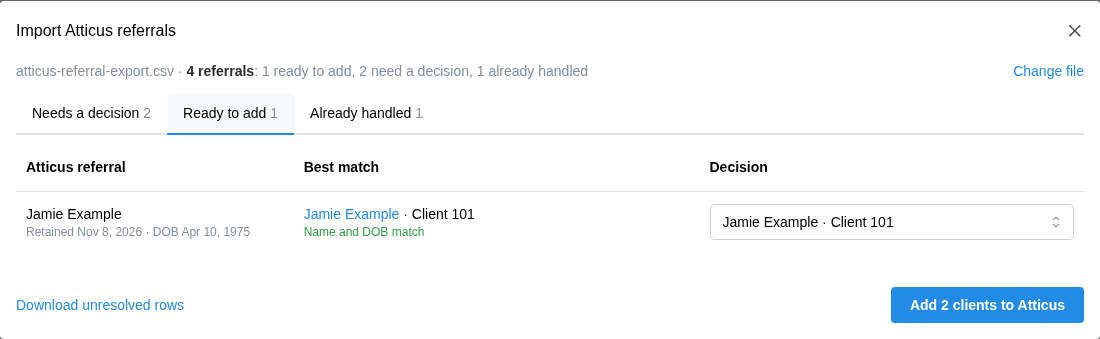
Ready to add shows confident matches that start selected. Check them before saving and change the match or skip a referral if needed.
Already handled shows referrals imported before, clients already selected for Atticus, and duplicate or invalid rows. If a client is already selected and the row has a new referral ID, saving remembers that referral for the next upload.
Save confirmed clients
Saving adds confirmed clients to Atticus document sharing and keeps your existing selections. We share eligible milestone documents through Box for the clients you select.
Click Download unresolved rows before saving if you want a CSV of skipped, undecided, duplicate, or invalid rows. It includes a reason for each row. If a referral has no matching client, make sure the client already exists in Chronicle before retrying that row.
Click the Add button that shows how many clients will be added to Atticus. If the import only remembers referrals for clients already selected, click Save import.
After saving, verify the Box folder for a newly selected client before relying on document sharing. Use the Atticus integration.