

The Mid-Case Paperwork Problem
Filing an SSDI/SSI application doesn’t end the work. SSA keeps requesting additional forms throughout the case. Function reports, in particular, arrive without much warning. Your staff has to:
- Check ERE constantly to notice when SSA posts a request
- Reach out to the client
- Track whether they finished the form
- Follow up when they don’t
Miss one, and the case stalls. For firms handling real volume, this manual ERE monitoring becomes untenable. Someone is always behind on checking, and the requests keep arriving.
A New Approach: Chronicle + Benny
Chronicle’s new integration with Benny automates your response to SSA form requests.
Benny is a mobile-first platform built specifically for SSDI/SSI paperwork. Clients complete initial applications on their phone in 30-45 minutes. Mid-case forms like function reports take 10-15 minutes. The AI matches job codes, catches errors before they cause problems, and files directly to SSA’s iClaim system.
Chronicle’s integration eliminates manual ERE monitoring entirely. Chronicle’s ERE data feed detects when SSA requests a function report; your team gets notified and can send the questionnaire through Benny with a single click.
One thing to understand: Chronicle does not integrate with Benny on initial application filing. Chronicle only sees a client once the application has been filed and received at SSA, since it’s connected to the ERE.
“This integration is about removing the tedious ERE monitoring that slows down firms. Chronicle watches for SSA form requests so your staff doesn’t have to.”
— Nikhil Pai, Founder of Chronicle
“When SSA mails an applicant a paper Function Report, the clock starts ticking. Chronicle tells us the moment that happens, and Benny enables advocates to send the electronic version to the applicant before the paper form ever hits their mailbox. The result is a stronger application for the applicant, because at the end of the day, everything we build is for the people who need these benefits the most.”
— Vincent Cardillo, CTO of Benny
How the Chronicle & Benny Integration Works (Setup)
Setup
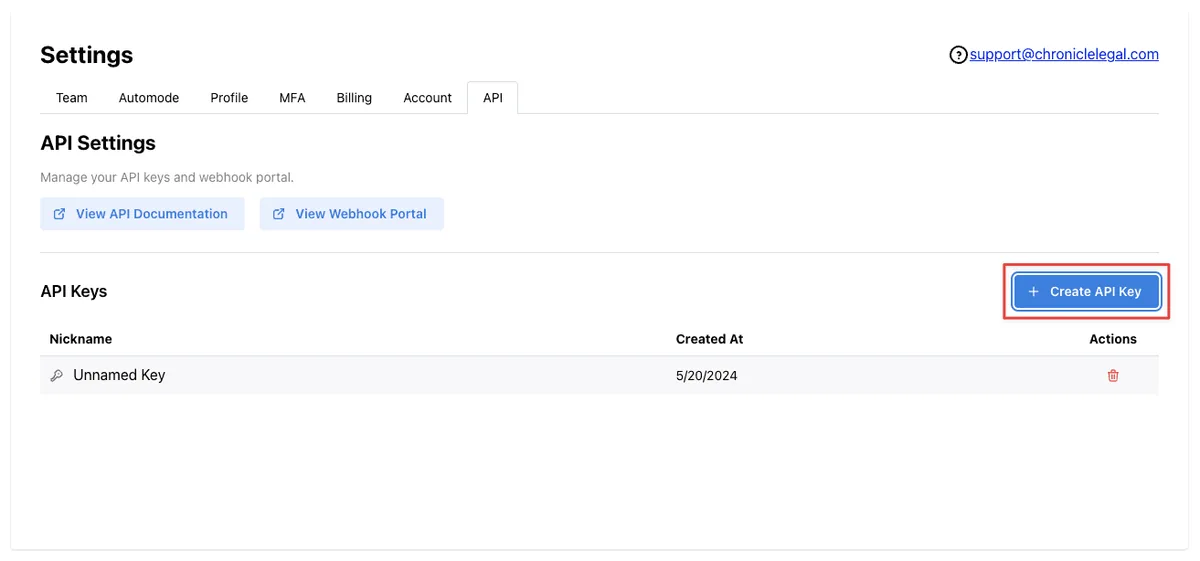
Go to your Chronicle settings, navigate to API, and generate a key. Enter it in Benny. That’s it.
When SSA Requests a Form
- Chronicle Detects the Request
Chronicle’s ERE data feed detects when SSA has requested a function report. Detection is immediate so no manual ERE monitoring required.
Function report detection is live; work history questionnaire detection planned for future release.
- Advocate Sends via Benny
Your team is notified. One click sends the questionnaire through Benny. You can also archive the notification if the form was already sent another way.
- Client Completes on Mobile
- Client receives SMS/email with the questionnaire
- Completes the form in 30-45 minutes on their phone
- AI guides them through each question
- AI catches errors and inconsistencies
- Case Continues in Chronicle
Chronicle monitors the case through ERE for the entire lifecycle from filing to decision.
A full runthrough of how this workflow works is outlined below:
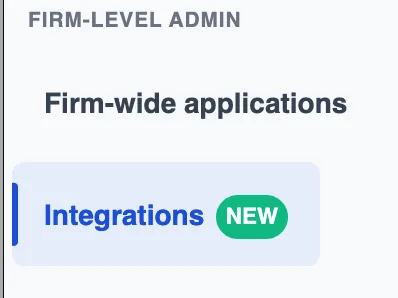
To get set up in Benny, this is what it’ll look like. First, navigate to the Integrations page in Benny.
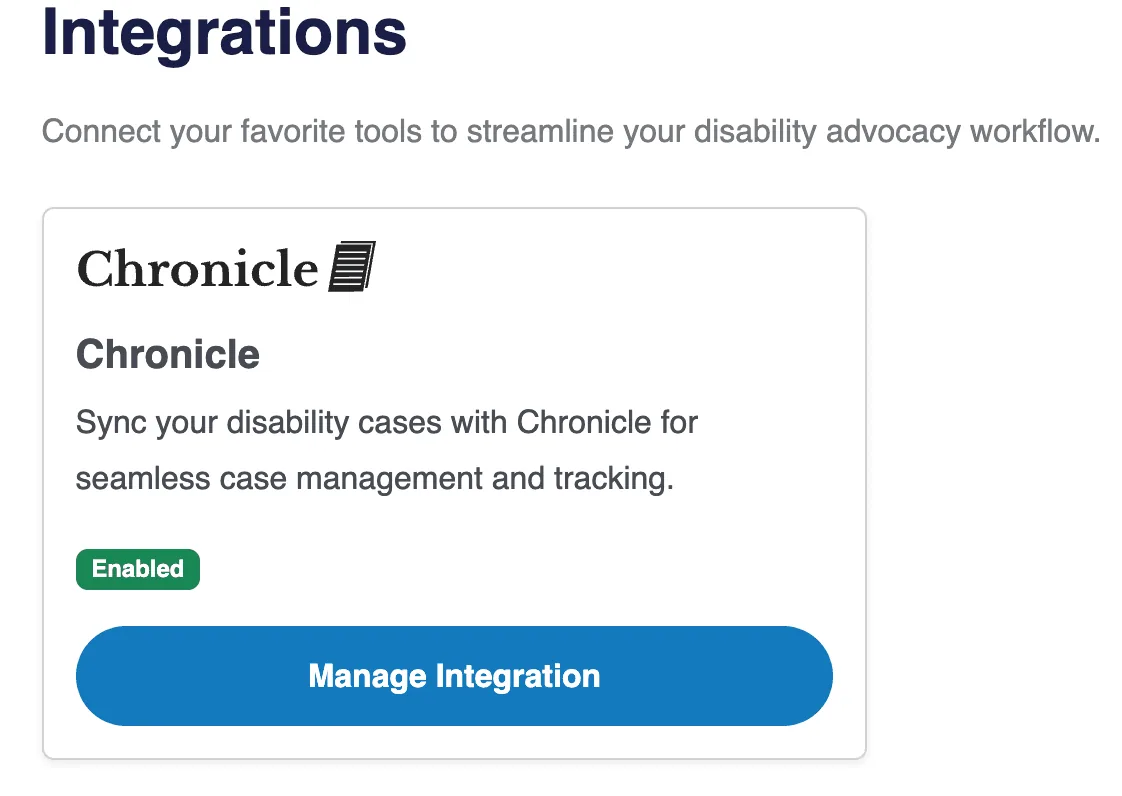
You’ll then be able to select Chronicle from this Integrations page from within Benny.
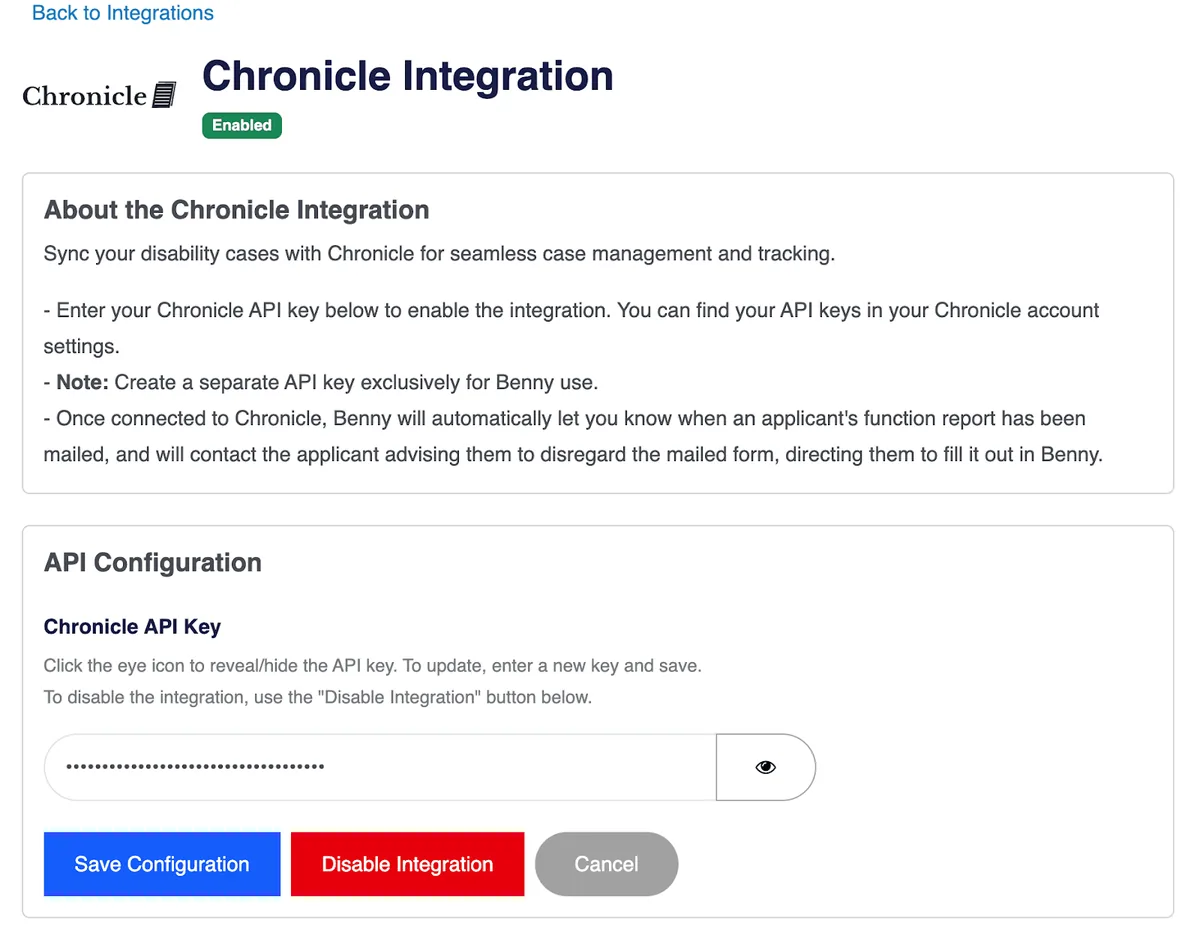
From here, add in the API key you got from Chronicle earlier and click “Save Configuration”.
If we have the applicant on file already, we automatically match them for you – you can then send a function report in one click:
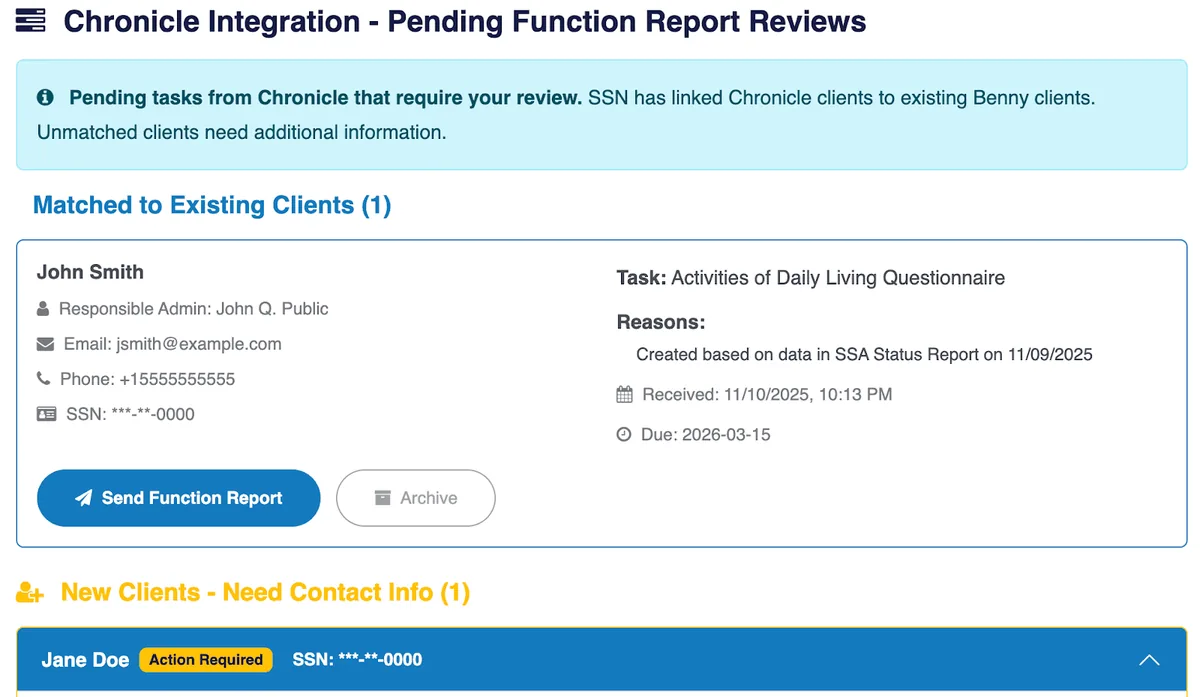
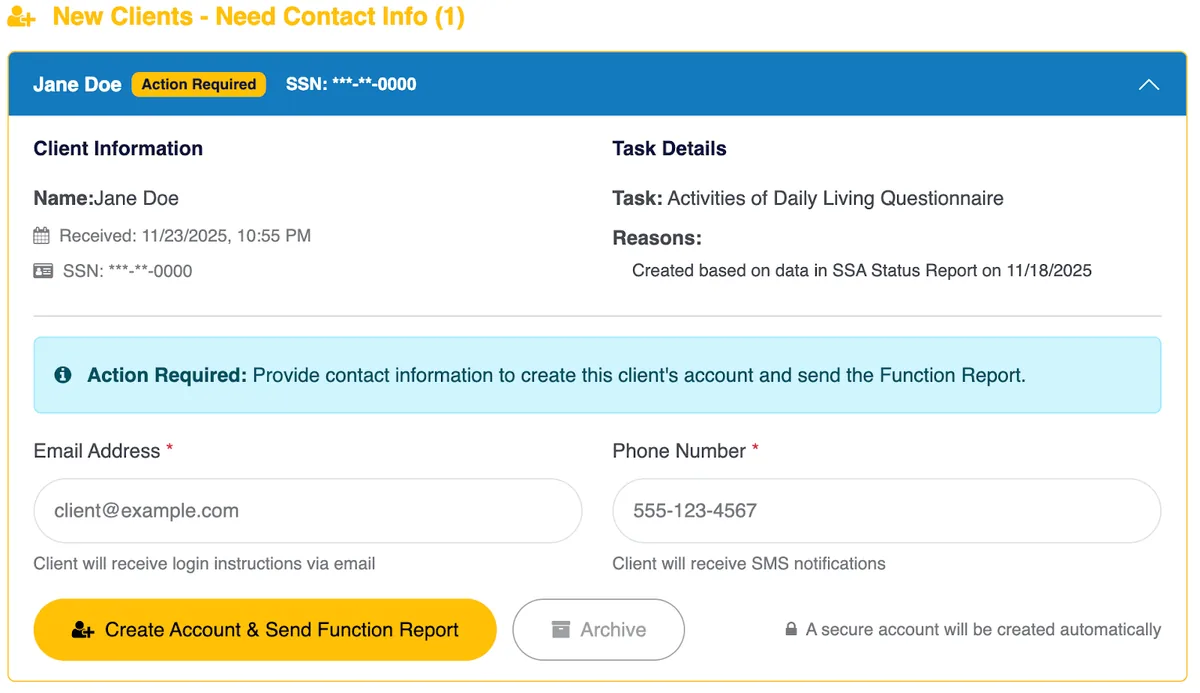
You can easily add a few details if we don’t have the applicant on file already, and then send them the function report:
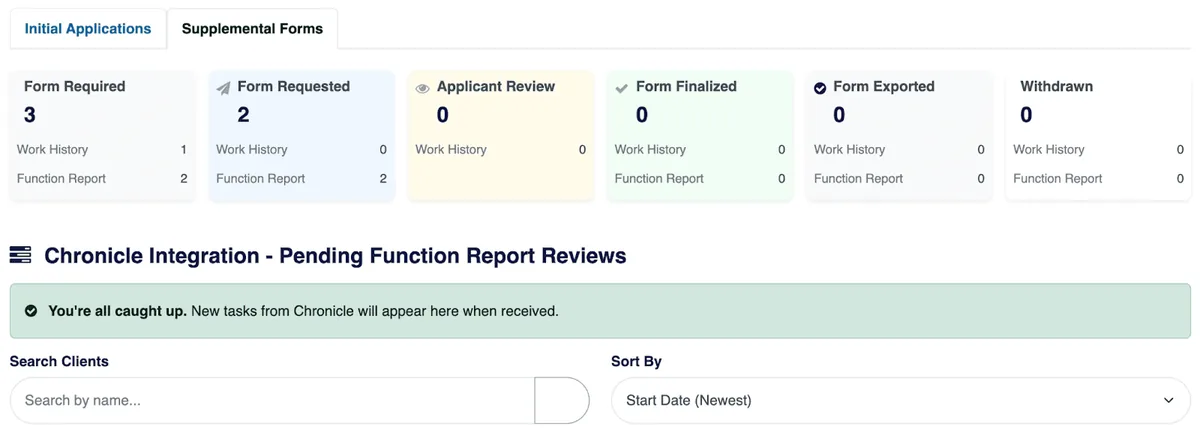
If you’re already caught up, it’ll look like this:
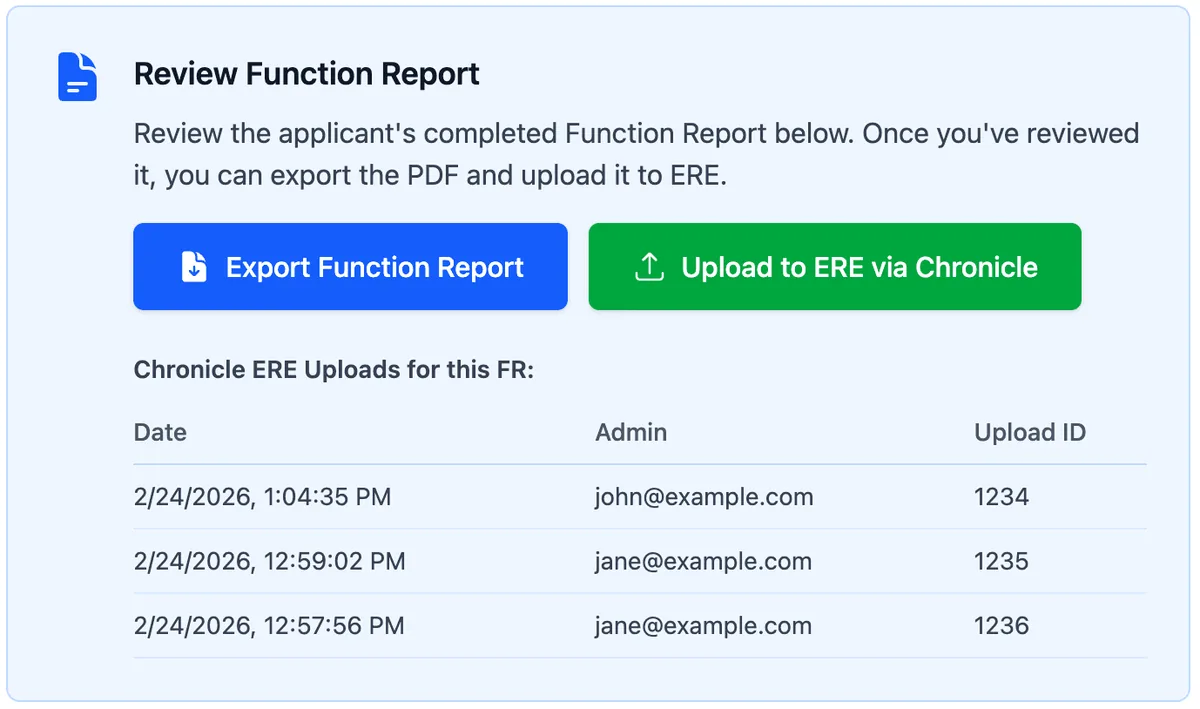
Once the Function Report is completed in Benny, you can upload it directly to the ERE through your Chronicle integration:
What Makes Benny Different
Benny isn’t just a form digitizer. It’s an AI-powered application platform built specifically for SSDI/SSI.
Mobile-First Experience
Clients complete everything on their phone. No desktop required. No printing and scanning.
AI-Powered Job Matching
Benny automatically matches work history to Department of Labor job codes. No manual lookup.
Error Detection
AI catches inconsistencies and errors before submission. Fewer rejections, less rework.
24/7 SMS Support
Clients can get help any time. That’s why Benny sees 92% completion rates.
Direct iClaim Submission
Electronic filing directly to SSA. No paper forms, no manual entry on the government side.
The Results Firms Are Seeing
Firms using Benny report:
- 90%+ completion rate (industry-leading)
- 2x caseload within one month
- 30-45 minutes per full application, compared to hours of phone calls and paperwork
- 24/7 availability so clients complete on their own time
The completion rate number matters most. A disability application that never gets finished never becomes a case.
Requirements and Pricing
Chronicle: Pro plan required for the Benny integration
Benny Pricing:
- $15/submission for Work History or Function Report standalones
- $30/submission for full applications
- Pricing decreases with volume
Get 10 free function reports when you request a Benny demo before April 1, 2026!
How to Get Started
If you’re already on Chronicle Pro, setup takes about five minutes:
- Log in to your Chronicle account
- Navigate to Settings, then API
- Generate an API key
- Enter the key in Benny
- Start syncing clients
Not on Pro yet? Learn more about Chronicle Pro
What This Means for SSD Firms
This integration removes a specific bottleneck. If your staff spends time checking ERE for SSA form requests, Chronicle handles that monitoring for you. When SSA requests a form, you know immediately. Benny handles the form capture and filing.
Together, they create a workflow that runs from filing through decision without the manual checks in between. Chronicle integrates with a growing ecosystem of SSD tools, and Benny is the latest addition. For the live walkthrough and Q&A, watch our Chronicle + Benny recap. If you also want faster medical chronologies, see our Superinsight integration; for CMS connectivity, see our Clio and Filevine integrations.
Chronicle detects. Benny captures.